
Seamless Transition: A Comprehensive Guide to Migrating Your Email Marketing from Mailchimp to Campaign Monitor
In the competitive landscape of digital marketing, the platform you choose to manage your audience is as critical as the creative content you produce. For many small business owners and marketing professionals, Mailchimp has long been a default starting point. However, as business needs evolve—often moving away from complex, bloated "all-in-one" platforms toward more specialized, streamlined solutions—many are finding that the grass is indeed greener on the other side.
Migrating your email marketing infrastructure can feel like a daunting technical hurdle. The fear of losing data, breaking subscriber connections, or disrupting active campaigns often keeps marketers tethered to platforms that no longer serve their specific business goals. This guide aims to demystify the process of moving from Mailchimp to Campaign Monitor, ensuring your transition is secure, efficient, and entirely seamless.
The Strategic Shift: Why Businesses Are Moving to Campaign Monitor
For over two decades, Campaign Monitor has cemented its reputation as a powerhouse for small-to-medium enterprises (SMEs) that prioritize deliverability and design. While competitors have shifted their focus toward becoming massive, omnichannel marketing suites—frequently at the cost of higher subscription fees and increased technical complexity—Campaign Monitor has remained steadfast in its commitment to the art of email.
The Cost of Omnichannel Bloat
Many modern marketing platforms have pivoted toward becoming comprehensive customer relationship management (CRM) tools. While this is beneficial for enterprise-level corporations, it often creates "feature fatigue" for smaller teams. These platforms frequently charge for premium features that small businesses never utilize, creating a disconnect between the price paid and the value received.
Why Campaign Monitor Stands Out
- Design-First Philosophy: Campaign Monitor provides high-quality, mobile-responsive templates that are easily customizable. This allows brands to maintain a professional, cohesive look without needing a dedicated team of HTML developers.
- Deliverability Focus: When you send an email, your primary goal is the inbox. Campaign Monitor invests heavily in its deliverability infrastructure, ensuring that your campaigns are less likely to be flagged by spam filters and more likely to be read by your audience.
- Intuitive User Experience: The platform is designed for marketers of all skill levels. By stripping away the unnecessary noise of omnichannel tools, Campaign Monitor allows users to focus on what matters most: creating engaging content and building relationships with subscribers.
- Exceptional Support: Beyond software, users gain access to a dedicated support team that understands the nuances of email marketing, providing guidance that goes beyond standard technical troubleshooting.
Chronology of Migration: A Step-by-Step Technical Guide
Migrating your audience is a linear process that requires precision. By following these steps, you can ensure that no data is left behind and your subscriber history remains intact.
Step 1: Exporting Your Audience from Mailchimp
Before you can move your data, you must extract it from your existing environment.
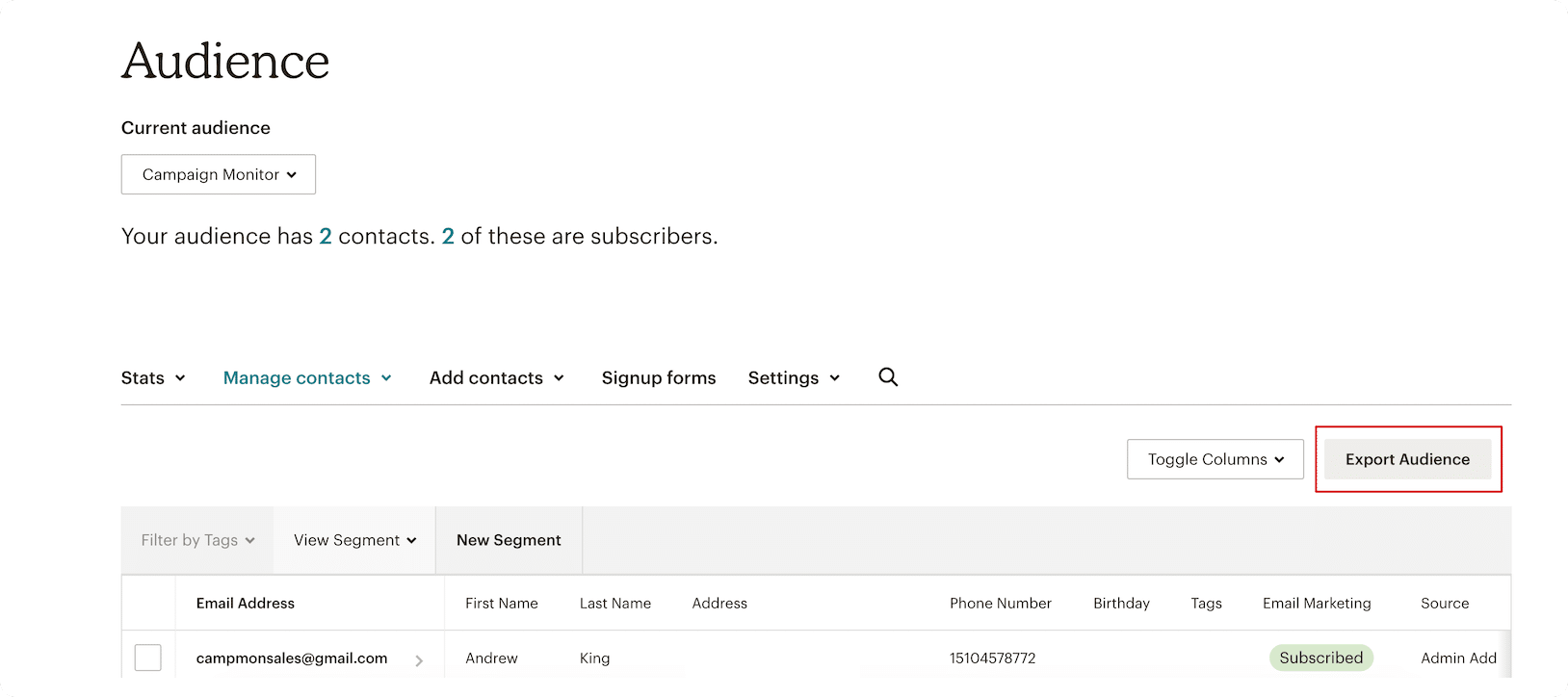
- Log into your Mailchimp account and navigate to your Audience dashboard.
- Select the specific audience you wish to migrate.
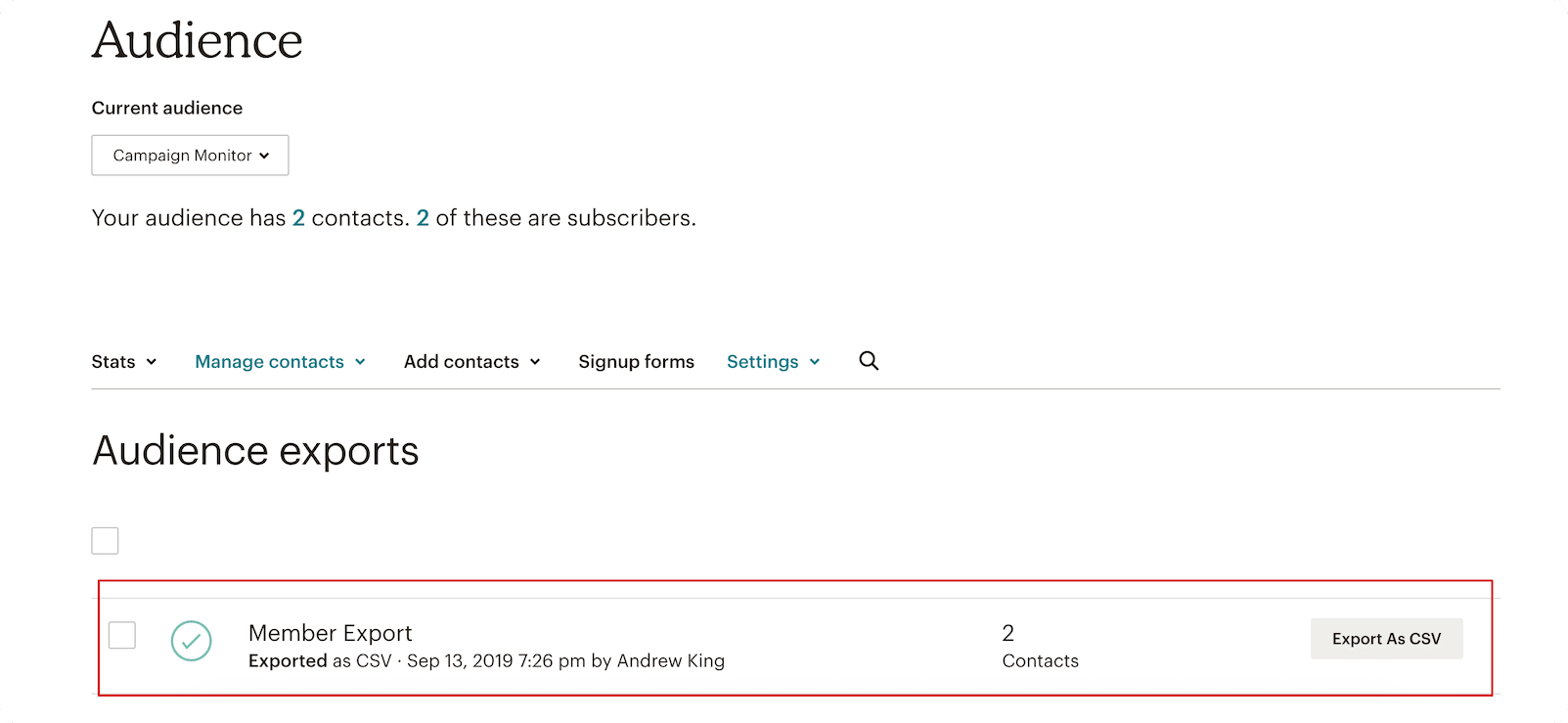
- Click the "Export Audience" button. Mailchimp will prepare a compressed file containing your subscriber data, including email addresses, names, and any custom metadata you have attached to those contacts.
Step 2: Preparing Your CSV File
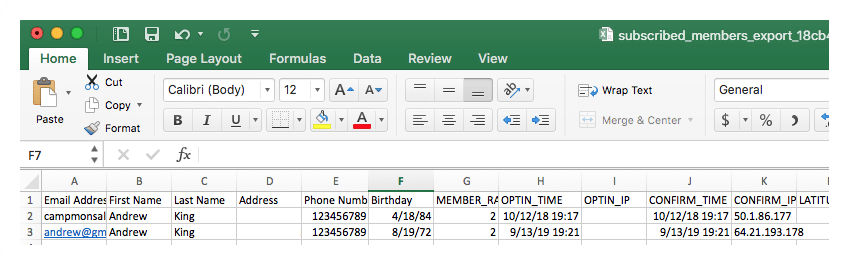
Once Mailchimp generates your file, download it as a CSV. It is crucial to note that for large databases, this process may take several minutes to compile. Once downloaded, take a moment to review the file. Ensure that all headers—such as First Name, Last Name, and Email—are clearly defined. This preparation will make the subsequent import into Campaign Monitor much faster and more accurate.
Step 3: Initializing Your Campaign Monitor Account
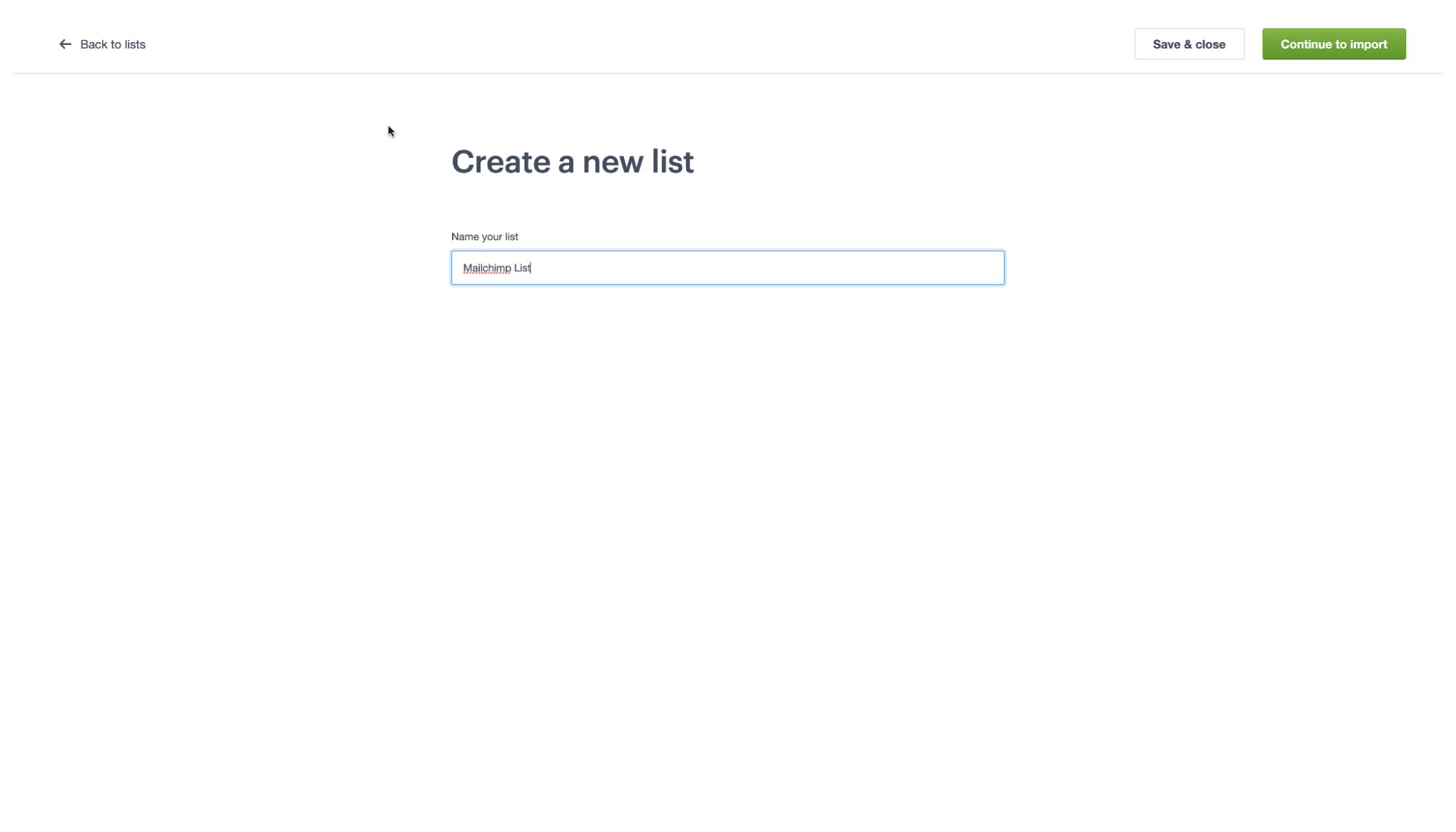
Head over to the Campaign Monitor website. If you are not yet a subscriber, the platform offers a free trial, which allows you to import your data and test the waters before committing to a monthly plan. Once logged in, navigate to the "Lists & Subscribers" tab. Click "Create a list," provide a descriptive name for your audience, and select "Continue to import."
Step 4: The Data Transfer
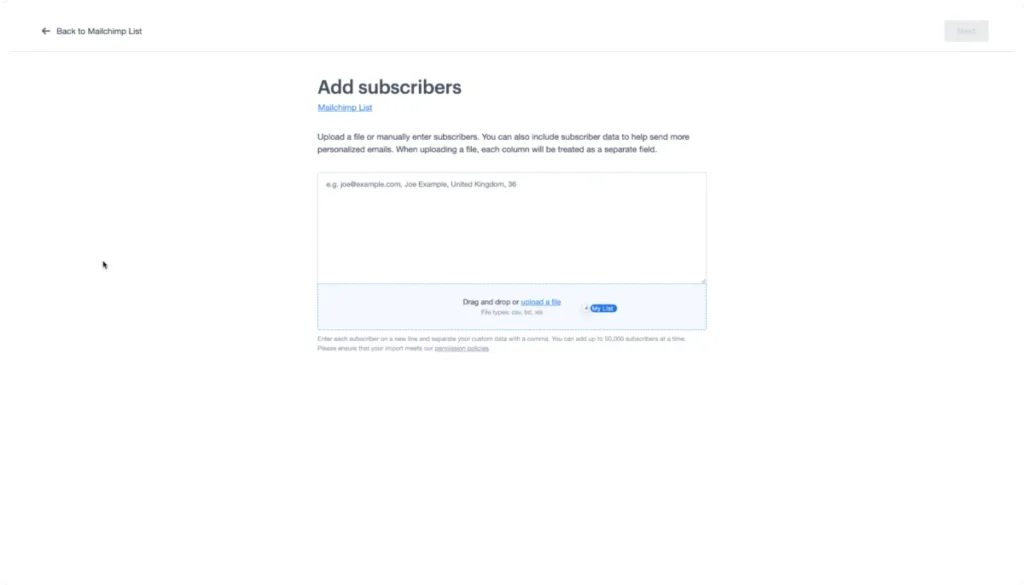
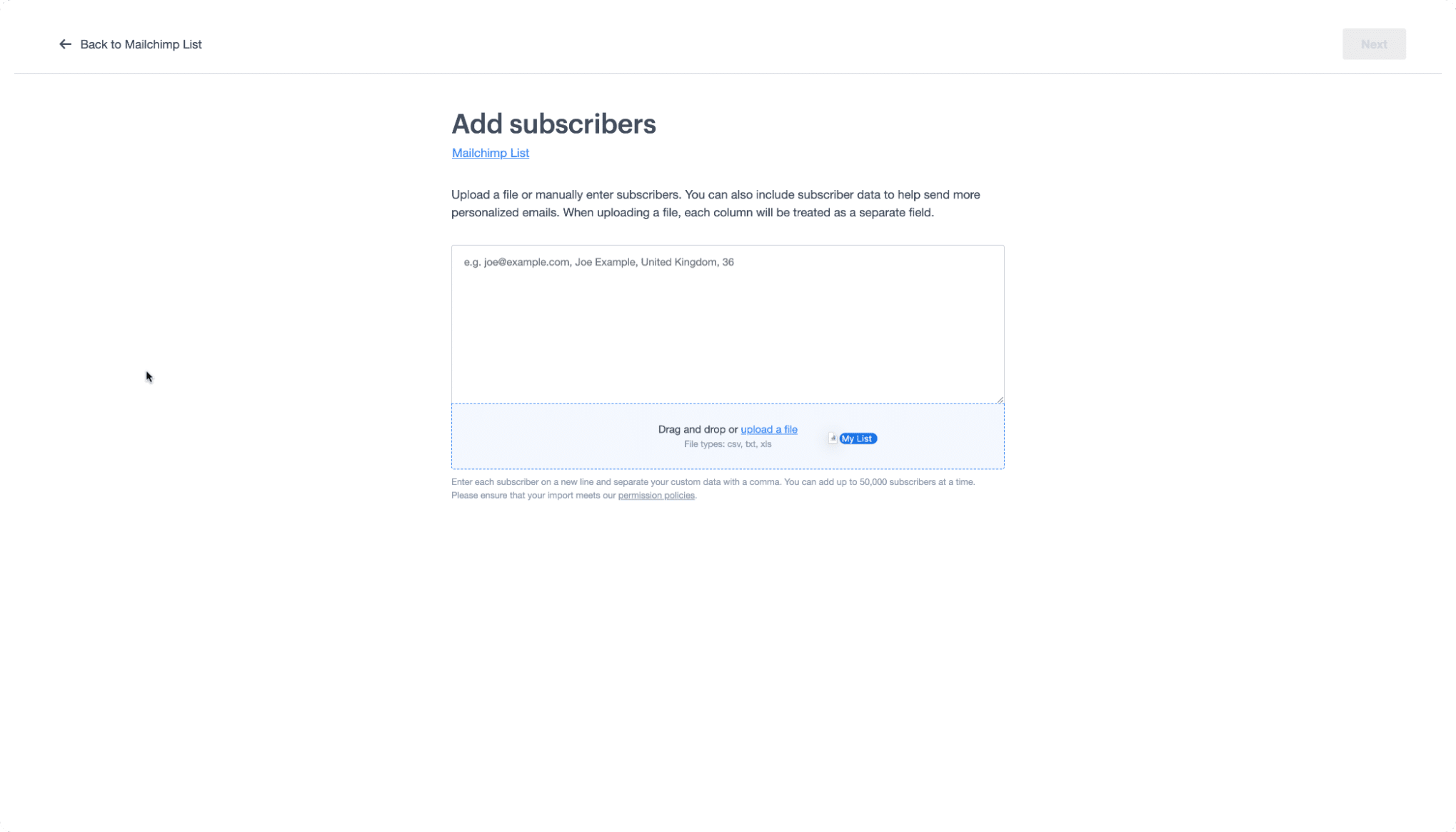
Within the import interface, you will see a designated box for your file. Simply drag and drop your CSV file from your desktop into this area. The platform will automatically recognize the format and initiate the upload.
Step 5: Mapping Your Customer Data
This is the most vital step for maintaining your email segmentation. Campaign Monitor will present you with a mapping screen. Here, you must match the headers from your Mailchimp CSV to the corresponding fields in Campaign Monitor. If your data is well-organized, the system will often auto-detect these matches, but it is always best to perform a manual review to ensure your custom fields (like purchase history or location) are correctly imported.
Bridging the Gap: The Migration Glossary
One of the most common points of confusion during a platform migration is the change in terminology. Each platform has its own internal lexicon. Use the following guide to ensure you are speaking the same language:
| Mailchimp Term | Campaign Monitor Equivalent | Definition |
|---|---|---|
| Audience | List | The primary repository for your contact data. |
| Subscribed Contact | Subscriber | A user who has opted-in to receive your emails. |
| Tags | Custom Fields | Labels used to categorize contacts based on specific attributes. |
| Groups | Segments | Sub-sections of your list based on behavior or interests. |
Understanding these definitions ensures that when you begin building your automation workflows, you aren’t hunting for features that have simply been renamed.
Supporting Data and Strategic Implications
The Impact on Deliverability
Data suggests that switching to a platform with a dedicated focus on email can improve deliverability rates by as much as 15% for businesses that were previously struggling with outdated template structures or poor list hygiene. By moving to a platform like Campaign Monitor, you are effectively "refreshing" your sender reputation.
The Financial Implication
For many small businesses, the cost of migrating is recouped within the first six months. By moving away from an "all-in-one" platform that charges for unused features, businesses typically see a reduction in overhead. Furthermore, the time saved by using Campaign Monitor’s drag-and-drop editor allows marketing teams to focus on strategy rather than wrestling with complex code.
Security and Compliance
One of the primary concerns during any data migration is security. Both Mailchimp and Campaign Monitor adhere to strict GDPR and CCPA compliance standards. When migrating, you are essentially moving your assets from one secure, compliant environment to another. Always ensure that you maintain a backup of your original CSV file until you have successfully sent your first campaign from the new platform.
Official Perspective: Advice for a Smooth Switch
The team at Campaign Monitor emphasizes that migration is not just a technical task; it is an opportunity for a "spring cleaning" of your database.
"When moving your data, take the time to audit your subscribers," says a representative from the Campaign Monitor support team. "Many marketers carry over years of inactive or invalid email addresses. By removing these ‘ghost’ subscribers during the migration process, you significantly improve your open rates and sender reputation from day one."
Furthermore, they recommend that for businesses with highly complex segmentations, the transition should be handled in waves. Start by migrating your most active list to test the waters, then proceed with the rest once you are comfortable with the new interface.
Conclusion: Looking Ahead
Transitioning your email marketing from Mailchimp to Campaign Monitor is a strategic decision that favors clarity, performance, and long-term sustainability. While the prospect of migration can seem intimidating, the actual process is a simple, well-defined sequence of events. By taking ownership of your data and choosing a platform that aligns with your specific needs, you position your brand for better engagement and more meaningful connections with your audience.
If you are ready to begin, the Campaign Monitor support documentation and their 101 video series are excellent resources to keep on hand as you navigate the platform for the first time. The future of your email marketing is waiting—it’s time to make the switch.
Disclaimer: This article provides general information regarding email marketing and platform migration. It does not constitute financial, legal, or tax advice. Always consult with professional advisors before making significant changes to your business infrastructure. All content is provided "as is," and we make no warranties regarding the outcome of your migration.
