

Mastering Regular Expressions in Google Analytics 4: A Comprehensive Guide
Last Modified: February 17, 2025
Digital analytics has evolved significantly, shifting from simple page-view counters to complex, event-driven data ecosystems. At the heart of this evolution lies the need for precision. Whether you are filtering vast datasets to uncover user behavior or segmenting traffic to optimize conversion paths, the ability to manipulate text data is paramount. This is where Regular Expressions—commonly known as RegEx or RegExp—serve as an indispensable tool for the modern data analyst.

For those who transitioned from Universal Analytics to Google Analytics 4 (GA4), RegEx is a familiar, albeit sometimes intimidating, companion. While some professionals have mastered its syntax, many others rely on a "good enough" understanding to get the job done. However, in the era of GA4, knowing exactly where and when to leverage RegEx can transform your reporting from basic to high-octane.
What is RegEx and Why Should You Use It?
At its core, a Regular Expression is a sequence of characters that defines a search pattern. Far predating the invention of digital analytics, RegEx is a staple in computer science and programming, used extensively to validate, search, and manipulate strings of text.
In the context of GA4, the primary objective of RegEx is to match specific patterns within your data and extract relevant values. Instead of manually searching for individual items—which is often impossible when dealing with dynamic, high-volume traffic data—RegEx allows you to apply a logical rule that automatically captures all items meeting your criteria.
The Utility of Pattern Matching
RegEx is primarily used in GA4 for:
- Text Data Extraction: Pulling specific subsets of data from complex URL structures or event parameters.
- Traffic Segmentation: Grouping disparate referral sources or campaigns under a single, unified banner.
- Cleaning Data: Excluding internal traffic or specific unwanted referral domains that skew performance metrics.
- Dynamic Filtering: Identifying patterns that change over time, such as tracking various product IDs or landing page variants without updating your filters weekly.
Understanding RegEx Match Types in GA4
Before deploying complex strings, one must understand the "Match Types" provided within the GA4 interface. These conditions dictate how your RegEx pattern is evaluated against the database.
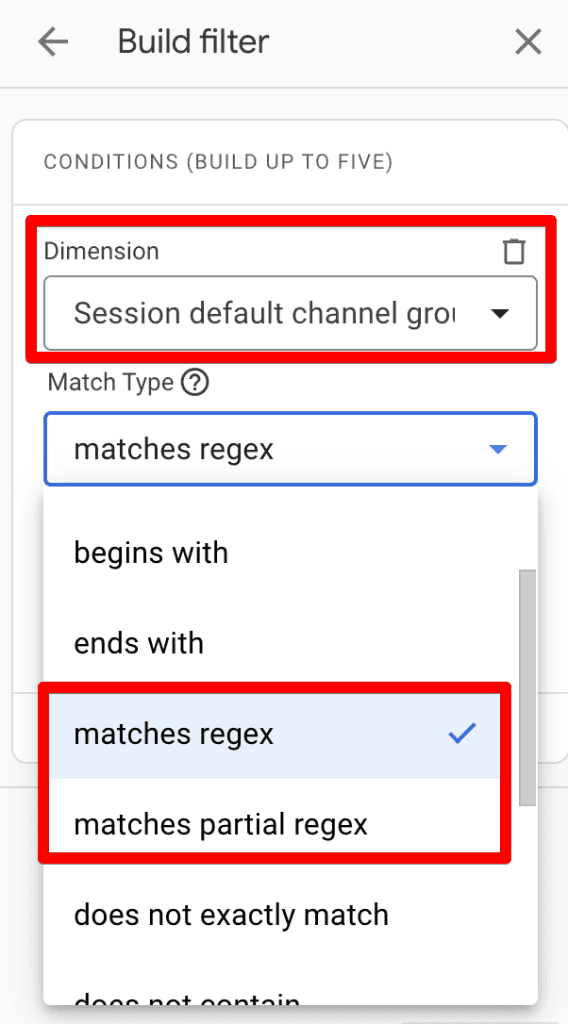
- Matches Regex: This is an exact match condition. Your pattern must represent the entire string or the specific target to return a positive result.
- Matches Partial Regex: This is a more flexible, inclusive condition. If your pattern exists anywhere within the target string, it will return a match.
A Critical Note on Sensitivity: In most GA4 filtering environments, RegEx is case-sensitive. If your data contains "organic" but your filter is written as "Organic," the match will fail. Always verify the casing of your source data before deploying your filter.
The Technical Foundation: RE2
GA4 utilizes the RE2 regex syntax. Unlike some more complex engines (like those found in Perl or Python), RE2 is designed for efficiency and safety. It avoids certain complex features to ensure that your reports load quickly, even when processing millions of events.
Key Limitations of RE2 include:
- No Lookaheads/Lookbehinds: You cannot look for a pattern that is preceded or followed by another pattern.
- No Backreferences: You cannot reference a previously captured group within the same regex string.
- No Recursion: The engine is linear, preventing the deep nesting found in other languages.
Strategic Implementation: Where to Use RegEx in GA4
RegEx is not a "one-size-fits-all" feature; its availability varies across the GA4 interface. Understanding where it can be applied is the first step toward effective implementation.
1. Standard Reports: The Power of Filtering
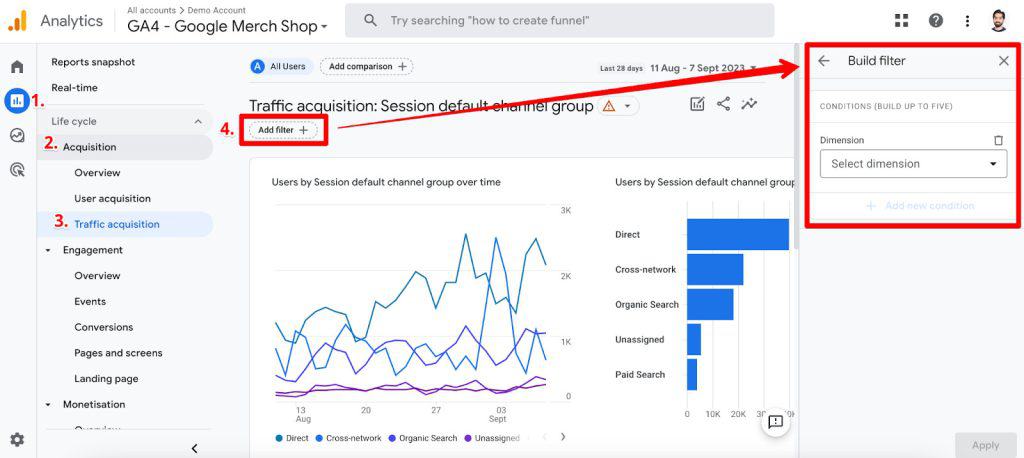
Standard reports offer a "Report Filter" feature that allows for granular data control. To use this, navigate to a report (e.g., Traffic Acquisition), click the Add Filter button, and select your dimension. By choosing "matches regex" or "matches partial regex," you can perform complex data cleaning on the fly.
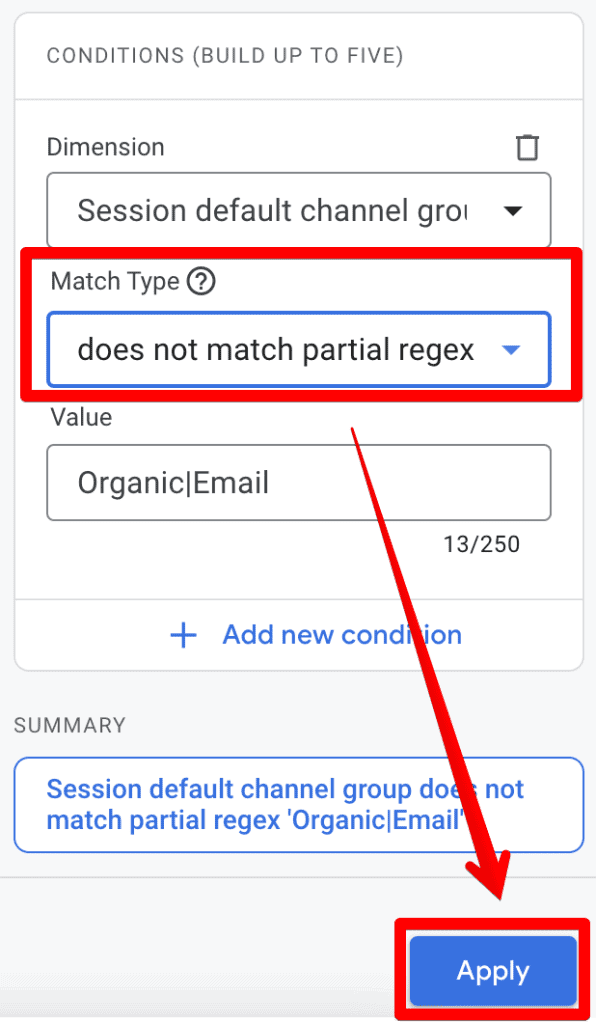
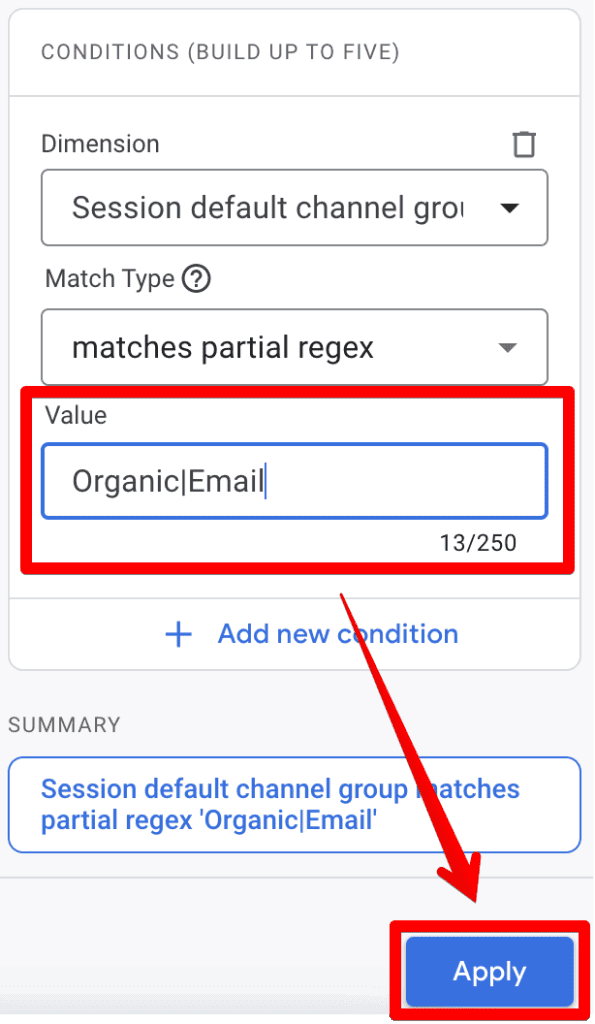
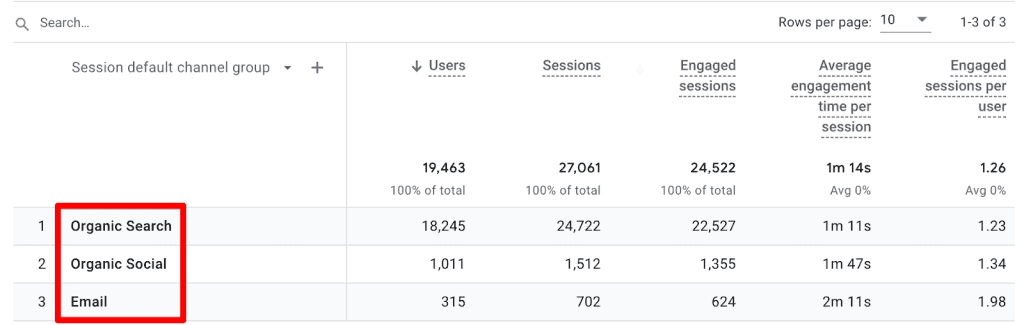
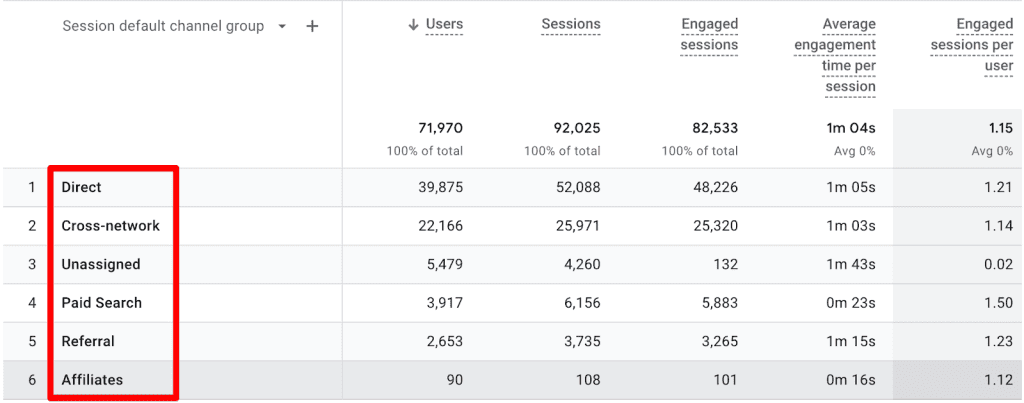
For instance, to view traffic from both Organic and Email sources simultaneously, you can use the pipe character (|) as an "OR" operator: Organic|Email. This streamlines your analysis significantly compared to building individual segments.
2. Explorations: Beyond Basic Reporting
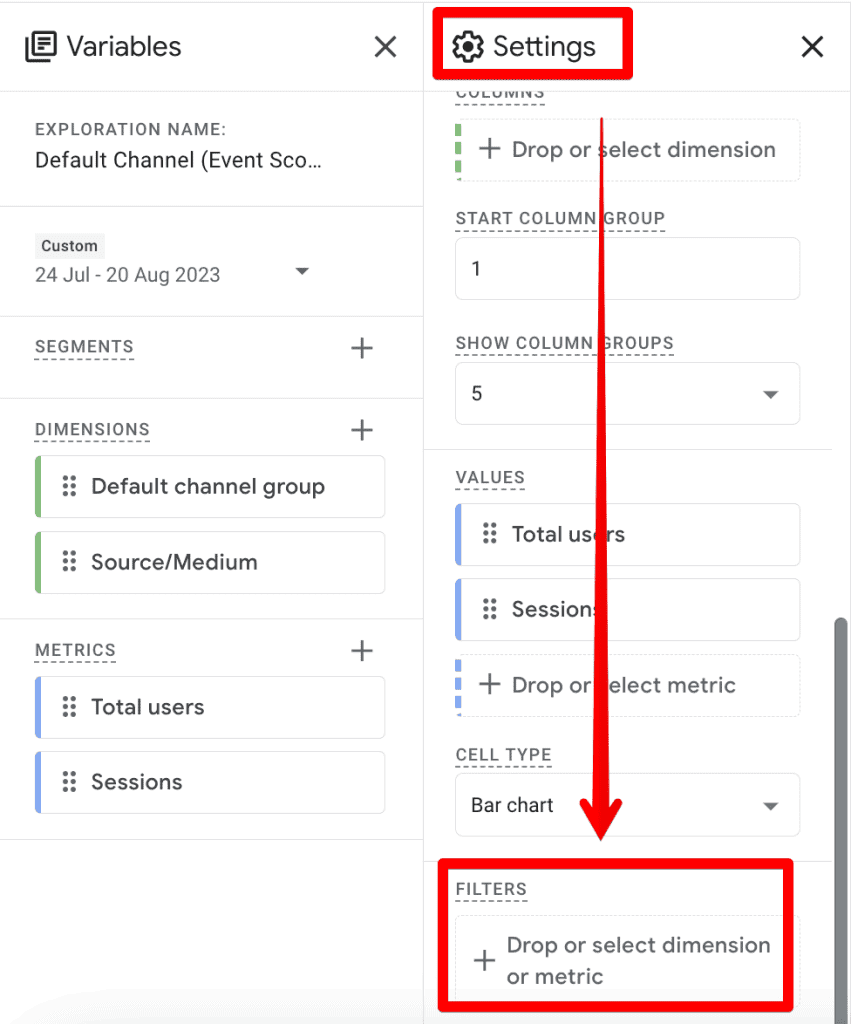
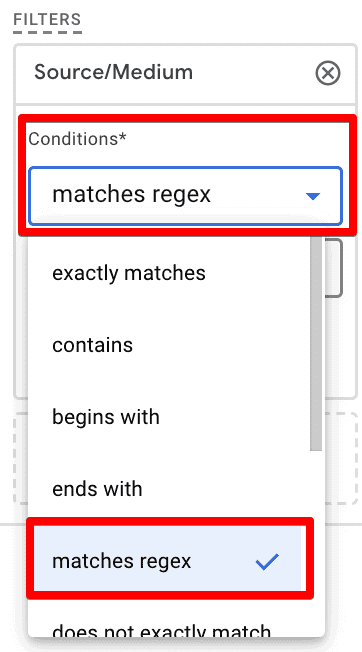
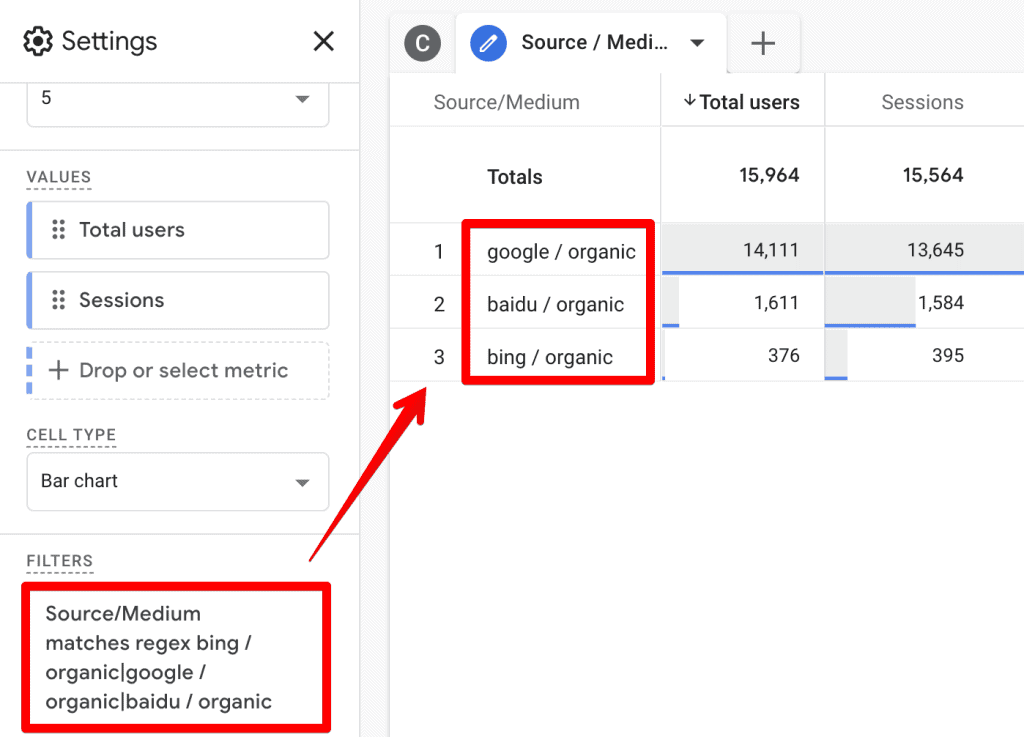
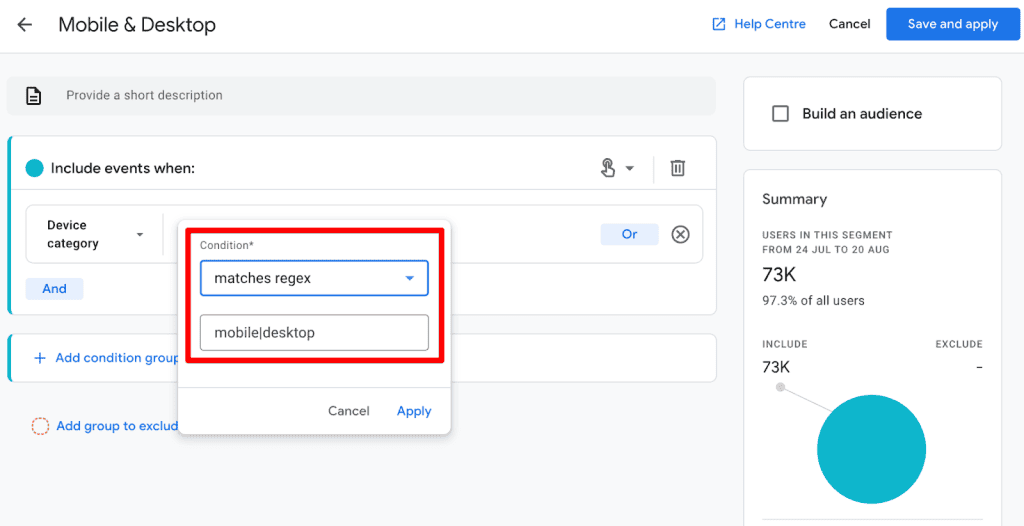
Explorations represent the "power user" side of GA4. While they offer advanced flexibility, they are paradoxically more restrictive regarding match types. Currently, Explorations primarily support "matches regex" and "does not match regex," but lack a "partial match" option.
If you are attempting to filter a Source/Medium dimension, you must be precise. Because there is no "partial" match, you cannot simply search for "organic"; you must list the full strings: bing / organic|google / organic|baidu / organic. This requires more maintenance but ensures high data integrity in your custom funnels.
3. Internal Traffic and Unwanted Referrals
RegEx is a savior when defining internal traffic. Under Admin > Data Streams > Configure Tag Settings, you can set IP filters. Using a RegEx pattern like ^90.204..* allows you to define an entire range of IP addresses as "internal" without listing every single machine.
Similarly, for Unwanted Referrals, you can use a single RegEx string to block multiple third-party payment gateways (e.g., stripe|paypal.com|checkout.stripe.com). This cleans your acquisition reports, ensuring that actual marketing channels are not obscured by payment processor noise.
4. Creating or Modifying Events
Event modification is perhaps the most powerful application of RegEx. By navigating to Admin > Events, you can create new events based on existing ones. For example, you can create a specific "measuremasters_visit" event that triggers only when a page path matches a specific regex pattern like https://measureschool.com/measure-masters/. This allows you to create custom conversion events without requiring developer intervention.
Essential RegEx Characters for Analysts
While the syntax can be vast, most GA4 users only need a handful of characters to achieve 90% of their goals:
.(Dot): Matches any single character.|(Pipe): Acts as a logical "OR." (e.g.,apple|orange).^(Caret): Matches the start of a string.$(Dollar Sign): Matches the end of a string.?(Question Mark): Makes the preceding character optional.- *`` (Asterisk):** Matches the preceding character zero or more times.
+(Plus): Matches the preceding character one or more times.(Backslash): Used to "escape" a character that has special meaning (e.g.,.to find a literal period).()(Parentheses): Used to group elements together.[](Square Brackets): Defines a set of characters to match.(Curly Braces): Specifies a specific number of occurrences.-(Hyphen): Defines a range of characters.
Best Practices for GA4 RegEx
The complexity of RegEx can lead to "false positives" where you accidentally include data you meant to exclude. Follow these best practices to maintain data hygiene:
- Test Before You Deploy: Never assume your RegEx is correct. Use tools like RegEx101.com. When using this tool, ensure you select the "Golang" flavor, which aligns with the RE2 engine used by Google.
- Avoid Over-Complexity: If a simple "contains" or "begins with" filter accomplishes the same goal as a complex RegEx string, use the simpler option. Complexity introduces the potential for human error.
- Use Comments and Documentation: If you are managing a large property, keep a log of the RegEx patterns used for custom channel groupings or event modifications. Future-proofing your setup is essential for team collaboration.
- Leverage AI Assistance: Modern tools like ChatGPT are highly proficient at generating RegEx patterns. You can describe your data structure and ask the AI to generate a pattern that captures your specific needs, then verify it against your sample data.
Implications for Future Reporting
The integration of RegEx into GA4 represents a shift toward more technical, developer-centric analytics. While Google has made significant strides in making these features accessible, the reliance on regex syntax suggests that the future of digital marketing will continue to favor those who can bridge the gap between business intelligence and technical data manipulation.
As Google continues to update GA4, we anticipate that "partial regex" support will be added to more areas, particularly within Explorations. Until then, practitioners must remain diligent, testing every filter and ensuring that their data remains clean, accurate, and actionable.
Summary
Regular Expressions are a fundamental skill for any serious GA4 analyst. From cleaning up messy referral data to creating precise custom events, RegEx offers a level of control that standard filtering simply cannot match. By mastering the pipe operator, understanding the limitations of the RE2 engine, and utilizing testing resources, you can unlock deeper insights into your user journey.
While the learning curve can be steep, the payoff is a significantly more refined data environment. Start small, practice in your test properties, and soon you will find that what once seemed like cryptic code is actually the key to unlocking the full potential of your analytics platform.
How are you using RegEx in your daily GA4 workflows? Share your favorite patterns or common hurdles in the comments below.
