
Navigating the Metrics Maze: A Comprehensive Guide to Unique Visitors in Google Analytics 4
Last Modified: March 26, 2025
In the modern digital landscape, data is the compass that guides business strategy. Yet, for many marketers and website owners, that compass can feel remarkably erratic. When logging into Google Analytics 4 (GA4), users are immediately bombarded with a deluge of terminology: Total Users, Active Users, New Users, Returning Users, Sessions, Engagement Rates. The sheer volume of metrics can lead to "analysis paralysis," where the desire to make data-driven decisions is stifled by the confusion surrounding what these numbers actually represent.
To perform a truly meaningful analysis, one must move beyond the surface-level numbers. We must understand the underlying architecture of how Google defines a "visitor." This guide serves as a deep dive into the mechanics of tracking, the philosophy behind user metrics, and the best practices required to ensure your data reflects reality rather than just noise.

The Core Concept: What Are Unique Visitors?
At its simplest, a visitor is an individual interacting with your website or application via a specific device. The term "unique" is added because, in an ideal world, we want to count that individual only once, regardless of how many times they return to the site within a specific timeframe.
However, the digital world is rarely ideal. What happens if a user switches from their smartphone to a laptop? What if they clear their browser cache or use an ad-blocker? These scenarios create the "interesting" challenges that define modern web analytics.
Total vs. Active Users: The GA4 Paradigm
It is critical to note that Google Analytics 4 does not feature a metric explicitly labeled "Unique Visitor." Instead, it provides two primary substitutes: Total Users and Active Users.

- Total Users: Google defines this as the number of unique users who have triggered at least one event on your site or app within a specified date range. A "page view" is an event, but so is a custom interaction like a "form submission" or "button click."
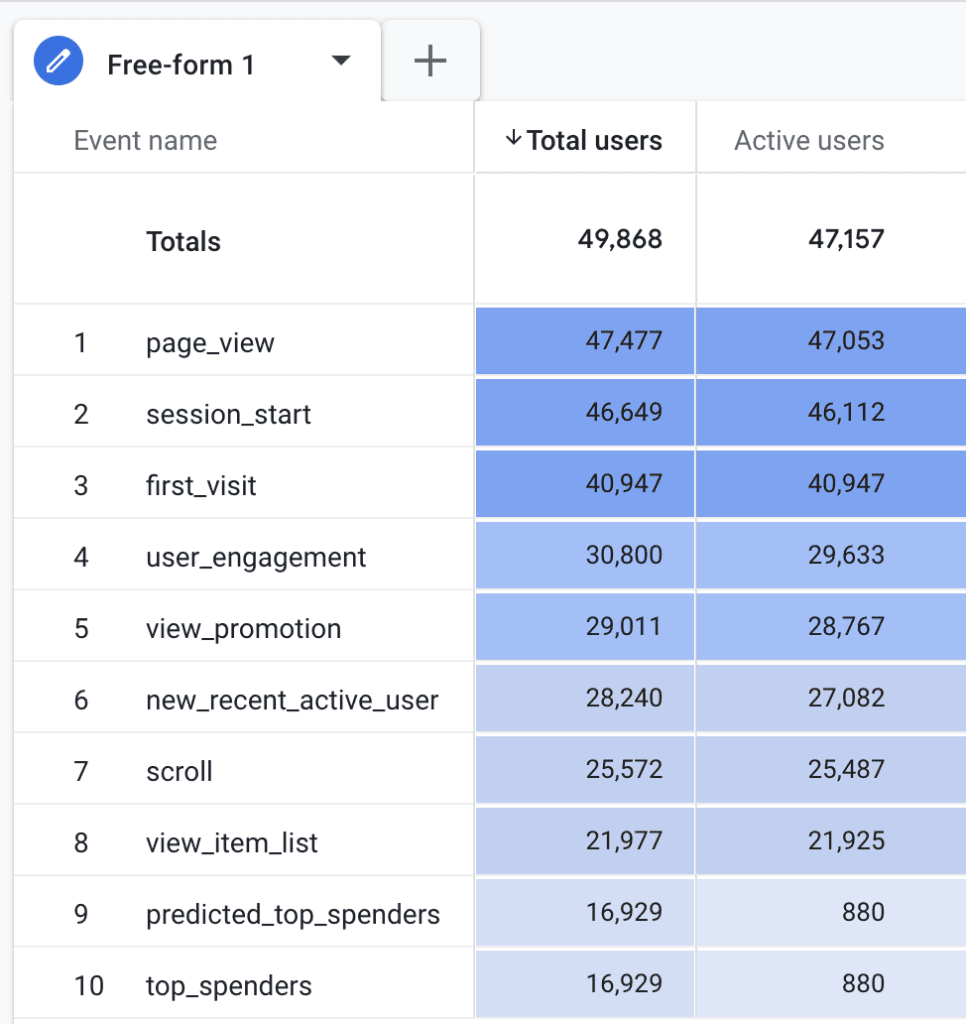
- Active Users: This is the metric GA4 prioritizes. An active user is defined by their level of engagement. A user becomes "active" if their session is an engaged session or if the platform collects a first_visit or engagement event.
The Nuance of "Engagement"
The definition of an "engaged session" is the bridge between a casual browser and a valuable user. A session is deemed "engaged" if it meets any of the following three criteria:
- The session lasts longer than 10 seconds.
- The user completes a conversion event.
- The user views at least two pages or screens.
Interestingly, while official Google documentation states that the user_engagement event triggers when a page is in focus for at least one second, real-world testing suggests the firing mechanism is more complex, often tied to duration thresholds or navigation events. Because the threshold for being an "active" user is relatively low, most visitors will eventually qualify, causing the numbers for Total Users and Active Users to often mirror one another closely.
How GA4 Tracks the Individual: The Mechanics of the "Client ID"
To understand how GA4 knows that User A is the same person who visited yesterday, we must look at the Client ID (CID).
When a user first lands on your site, GA4 assigns a unique identifier stored in a first-party cookie named _ga. This identifier looks like a randomized string: 1242591205.1741664478. The first segment is a randomly generated number, while the second is a UNIX timestamp indicating when the ID was created.
The Lifespan of the Cookie
By default, this cookie has a two-year expiration. However, this is increasingly challenged by modern privacy regulations and browser-level restrictions. For instance, Apple’s Intelligent Tracking Prevention (ITP) on iOS devices can limit the lifespan of these cookies to as little as 24 hours or seven days.
The Implication: If a user returns after their cookie has been purged by a privacy-focused browser, GA4 will assign them a new Client ID. Consequently, one real-world person is counted as two "new" users. This creates an unavoidable inflation in user counts that analysts must account for when interpreting longitudinal data.
Locating Your Data: Where to Find User Metrics
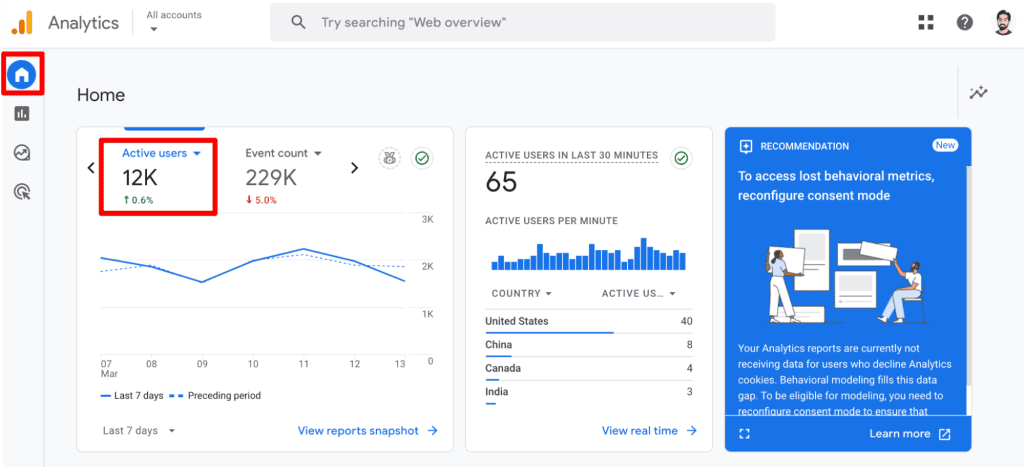
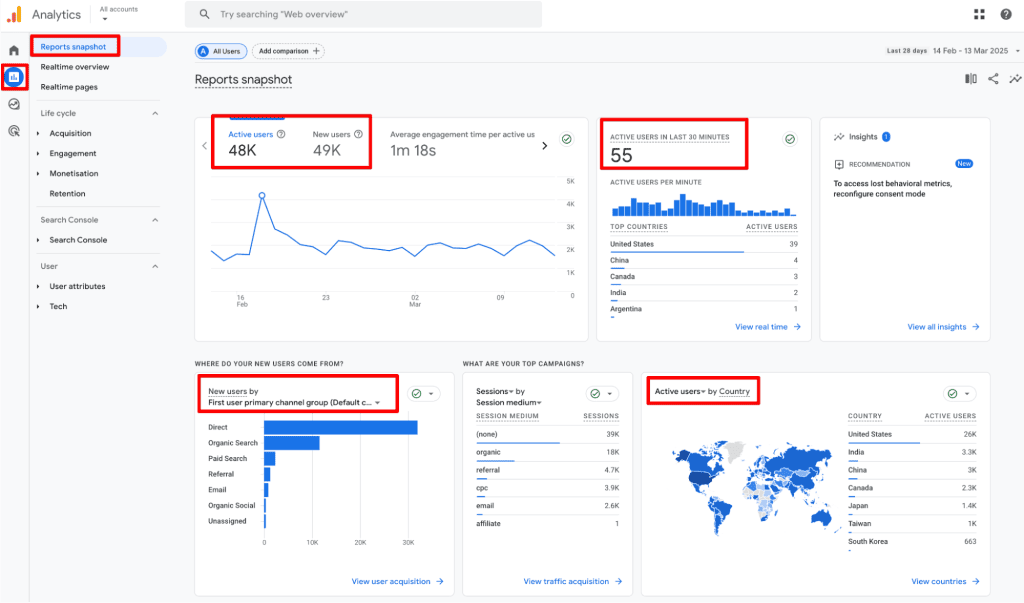
GA4 integrates user metrics into almost every standard report. Depending on your analytical goals, you can find these metrics in the following locations:
- Home & Reports Snapshot: Provides an immediate view of Active and New users.
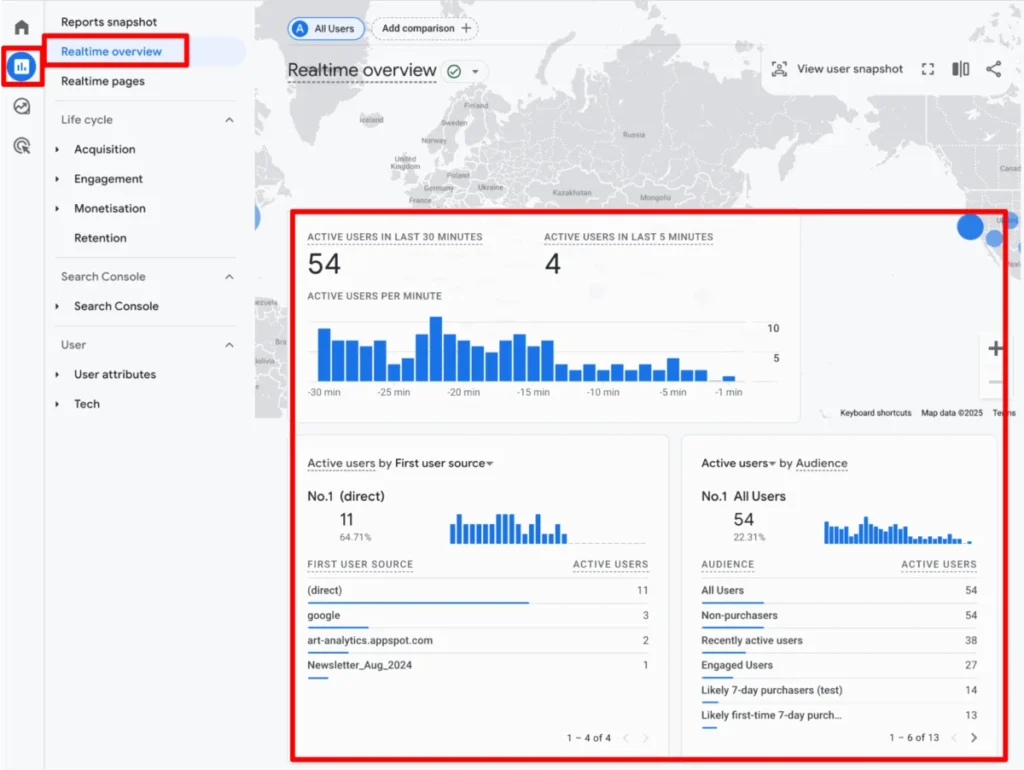
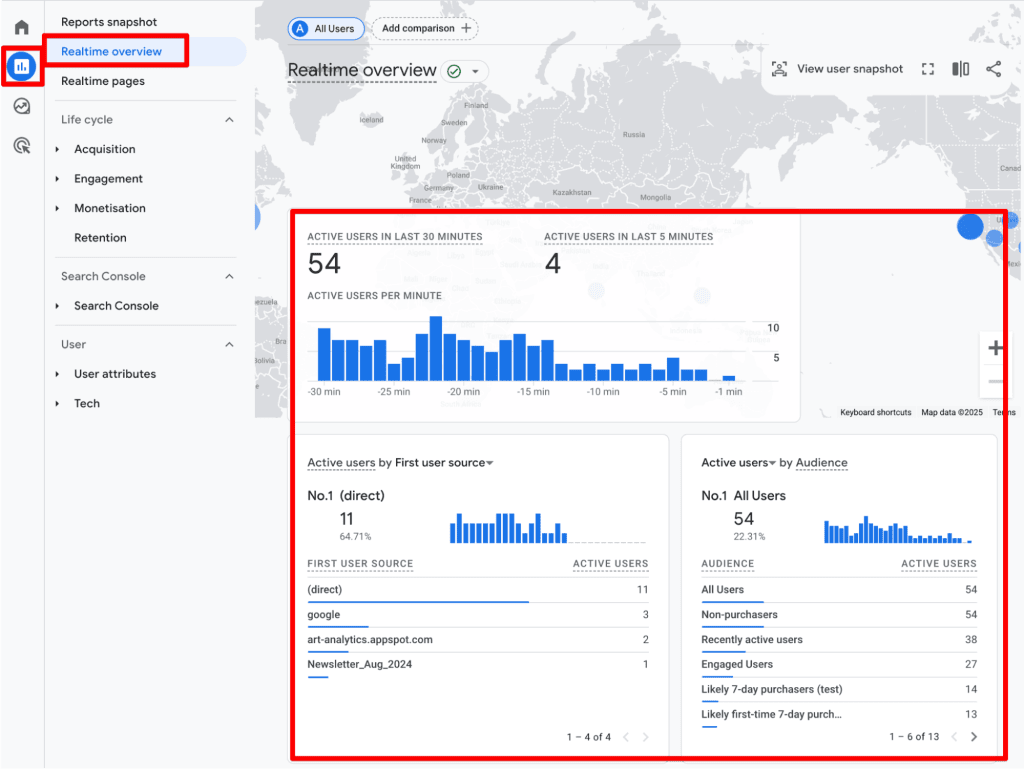
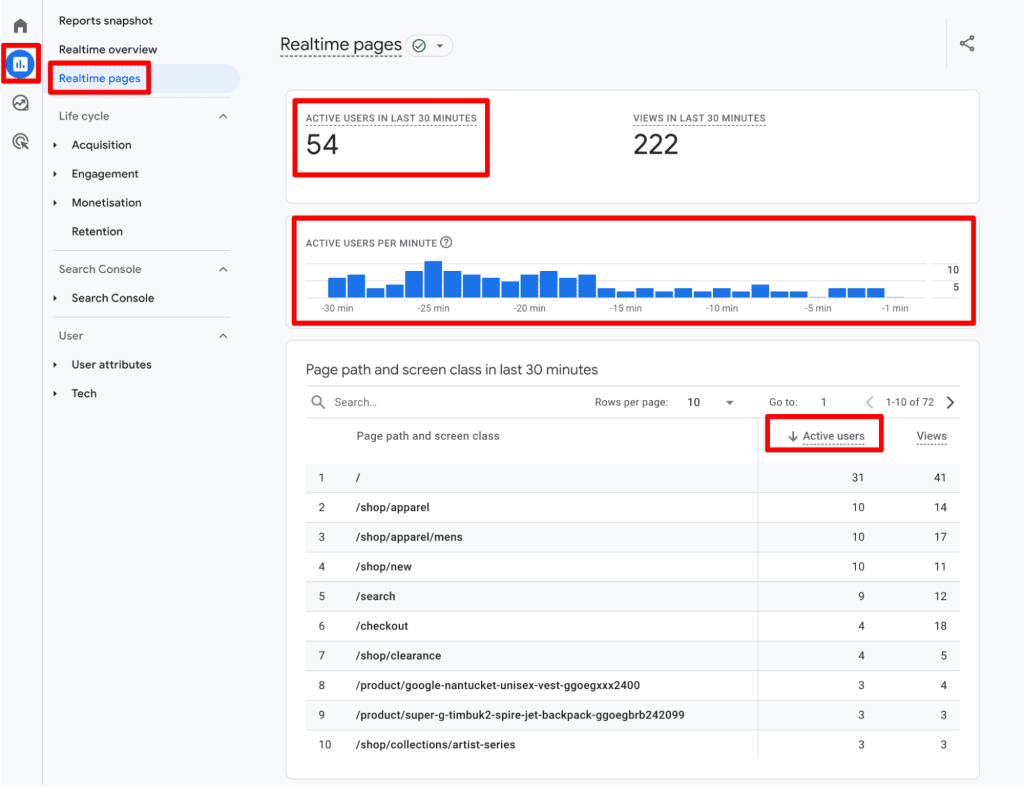
- Realtime Overview & Pages: Allows for a "pulse check" on traffic within the last 30 minutes.
- Acquisition Reports: Excellent for determining the source (e.g., organic, paid, social) of your New and Total users.
- Engagement Reports: Useful for seeing how Active users interact with specific content or landing pages.
- Retention Reports: Essential for comparing the ratio of new versus returning users to gauge loyalty.
For those requiring deeper analysis, the Explorations module is the gold standard. Here, you can build custom free-form reports, dragging and dropping user metrics to suit your specific business questions. If a metric is unavailable for a specific dimension, GA4 will intuitively gray it out, preventing invalid data combinations.
Best Practices for Meaningful Analysis
Collecting data is only half the battle; the other half is interpreting it without falling into common traps.
1. Avoid the "Summation Trap"
A common mistake among beginners is attempting to sum up user counts across different dimensions. Because a single user can visit multiple times or arrive via multiple channels, summing their daily counts will lead to gross over-reporting. Always rely on GA4’s aggregate counts for specific date ranges rather than performing manual addition.
2. Segment, Don’t Just Aggregate
Raw numbers rarely tell the whole story. Use segments to isolate specific behaviors. For example:
- How do users from organic search behave compared to those from paid ads?
- Do users on mobile devices exhibit higher engagement rates than those on desktop?
- What is the content consumption pattern of your most loyal returning users?
3. Monitor for Anomaly Detection
Use GA4’s "Custom Insights" to set up alerts. If your traffic spikes or dips unexpectedly, an automated email notification can save you hours of manual investigation. Proactive monitoring is the only way to catch tracking failures or technical issues before they compromise your monthly reports.
4. Understand the New vs. Returning Dichotomy
It is a mistake to assume that New Users + Returning Users = Total Users. Because a user can be "new" on March 1st and "returning" on March 5th, they may appear in both categories within a 10-day report. View these as distinct behavior sets:
- High New Users: Your acquisition strategy is working.
- High Returning Users: Your content or product is sticky, signaling strong brand loyalty.
Limitations: The Reality of Modern Analytics
As we navigate the post-cookie era, it is vital to accept that GA4 data is an approximation, not a ledger of absolute truth.
- Privacy Protections: As mentioned, browser restrictions and user-installed ad blockers prevent tracking entirely. If a user blocks cookies, they simply disappear from your GA4 reports.
- Cross-Device Fragmentation: Unless you have implemented User-ID tracking (which requires a signed-in authentication system on your site), GA4 cannot link a user’s mobile visit to their desktop visit. They will appear as two distinct individuals.
- Sampling and Thresholding: In large datasets, Google may use data sampling to provide reports faster. Additionally, in reports where demographics or interests are displayed, Google applies "thresholding" to prevent the identification of individual users, which can lead to gaps in your data.
Conclusion: Turning Metrics into Strategy
Understanding unique visitors in GA4 is not about achieving 100% mathematical precision; it is about recognizing the patterns and trends that drive business growth. By mastering the distinction between Active and Total users, respecting the limitations of cookie-based tracking, and utilizing advanced segmentation, you can transform your analytics from a source of confusion into a powerful strategic asset.
Remember that metrics are simply the reflection of human behavior. When the numbers look strange, look to the user experience—your website’s design, load times, and content quality are the true drivers of the data you see in your dashboard. By focusing on engagement and retention, you move beyond mere "counting" and into the realm of true optimization.
What challenges have you faced with GA4 user metrics? Are you seeing discrepancies between your internal data and Google’s reports? Share your experiences in the comments below.
