
Beyond the Copy-Paste: How Integrating Claude with Hootsuite is Redefining Social Media Management
For years, the professional social media manager’s workflow has been defined by a repetitive, fragmented process: using an AI tool like Claude to brainstorm or draft copy, laboriously copying that text, switching browser tabs, pasting it into a scheduling tool, and finally hitting publish. It is a "copy-and-paste dance" that consumes valuable time and introduces friction into what should be a seamless creative flow.
However, a new wave of connectivity is changing the landscape. By leveraging the Model Context Protocol (MCP), professionals can now bridge the gap between their AI assistant and their social media management platform. This integration allows users to plan, schedule, and analyze content directly from the Claude chat interface, turning an AI chatbot into an active command center for digital marketing.

The Evolution of the Social Workflow
The traditional workflow of a social media team—comprising ideation, drafting, scheduling, and performance tracking—has historically relied on multiple disconnected software silos. AI has long been a part of this process, typically acting as a "writer in the room." But until recently, AI tools operated in a vacuum, unaware of the specific calendar constraints, audience demographics, or historical engagement data of the brands they were assisting.
Connecting Claude to a social media management suite like Hootsuite removes the "middle steps." This isn’t just about convenience; it’s about context. When Claude is connected to your live dashboard, it is no longer guessing about your brand’s needs; it is accessing real-time data to make informed recommendations.

Understanding the Technology: MCP Connectors
The backbone of this transformation is the Model Context Protocol (MCP). In plain terms, an MCP connector acts as a secure, standardized bridge between an AI assistant and an external application.
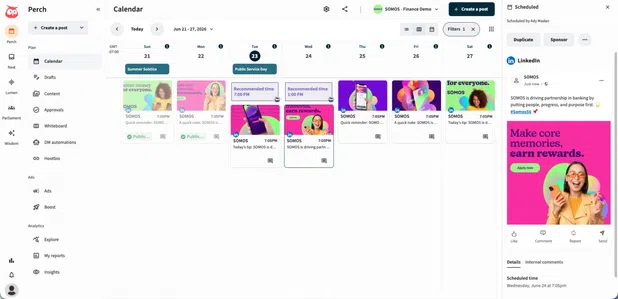
Traditionally, Claude’s knowledge was restricted to the information provided within the text prompt. If you wanted to know how a specific post performed last month, you had to manually export a report and feed that data into the chat. An MCP connector skips that entire process. Once linked, Claude can query your social media management platform to pull metrics, check calendar availability, and push content directly to your queue.
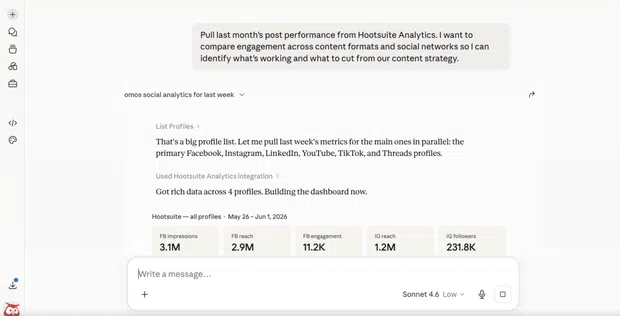
Setting Up Your Command Center
For teams looking to integrate Claude with Hootsuite, the setup process is designed to be accessible even for those without a technical background. The integration works across both the web-based Claude.ai and the Claude Desktop application.
The Step-by-Step Integration Process
- Preparation: Ensure you have the Claude Desktop app installed.
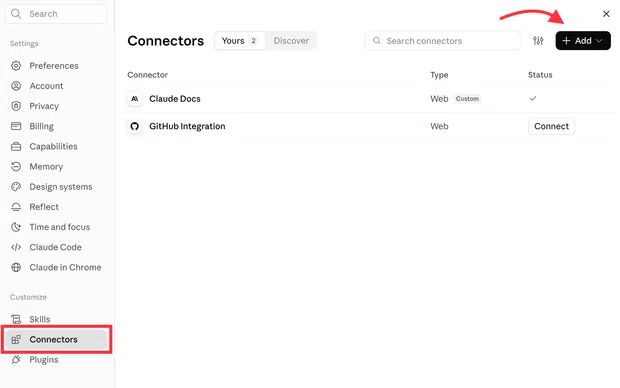
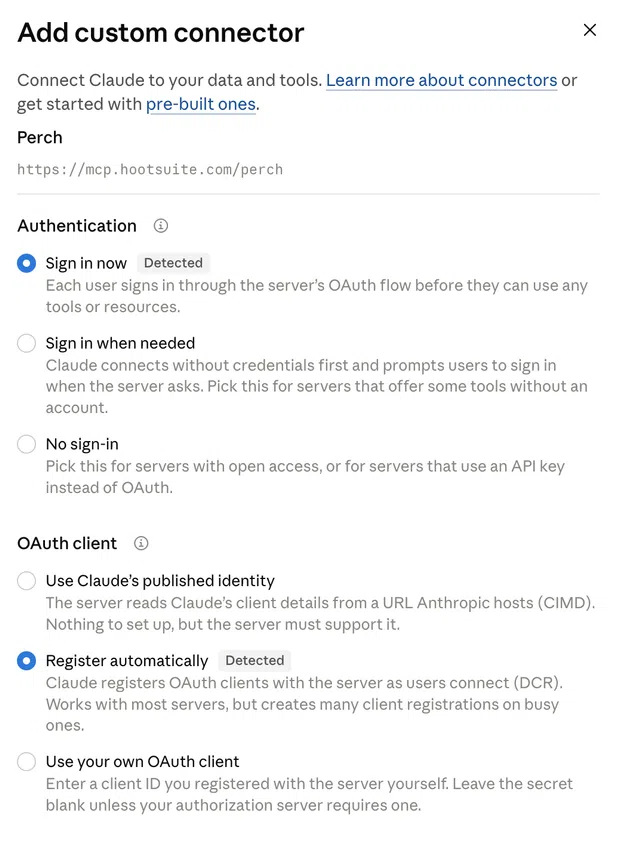
- Accessing Connectors: Navigate to the "Settings" menu within the Claude interface and select "Connectors."
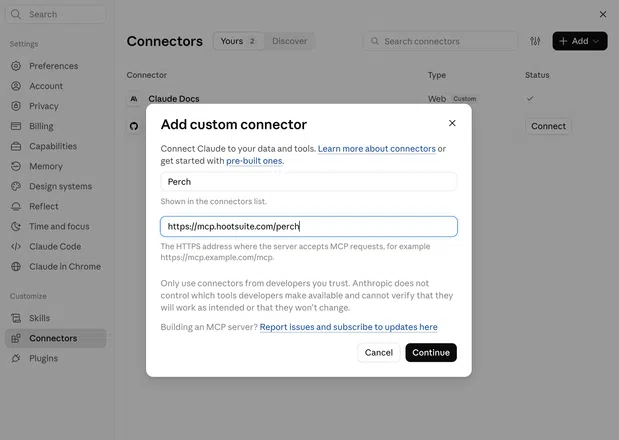
- Custom Configuration: Select "Add custom connector" and input the specific URL for the Hootsuite MCP server.
- Secure Authentication: Use OAuth to sign in to your Hootsuite account. This step is critical, as it ensures that Claude operates within the security permissions of your specific organization, allowing for "Register automatically" options that keep the connection secure without manual API key management.
- Deployment: Once authorized, Claude becomes an extension of your Hootsuite workspace, capable of executing commands ranging from drafting posts to analyzing engagement.
Functional Capabilities: What the Integration Can Do
The integration is not a "set it and forget it" tool; it is a collaborative partner. It empowers users to delegate time-consuming tasks while maintaining high-level control.
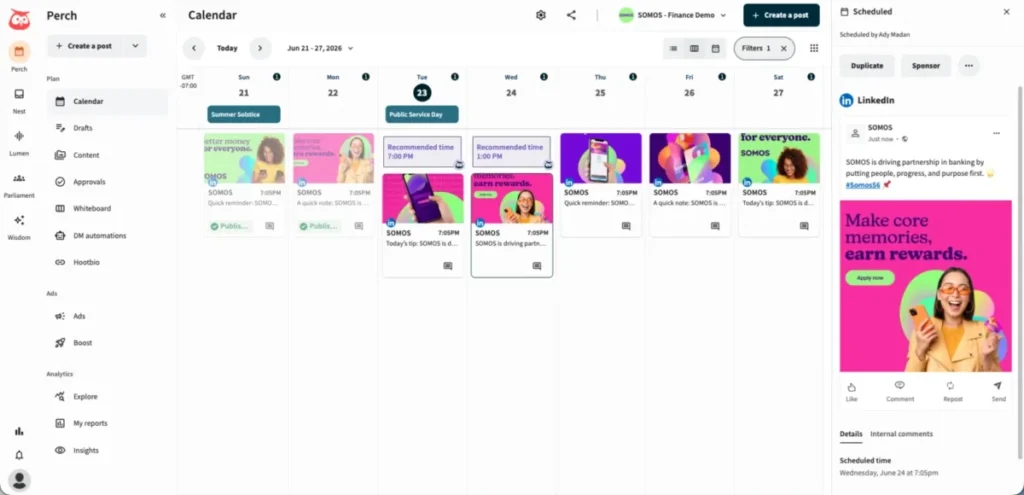
Planning and Publishing with Perch
Using the Perch module, teams can ask Claude to identify gaps in their content calendar. For instance, a user might prompt: "Look at my calendar for next week and suggest three post ideas based on our top-performing content from last month." Claude can then draft these posts, suggest optimal posting times based on engagement data, and place them into the scheduler.
Managing Conversations with Nest
Social media is increasingly a customer service channel. The "Nest" integration allows Claude to process incoming comments and direct messages. It can categorize inquiries by urgency, suggest responses based on the company’s saved templates, and even flag potentially sensitive or negative interactions for human intervention.
Social Listening with Lumen
The "Lumen" integration provides real-time access to social listening data. If a brand suddenly sees a spike in mentions, Claude can analyze the sentiment of those mentions and determine whether the trend is a positive viral moment or the beginning of a public relations crisis, providing the team with the necessary insights to act decisively.
Employee Advocacy with Parliament
For companies with large teams, "Parliament" helps manage employee advocacy. Employees can use the Claude integration to find brand-approved content and share it directly to their professional profiles, significantly increasing the organic reach of corporate messaging.
The Human-in-the-Loop Imperative
While the efficiency gains are significant, industry experts emphasize that this integration is not a replacement for human oversight. The risks of "AI autopilot"—such as off-brand messaging or tone-deaf responses during sensitive global events—remain high.
Melina Giorgalletou, Content & Social Media Manager at Supernormal, notes, "The more outward-facing or higher-stakes the task, the more I’m involved. Anything that goes public, involves a person, or represents the brand needs my sign-off first."
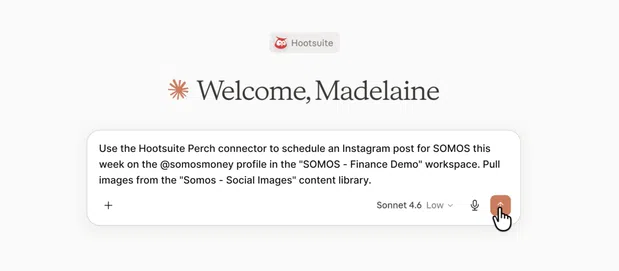
To mitigate these risks, companies are implementing mandatory review protocols. AI drafts are treated as starting points, not final products. The integration is designed to assist in the creation and organization of content, but the final "publish" command or approval step remains firmly in human hands.
Implications for the Future of Marketing
The move toward integrated AI assistants signals a shift in how marketing teams will be structured. We are moving away from the era of the "manual operator" toward the "AI orchestrator."
Brand Voice and Consistency
One of the primary criticisms of AI-generated content is its tendency toward generic, "robotic" language. By feeding Claude specific brand guidelines, style guides, and examples of high-performing past content through the integration, marketers can ensure that the AI learns the specific nuances of their brand voice, resulting in output that feels authentic and aligned with company culture.
Security and Compliance
For organizations in regulated industries, data security is paramount. The current Hootsuite-Claude integration allows teams to control exactly what data is accessible. Administrators can limit the permissions granted to the AI, ensuring that customer names, private order details, and unreleased strategic documents remain protected. Compliance teams should review these integrations with the same rigor applied to any other SaaS tool.

Competitive Advantage
Teams that adopt these workflows early will likely see a massive gain in speed-to-market. By cutting the time spent on "administrative" social media tasks, teams can pivot their focus toward higher-level strategy, creative campaign development, and proactive engagement.
Conclusion
The integration of Claude and Hootsuite represents a significant leap forward in the professionalization of AI in social media management. It effectively bridges the gap between creative ideation and execution, providing a streamlined, context-aware, and highly efficient workflow.
However, the technology’s true power lies in its ability to augment, not replace, human judgment. As these tools continue to evolve, the most successful social media managers will be those who learn to harness the efficiency of AI to handle the mundane, while retaining the human creativity and empathy required to build genuine connections with their audience.
In a crowded digital landscape, the ability to act faster, respond smarter, and remain consistent is the ultimate competitive advantage. By bringing your entire social workflow into a single, connected environment, you aren’t just saving time—you are building a more responsive, intelligent, and effective social media strategy.
