
Unlocking Digital Insights: The Critical Role of UTM Parameters in Google Analytics 4
Last Modified on February 17, 2025

Main Facts: Navigating the New Era of Web Analytics with Precision
In an increasingly complex digital landscape, understanding the origins of website traffic is paramount for any organization aiming to optimize its online presence and marketing spend. Universal Tracking Module (UTM) parameters, small codes appended to URLs, have long been the bedrock of granular traffic source identification. With the transition to Google Analytics 4 (GA4), these parameters have become even more critical, acting as indispensable tools for marketers and data analysts. GA4’s event-driven data model necessitates a sophisticated approach to tracking, and UTMs are central to accurately attributing user journeys, campaign performance, and ultimately, return on investment.
Many businesses diligently create UTM parameters for their inbound links but often struggle with the subsequent step: effectively interpreting this data within their GA4 accounts. While numerous resources guide the creation of UTMs, a significant gap exists in comprehensive guidance on how to locate, analyze, and extract actionable insights from these codes in GA4. This article delves into the indispensable nature of UTM parameters, their operational mechanics within GA4, and advanced strategies to transform raw traffic data into strategic business intelligence.
Chronology: From Link Creation to Data Revelation in GA4

The journey of a UTM parameter begins long before a user clicks a link and culminates in actionable reports within Google Analytics 4. This process, while seemingly straightforward, involves several critical stages that demand precision and foresight.
What are UTM Parameters? The Digital Breadcrumbs
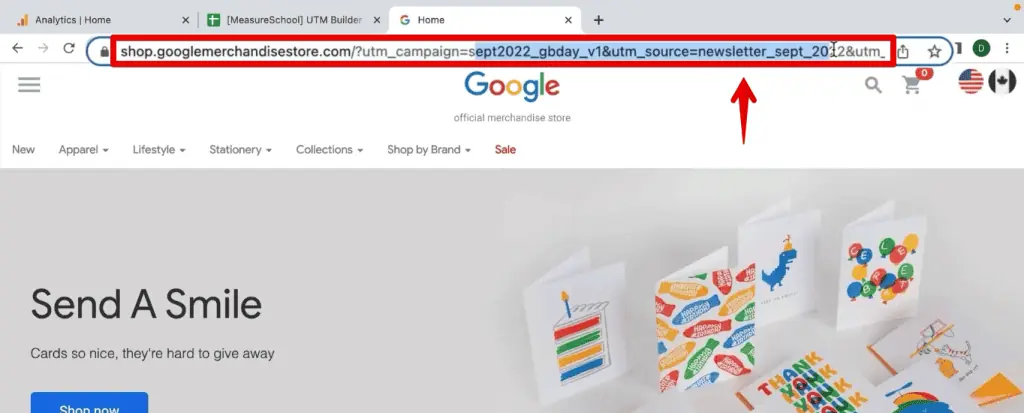
You’ve likely encountered UTM parameters as peculiar strings of text appended to a web address, resembling something like www.example.com?utm_source=newsletter&utm_medium=email&utm_campaign=sept_promo. These are not random characters but meticulously crafted tags that serve as digital breadcrumbs, offering unparalleled clarity on where your website traffic originates. UTM parameters empower marketers to move beyond basic traffic counts, enabling a deep dive into the "who," "how," and "what" behind every user visit. They are specifically designed for external links, ensuring that when users arrive at your site, GA4 can accurately record the specific campaign, source, and medium that drove them there.
Why They Are Useful: Unveiling the True Story of Your Campaigns
The utility of UTM parameters lies in their ability to demystify website analytics. Consider a scenario where a marketing team is running concurrent campaigns across Facebook, LinkedIn, and Google Ads, all promoting a new product. Without UTMs, an analyst might only see 1,000 users visiting the product page and making purchases. This top-line data, while indicating success, provides no insight into which platform or specific ad drove those conversions.
With robust UTM tagging, the narrative dramatically changes. The data might reveal:

- Facebook: 500 users, 200 purchases (e.g.,
utm_source=facebook&utm_medium=paid_social&utm_campaign=product_launch_q4) - LinkedIn: 300 users, 50 purchases (e.g.,
utm_source=linkedin&utm_medium=cpc&utm_campaign=b2b_awareness) - Google Ads: 200 users, 150 purchases (e.g.,
utm_source=google&utm_medium=cpc&utm_campaign=product_keywords)
This level of detail is transformative. It allows marketers to precisely evaluate the performance of each channel, campaign, and even specific creative elements. Such insights are invaluable for optimizing future campaigns, reallocating budgets, and refining marketing strategies to maximize ROI.
Where Can They Be Used: A Universal Application
The versatility of UTM parameters extends across virtually every digital touchpoint where a link directs users to your website. Their application is broad and includes:
- Email Marketing Campaigns: Track clicks from newsletters, promotional emails, and automated sequences.
- Social Media Posts: Monitor organic and paid posts across platforms like Facebook, Instagram, LinkedIn, and X (formerly Twitter).
- Paid Advertisements: Attribute traffic from Google Ads, Bing Ads, display networks, and social media ads.
- Affiliate Marketing: Measure performance of partners and influencers.
- Guest Posts & External Content: Understand traffic driven from articles, blogs, and other external publications.
- QR Codes: Link physical world interactions to digital analytics.
- Offline Marketing with Digital Touchpoints: Even traditional media can leverage QR codes with UTMs to bridge the gap.
Essentially, any URL shared with the intention of driving traffic to your site is a candidate for UTM tagging.
Common Use Case Scenarios: Practical Applications in Action
UTM parameters are instrumental in a variety of analytical and strategic marketing tasks:
- Campaign Performance Measurement: Assess the effectiveness of specific marketing initiatives.
- A/B Testing of Ad Copy or Creatives: Compare different versions of ads by tagging them distinctly.
- Tracking Content Performance: Understand which blog posts or articles are driving the most traffic and engagement.
- Analyzing Partner Referrals: Evaluate the success of collaborations and affiliate programs.
- Distinguishing Organic vs. Paid Efforts on the Same Platform: For instance, Facebook organic posts vs. Facebook paid ads.
Supporting Data: Deciphering UTMs in Google Analytics 4

The true power of UTMs is unleashed when their data is effectively analyzed within GA4. The platform offers two primary avenues for this: standard reports and the more flexible Exploration Reports.
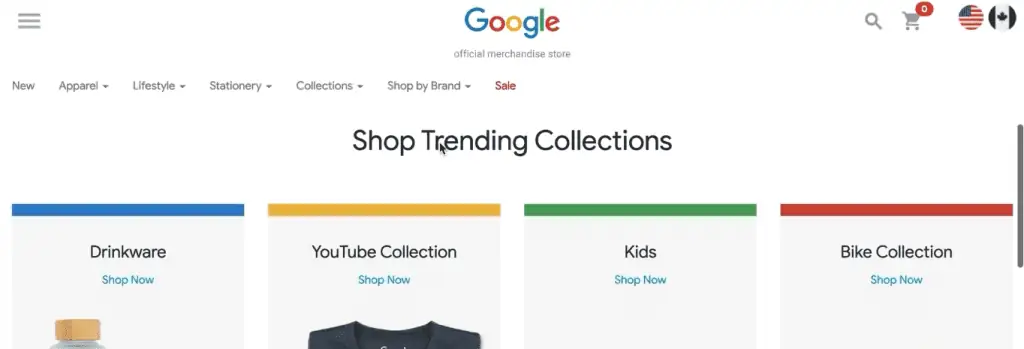
To illustrate, let’s consider a practical example using a hypothetical "Google Merchandise Store" dataset, similar to the one often used in GA4 tutorials. This store promotes various products and utilizes newsletters with UTM-tagged links.
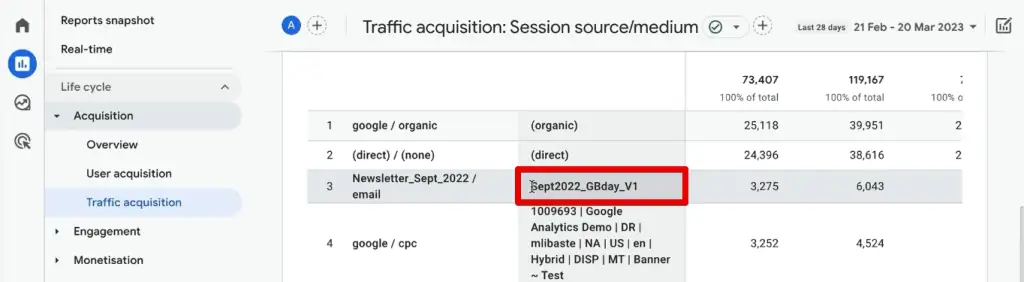
Viewing UTM Parameters in Standard Reports
The quickest way to get an overview of your UTM data is through GA4’s standard reports.
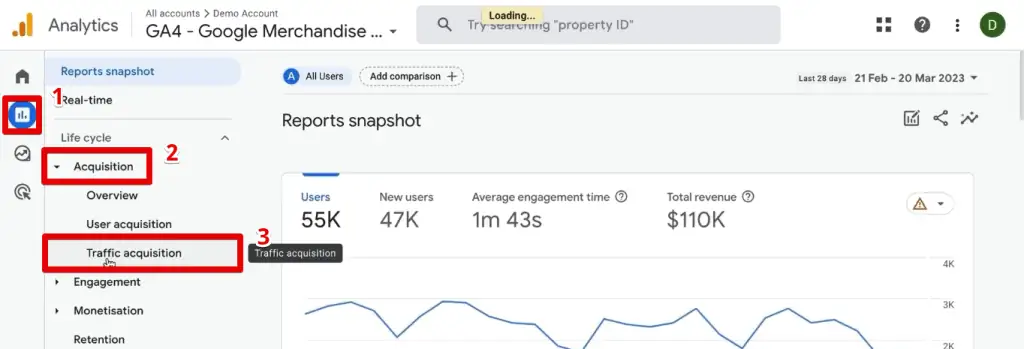
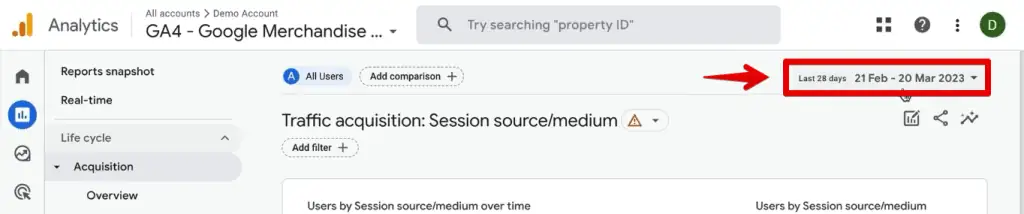
- Navigate to Reports -> Acquisition -> Traffic Acquisition. This report is designed to show how users arrive at your site.
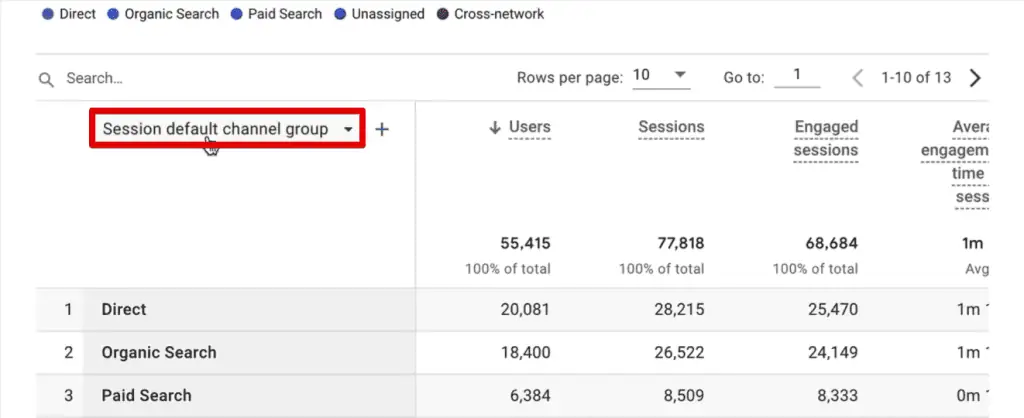
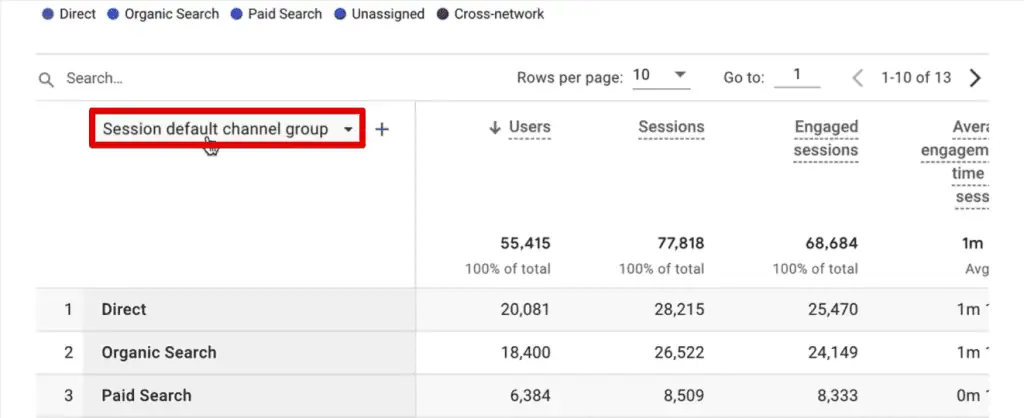
- By default, the primary dimension is often the ‘Session default channel grouping’. To view UTM-specific data, change this to ‘Session source/medium’. This combines the
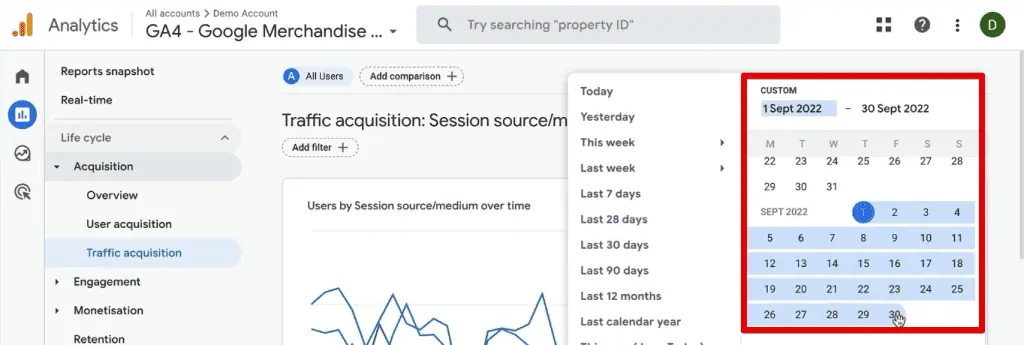
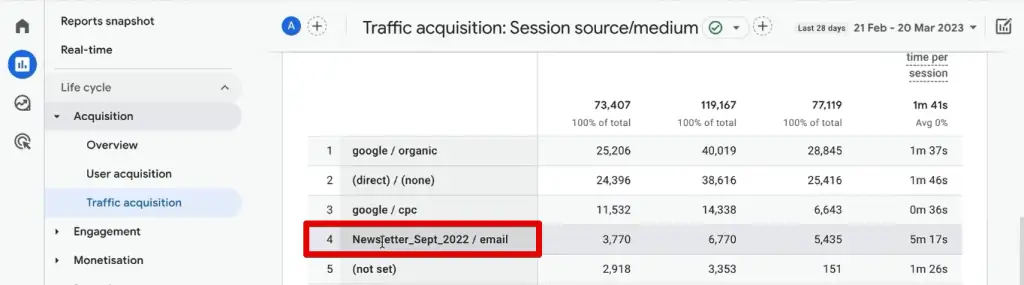
utm_sourceandutm_mediumvalues, offering a consolidated view. - To find specific campaigns, like a ‘Newsletter_Sept_2022’ source, adjust the date range. For instance, setting the range to September 2022 would reveal the performance of that particular newsletter, showing metrics like ‘Sessions’, ‘Engaged sessions’, and ‘Conversions’.
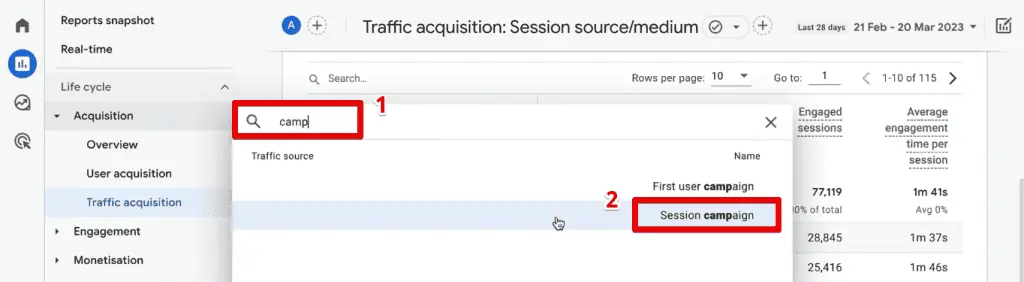
- For additional granularity, you can add a secondary dimension. Clicking the ‘+’ sign allows you to search for and add dimensions such as ‘Session campaign’ (for
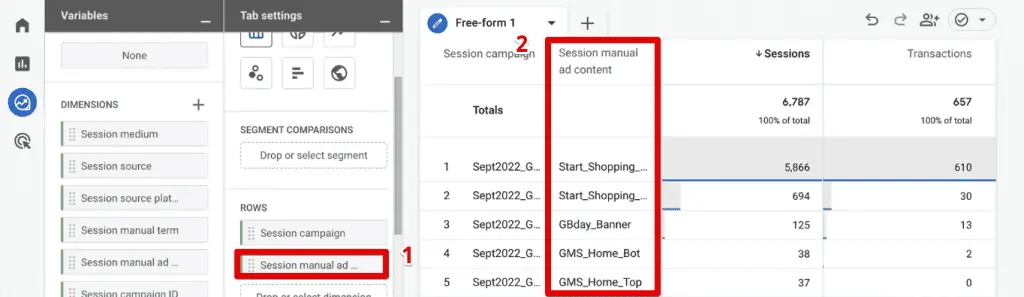
utm_campaign), ‘Session manual ad content’ (forutm_content), or ‘Session manual term’ (forutm_term).
While convenient, standard reports have limitations. They typically display only one or two dimensions at a time, making deep, multi-dimensional analysis cumbersome. For more complex investigations, GA4’s Exploration Reports are the preferred tool.
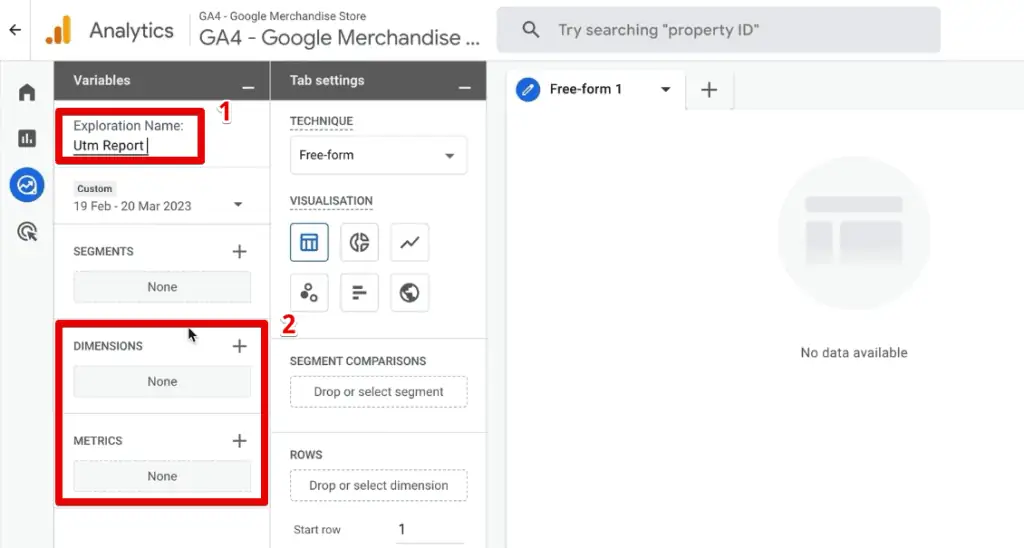
Analyzing UTM Parameters in Exploration Reports: Unlocking Deeper Insights
Exploration Reports provide a customizable canvas for dissecting your data, offering unparalleled flexibility.

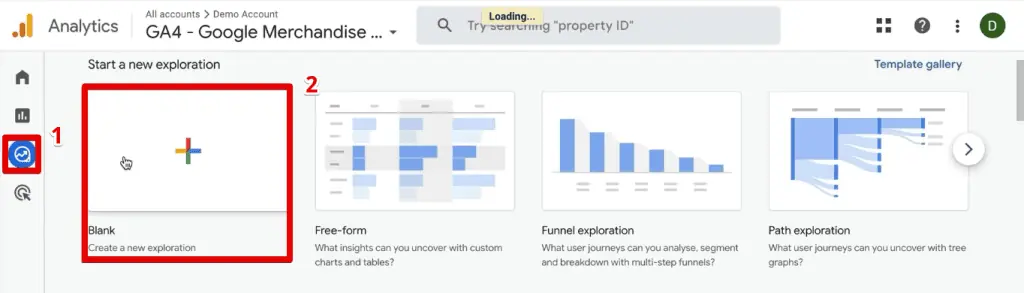
- Start with Explore -> Blank report. Name your report descriptively (e.g., "UTM Campaign Performance").
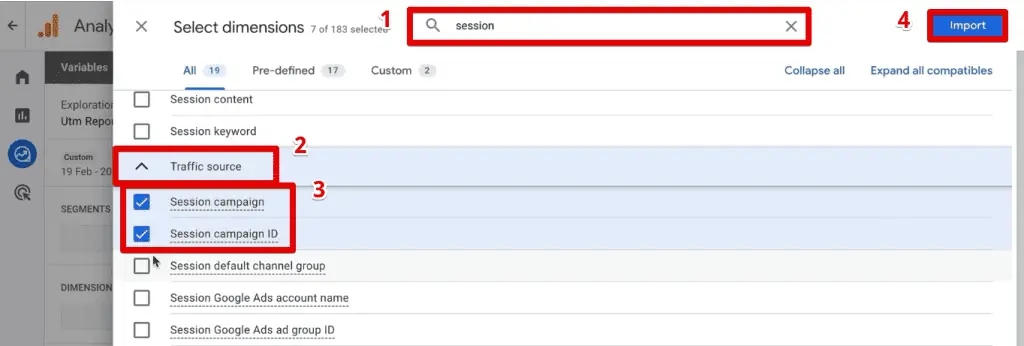
- Import Dimensions: Crucially, you need to import all relevant UTM-related dimensions. GA4 translates UTM parameters into specific dimensions:
utm_id-> Session campaign IDutm_source-> Session sourceutm_medium-> Session mediumutm_campaign-> Session campaignutm_source_platform-> Session source platformutm_term-> Session manual termutm_content-> Session manual ad content
(Note:utm_creative_formatandutm_marketing_tacticare not currently reported in GA4 properties.)
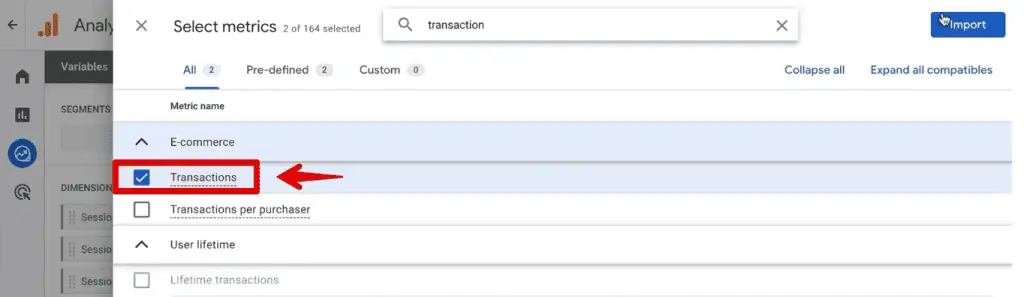
- Import Metrics: Add key metrics like ‘Sessions’, ‘Total users’, ‘Conversions’, and for e-commerce, ‘Transactions’ or ‘Purchase Revenue’.
- Build Your Report:
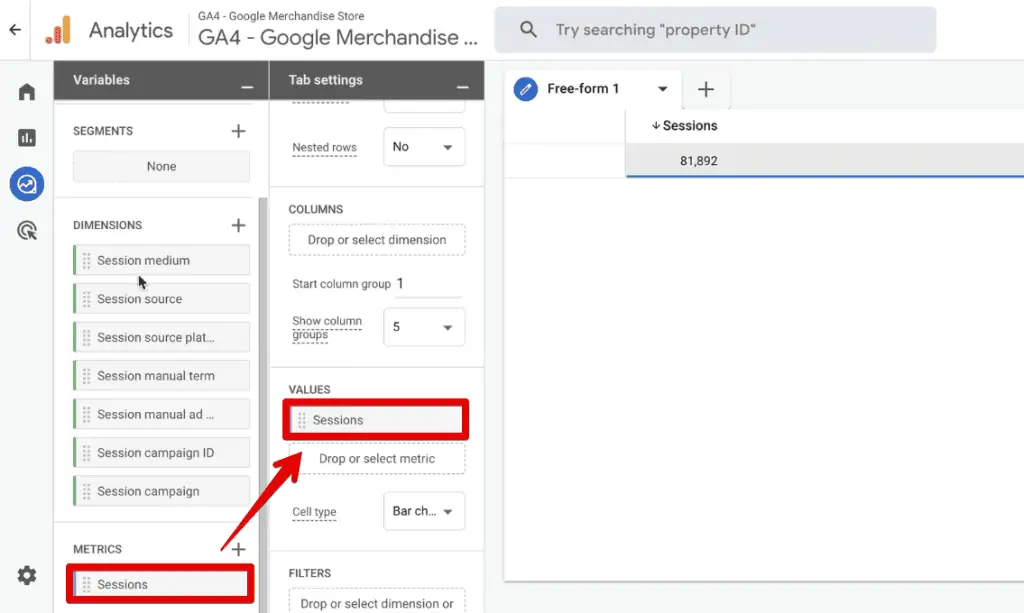
- Drag ‘Sessions’ (and other metrics) to the Values section.
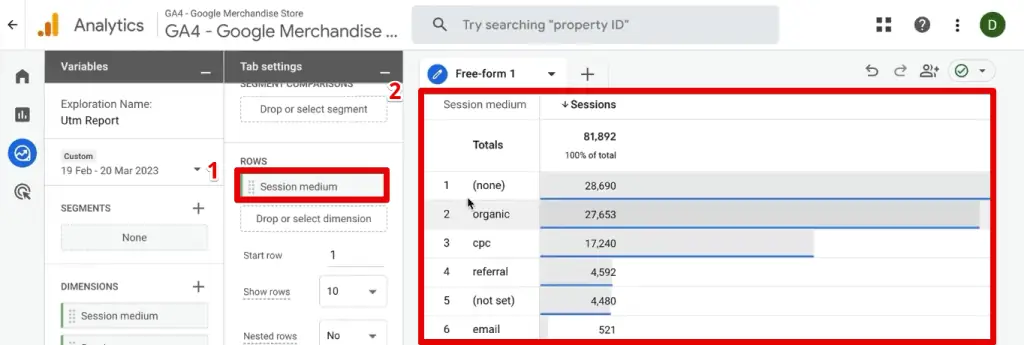
- Drag ‘Session medium’ and ‘Session source’ to the Rows section. This immediately populates a table showing traffic by source/medium.
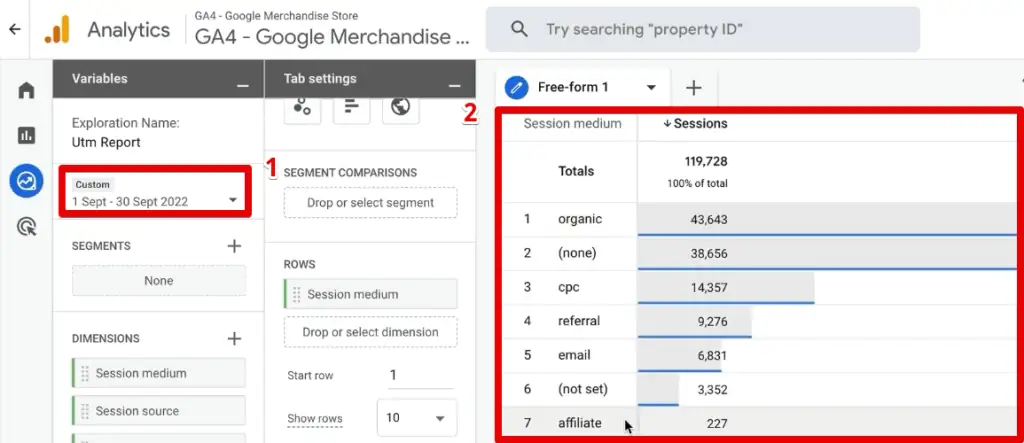
- Adjust the date range to focus on your desired period (e.g., September 2022).
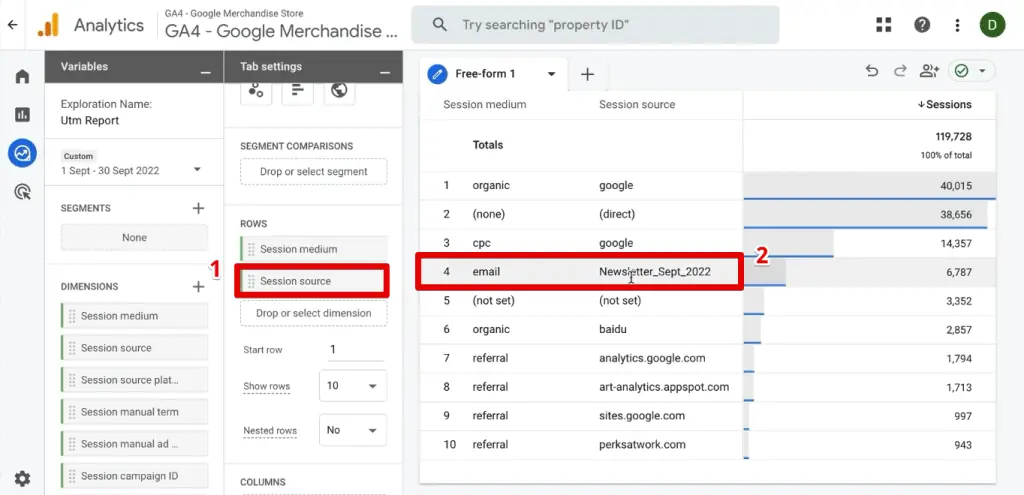
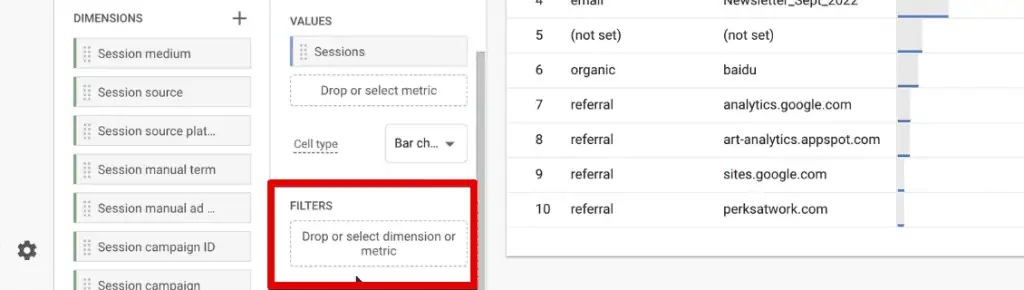
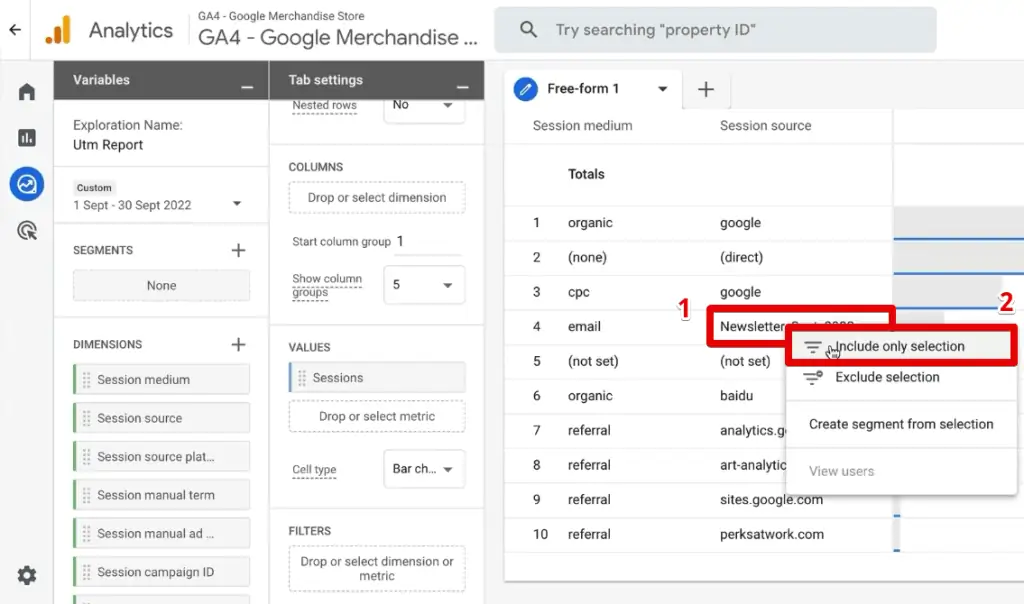
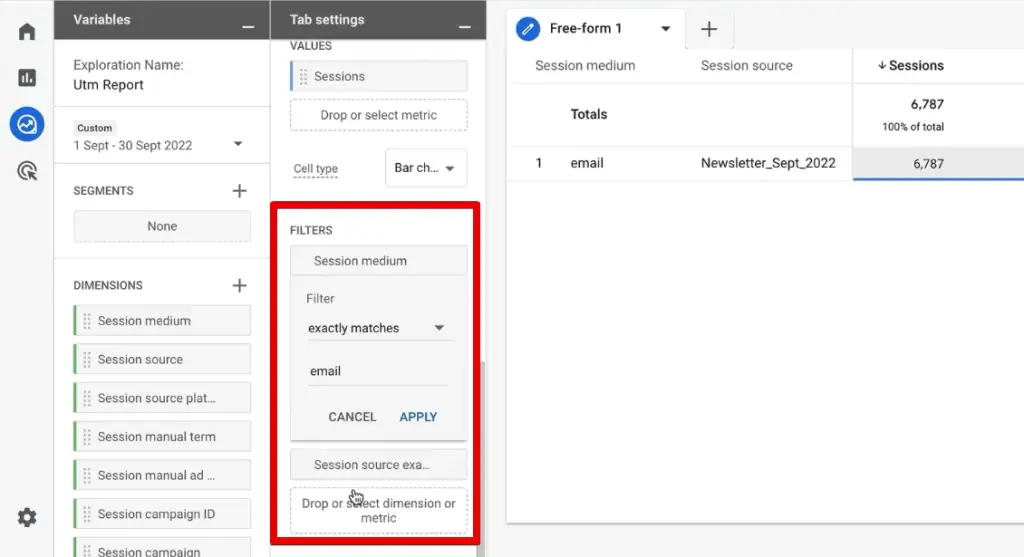
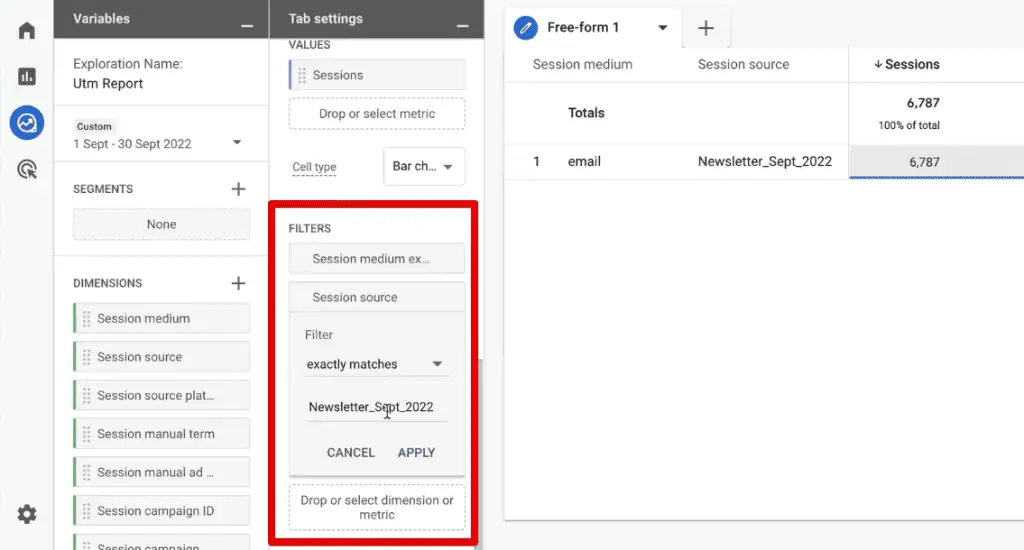
- Filtering for Focus: Instead of manually configuring filters, a powerful shortcut exists: right-click on a data point in your table (e.g., ‘Newsletter_Sept_2022’ under ‘Session source’) and select ‘Include Only Selection’. This automatically applies filters for that specific source and medium.
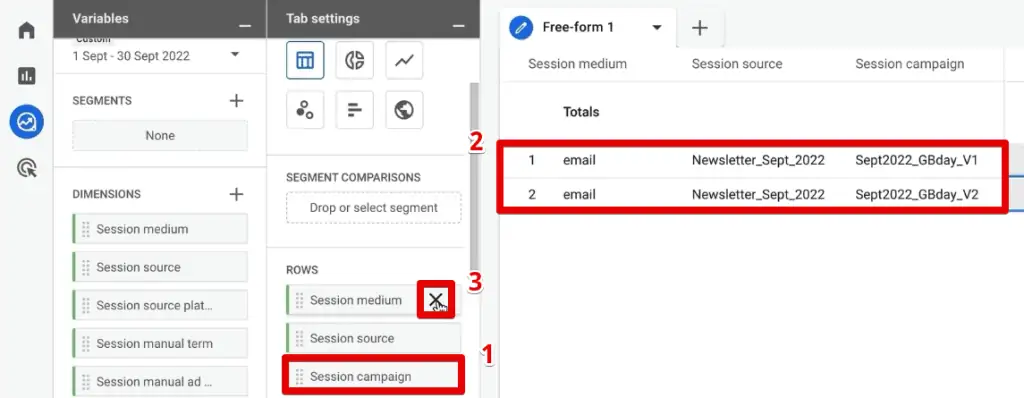
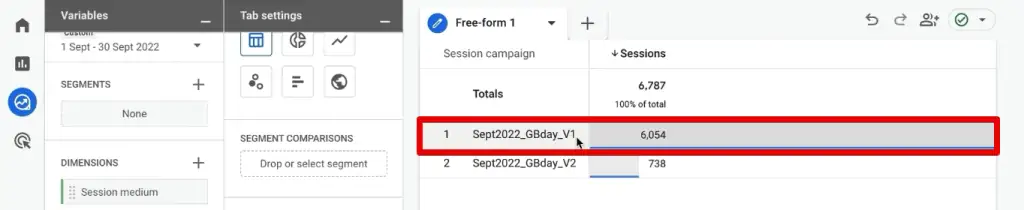
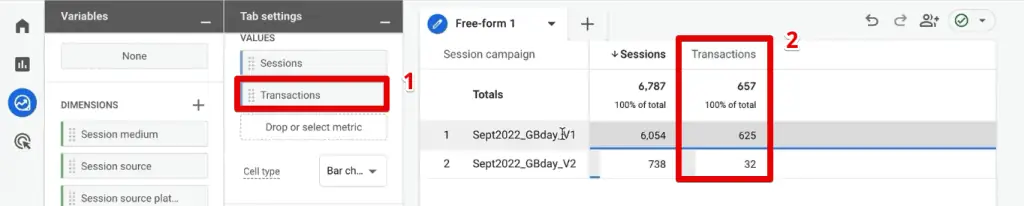
- Layering Dimensions for Granularity: Remove the broad ‘Session medium’ and ‘Session source’ from the Rows section (since they are now filtered) and add ‘Session campaign’. This immediately reveals the performance of different campaigns within your filtered newsletter source. You might discover, for example, that ‘newsletter_v1’ significantly outperforms ‘newsletter_v2’ in terms of sessions and transactions.
- Adding More Metrics: Integrate additional metrics like ‘Transactions’ to see the direct impact of each campaign version on sales.
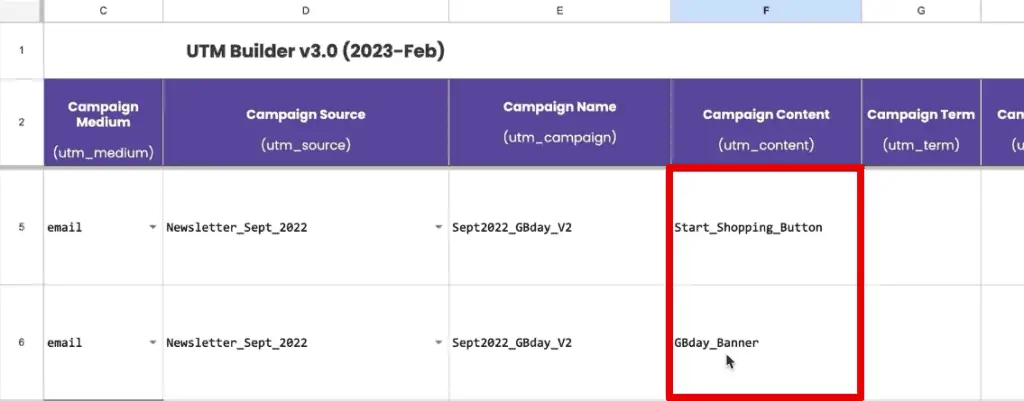
- Comparing Different Content Elements: Further drill down by adding ‘Session manual ad content’ to the Rows. You can then compare elements like a ‘Start_Shopping_Button’ versus a ‘Birthday_Banner’ within a specific campaign, again using the ‘Include Only Selection’ trick to filter.
Official Responses: Best Practices for Robust UTM Implementation
Google and industry experts consistently emphasize the importance of systematic UTM usage. Adhering to best practices is crucial for data accuracy and analytical efficiency.
Best Practices for UTM Parameters:
- Consistency is Key: Establish and strictly follow a standardized naming convention across all campaigns and channels. Use lowercase letters, hyphens instead of spaces, and avoid special characters. Inconsistent naming (e.g., "Facebook" vs. "facebook") will fragment your data.
- Required Parameters: Always use
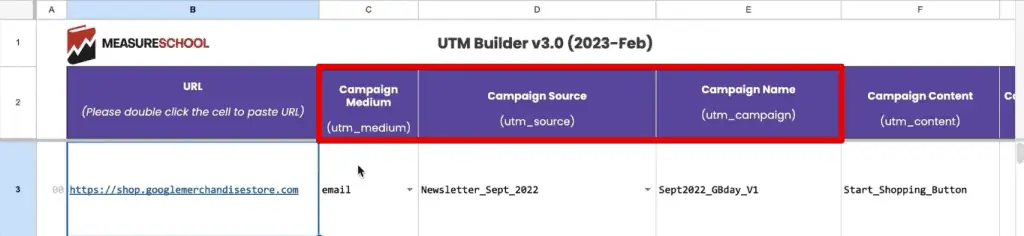
utm_source,utm_medium, andutm_campaign. These are the foundational elements for traffic attribution. - Specific & Descriptive Values: Ensure your parameter values are clear and informative.
utm_source=facebookis good,utm_medium=paid_socialorutm_medium=emailis clear.utm_campaign=winter_sale_2024is much better thanutm_campaign=sale. - Avoid Internal Linking: Do not use UTM parameters for internal links within your website. This can overwrite existing session data and lead to inaccurate attribution.
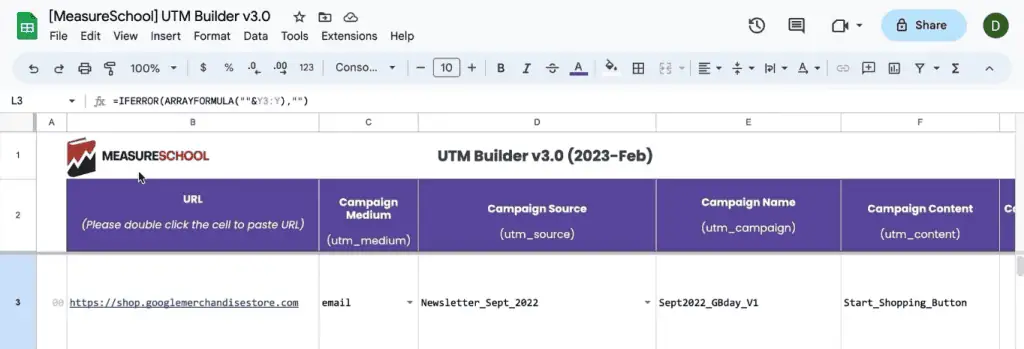
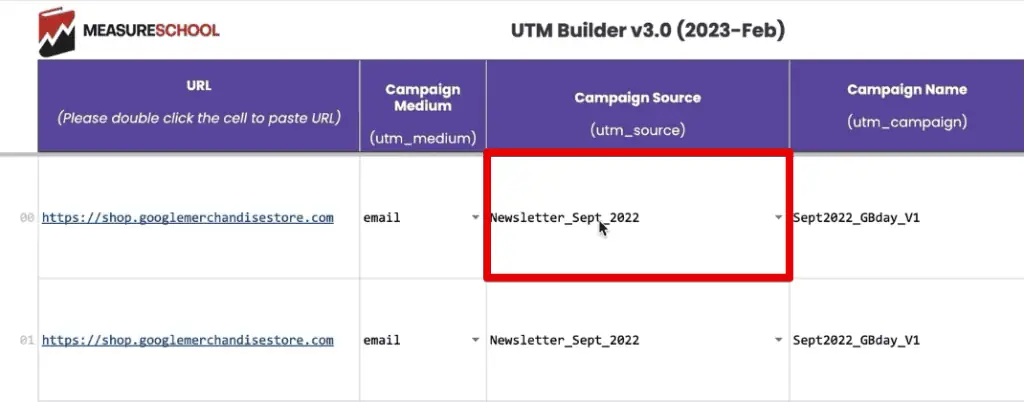
- Use a UTM Builder Tool: Leverage tools like Google’s Campaign URL Builder or a custom UTM builder sheet (like MeasureSchool’s) to ensure consistent parameter construction and minimize errors.
- Documentation: Maintain a comprehensive log of all UTM parameters used, including their purpose and the campaigns they support. This is vital for historical analysis and team collaboration.
Advanced Strategies: Maximizing UTM Data Beyond Basic Reports
The utility of UTMs extends far beyond standard reporting, especially for organizations with sophisticated marketing operations and CRM systems.
Custom UTM Parameters: When default GA4 dimensions don’t capture specific nuances of your campaigns, custom UTM parameters offer a solution. By setting these as custom dimensions in GA4, often facilitated by Google Tag Manager, you can capture unique identifiers or descriptive tags relevant to your business (e.g., utm_audience=retargeting_segment_a). This allows for highly tailored analysis.
Passing UTM Parameters to CRM Tools: For businesses that track leads and customer interactions in a CRM (e.g., Salesforce, HubSpot, ConvertKit), integrating UTM data is critical for full-funnel attribution. This typically involves:
- Storing UTMs in Cookies: When a user lands on your site via a UTM-tagged URL, the parameters are captured and stored in browser cookies.
- Populating Hidden Form Fields: When the user fills out a lead form, JavaScript reads the UTM data from the cookies and populates hidden fields within the form.
- CRM Integration: Upon form submission, the UTM data, now part of the form submission, is passed directly to your CRM.
This ensures that your sales and marketing teams know the exact campaign, source, and medium that generated a lead, even if the user navigated multiple pages before converting.
Implications: The Business Impact of Strategic UTM Management
The meticulous application and analysis of UTM parameters carry significant implications for business strategy, operational efficiency, and competitive advantage.
Troubleshooting Tips for Misattributed Traffic: Rectifying Data Anomalies
Poor UTM implementation can lead to significant data inaccuracies, undermining analytical efforts. Recognizing and rectifying common issues is crucial:
- Too Much Direct Traffic: A disproportionately high percentage of "direct" traffic (25-30% or more) often signals a failure to implement UTMs for various inbound links. Google Analytics struggles to identify sources without these tags, defaulting them to "direct." This can mask valuable insights, making it appear users are typing your URL directly when they might have clicked an untagged email link or social post. The implication is wasted marketing effort and an inability to truly understand user acquisition paths.
- Wrong Source Bucket Attribution: Inconsistent parameter values can cause traffic to be misclassified. If
utm_mediumis set to "psoc" (paid social) instead of Google’s default "paid_social" or "cpc" (cost-per-click) for paid campaigns, GA4 might incorrectly categorize it as "Organic Social." This distorts channel performance reports, leading to misguided budget allocations and campaign evaluations. Adhering to GA4’s default channel grouping rules (or defining custom channel groups) is vital. - Fragmented Traffic: Variations in casing or spelling (e.g.,
utm_source=Facebookvs.utm_source=facebook) will result in GA4 reporting these as two separate sources. This fragments data, making it harder to get a consolidated view of performance for a single source or medium. Strict naming conventions, ideally enforced by a centralized UTM builder, prevent this.
Enhanced Decision-Making and ROI Optimization: By consistently and accurately tracking campaign performance through UTMs, businesses gain the clarity needed to make data-driven decisions. This leads to more efficient allocation of marketing budgets, a deeper understanding of audience engagement, and the ability to refine strategies for maximum impact. The ability to compare different campaign versions or content elements side-by-side, as demonstrated in GA4’s Exploration Reports, empowers continuous optimization.
Seamless Cross-Departmental Collaboration: When UTM data is integrated into CRM systems, it bridges the gap between marketing and sales. Sales teams gain context about where leads originated, enabling more personalized outreach. Marketing teams can track the entire customer journey, from initial click to closed deal, providing a holistic view of campaign effectiveness. This alignment fosters greater accountability and shared goals.
Competitive Advantage: In a market saturated with digital content, businesses that master their analytics, particularly traffic attribution, hold a significant advantage. They can react faster to market changes, capitalize on successful campaigns, and avoid wasting resources on underperforming initiatives. Precise UTM tracking becomes a strategic asset, enabling agility and informed growth.
Summary
Decoding UTM parameters in Google Analytics 4 is no longer optional; it’s a fundamental skill for any data-driven marketer. This guide has illuminated the process from meticulous UTM creation to advanced analysis within GA4’s powerful reporting interface. While standard reports offer a quick overview, the customizable Exploration Reports are where true insights are unearthed, allowing for multi-dimensional analysis, segmentation, and comparison.
We’ve explored the importance of adhering to best practices—consistency, clarity, and documentation—to ensure data integrity. Furthermore, advanced strategies like custom UTM parameters and passing data to CRM tools demonstrate the profound impact of UTMs on end-to-end attribution and marketing-sales alignment. By addressing common troubleshooting issues such as misattributed direct traffic or fragmented data, organizations can ensure their analytics accurately reflect their digital efforts.
Whether you’re new to GA4 UTM tracking or seeking to refine your existing strategies, the ability to effectively leverage these parameters is paramount for navigating the complexities of modern digital marketing, optimizing campaigns, and driving measurable business growth. Which UTM parameter do you find most insightful in your analysis? How do you typically approach viewing your UTM data within GA4? Share your experiences and techniques in the comments below.
