

The Great Financial Stack Showdown: Xero vs. FreshBooks in the Modern Business Ecosystem
As small businesses and scaling enterprises navigate an increasingly digitized economic landscape, the choice of core accounting infrastructure has never been more critical. For years, the battle lines in cloud accounting were sharply drawn: enterprise-grade ledgers on one side, lightweight invoicing tools on the other.
Today, that dichotomy is blurring. Platforms like Xero and FreshBooks share a vast overlapping feature set, spanning automated bank feeds, complex reporting engines, and robust cloud integrations. Yet, beneath this functional convergence lie two fundamentally distinct philosophies on how a modern business should manage its capital.
Understanding the nuances of Xero and FreshBooks requires a deep dive into their cost structures, feature parity, scalability, and target demographics. Whether you are a solo consultant dispatching a dozen invoices a week or a multi-currency e-commerce brand juggling global inventory, choosing the right system can mean the difference between financial clarity and administrative gridlock.
1. Main Facts: Core Architecture and Market Positioning
At their core, both Xero and FreshBooks aim to eliminate the friction of manual bookkeeping. However, they approach this mandate from opposite ends of the corporate spectrum.
- FreshBooks remains unabashedly optimized for service-based businesses, freelancers, and small agencies. Its entire product architecture revolves around client interactions—custom invoicing, payment plans, retainers, and time tracking.
- Xero is engineered for growing businesses, particularly those operating across multiple sales channels, managing physical inventory, or dealing with international multi-currency transactions. It adheres strictly to traditional double-entry bookkeeping principles, offering a higher ceiling for financial complexity.
Despite these differing DNA profiles, both tools offer powerful workflow automation, expense tracking, and document capture. The fundamental friction point for business owners evaluating the two platforms usually boils down to user licensing and inventory needs. Xero famously includes unlimited user seats across all plans, whereas FreshBooks structures its pricing around the number of billable clients and charges per additional user account.
2. Chronology: The Evolution of Cloud Accounting Platforms
To understand where Xero and FreshBooks stand today, it helps to look at how they arrived here.
The Early Decades: Ledgers vs. Invoices
In the late 2000s and early 2010s, accounting software was divided into desktop monoliths and emerging web-based alternatives. Xero entered the market as a cloud-native double-entry ledger designed to rival legacy desktop software, appealing directly to accountants and growing companies. FreshBooks, conversely, launched as an electronic invoicing tool ("Invoice Machine") built by web designers who simply wanted a painless way to bill clients.
Feature Convergence (2015–2022)
Over the next decade, both platforms aggressively expanded their turf. FreshBooks introduced true double-entry accounting features to appease accountants who demanded more than just cash-basis income tracking. Meanwhile, Xero built out its ecosystem through a thriving third-party app marketplace and enhanced its client-facing capabilities, narrowing the gap with FreshBooks’ streamlined invoicing workflow.
The AI and Automation Era (2023–Present)
Most recently, both platforms have integrated artificial intelligence to automate manual data entry and bank reconciliation. Xero introduced its JAX AI assistant, capable of answering natural language queries about financial data, generating cash flow projections, and benchmarking performance. FreshBooks has leaned into rules-based automation, focusing heavily on automated payment reminders, late fees, and recurring billing sequences.
3. Supporting Data: Pricing, Limits, and Total Cost of Ownership
Financial analysis of accounting software often reveals hidden costs that go beyond the headline monthly subscription fee.
Xero Pricing and Tiers (US Market)
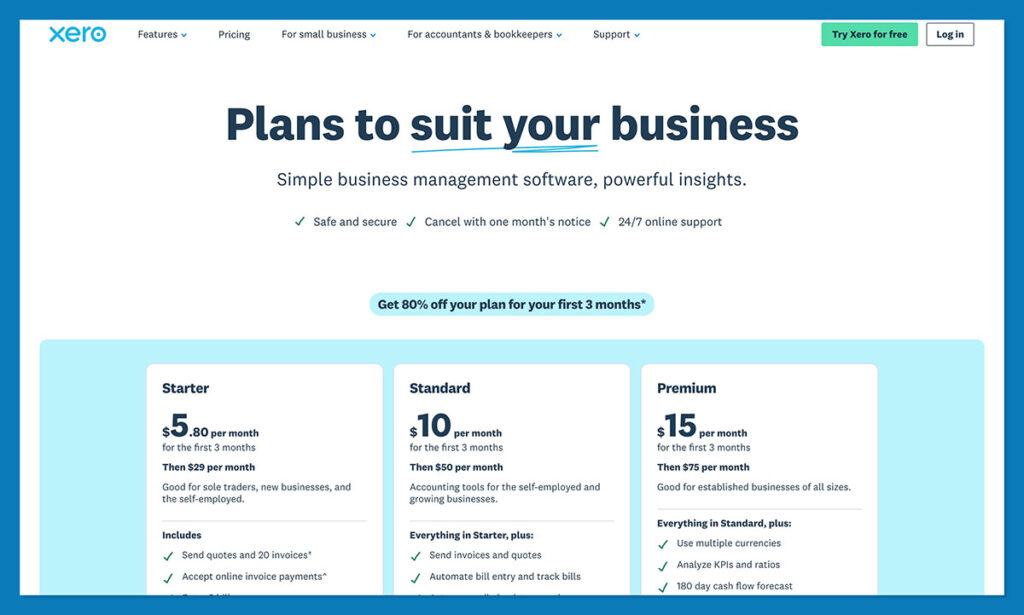
Xero structures its plans based on feature depth and transaction volume caps:
- Early Plan ($25–$27/month): Restricts users to 20 invoices and 5 bills per month, with a 30-day cash flow forecast. It excludes multi-currency support and advanced inventory.
- Growing Plan ($55–$59/month): Removes invoice and bill caps, making it the practical starting point for active businesses.
- Established Plan ($90–$97/month): Unlocks multi-currency management (over 160 currencies), expense claims, and advanced analytics.
(Note: A structural price adjustment took effect, moving these tiers slightly higher for new and existing subscribers, while legacy multi-organization discounts are phased out.)
FreshBooks Pricing and Tiers
FreshBooks scales its pricing primarily by active billable clients rather than feature gates:
- Lite ($23/month): Supports up to 5 billable clients and 1 user. Note that accountant access is restricted on this tier, creating potential friction at month-end.
- Plus ($43/month): Expands capacity to 50 billable clients and adds real-time expense tracking.
- Premium ($70/month): Offers unlimited billable clients and advanced reporting tools.
The User-Seat Trap
While FreshBooks appears competitively priced at entry level, its per-user pricing model means that adding team members, project managers, or internal bookkeepers incurs extra charges. Xero’s policy of including unlimited users across every plan makes it significantly more cost-effective for collaborative teams, even if its base subscription appears higher at first glance.
4. Official Responses and Platform Capabilities
A side-by-side comparison of specific functional areas reveals stark contrasts in how each platform delivers value.

Invoicing and Client Management
- FreshBooks Wins the Service Sector: It allows users to turn invoices into structured payment plans (up to 12 installments), set up automated reminders, accept partial payments, apply late fees, and manage complex client retainers.
- Xero Counters with AI Design: Xero enables ACH and Apple Pay processing, scheduled invoicing, and utilizes its JAX AI assistant to help design professional invoices. However, its time-tracking features often require add-ons.
Bookkeeping and Bank Reconciliation
- Xero’s Ledger Superiority: Built from the ground up for double-entry accounting, Xero excels at advanced bank reconciliation, fixed asset management, and automated document capture. Sharing data with an external accountant is frictionless on every plan.
- FreshBooks’ Single-Currency Limit: FreshBooks offers solid bank reconciliation for matching expenses, invoices, and credits, but it is strictly limited to a single currency. Furthermore, complex assets like crypto, lines of credit, and investment accounts are generally excluded.
E-commerce and Inventory Management
- Xero Dominates Product Businesses: Xero features native tracked inventory, Cost of Goods Sold (COGS) monitoring, gross profit tracking, and backorder management. Its direct integrations—such as a free Shopify app and the Inventory Plus add-on for Amazon FBA—make it the clear choice for multichannel retail.
- FreshBooks’ Lightweight Alternative: FreshBooks can handle basic product quantities and tax reporting, making it viable for service businesses that occasionally sell physical goods, but it lacks true inventory control.
5. Strategic Implications for Business Owners
Choosing between Xero and FreshBooks is ultimately an exercise in aligning software architecture with long-term business strategy.
+--------------------------------------------------------------------------+
                    WHICH ACCOUNTING SOFTWARE TO CHOOSE?
+--------------------------------------------------------------------------+
                                    |
            +-----------------------+-----------------------+
            |                                               |
     [ SERVICE-BASED ]                               [ PRODUCT / SCALE ]
     Freelancers, Agencies,                         Growing Businesses,
     Consultants                                    E-commerce, Multi-currency
            |                                               |
            v                                               v
     CHOOSE FRESHBOOKS                                 CHOOSE XERO
     - Intuitive Invoicing                           - Unlimited Users
     - Client Retainers                              - Advanced Inventory
     - Phone Support                                 - Multi-Currency Ledger
The Freelancer’s Verdict
For solo operators, consultants, and agencies where revenue is generated primarily through billable hours and project-based invoicing, FreshBooks is the path of least resistance. Its interface assumes zero accounting background, its client portals foster strong professional relationships, and the inclusion of phone support ensures that help is readily available when tax season looms.
The Scaling Enterprise’s Verdict
For companies with ambitions of rapid scale, multi-person finance teams, international transactions, or physical inventory, Xero is the definitive winner. While the initial learning curve is steeper due to its strict adherence to double-entry bookkeeping, the platform grows with the business. The absence of per-user fees, combined with powerful AI-driven insights, multi-currency reporting, and deep e-commerce integrations, ensures that companies will not outgrow their accounting infrastructure prematurely.
Frequently Asked Questions (FAQ)
How much does Xero cost, and are prices changing?
Xero’s US plans are structured at $27/month for Early, $59/month for Growing, and $97/month for Established. A recent price adjustment reflects ongoing updates to its platform infrastructure, and legacy multi-organization discounts are actively being phased out.
What are the transaction limits on Xero’s cheapest plan?
The Early plan restricts users to 20 outgoing invoices and 5 bills per month. It also limits cash flow forecasting to 30 days and excludes multi-currency support and advanced inventory tools. Active businesses typically find the Growing plan to be the necessary baseline.
Does Xero really include unlimited users?
Yes. Unlike competitors that charge per seat, Xero does not charge additional user fees. Business owners, internal bookkeepers, and external accountants can all access the platform under a single subscription.
Which Xero plan is required for multi-currency accounting?
Multi-currency capabilities—including foreign currency bank accounts, multi-currency reporting across more than 160 currencies, and automated foreign expense conversion—are exclusive to the Established plan.
Is FreshBooks suitable for product-based businesses?
FreshBooks can manage basic product quantities and tax calculations, making it acceptable for hybrid businesses that primarily sell services. However, for dedicated retail, e-commerce, or wholesale operations requiring robust inventory control and COGS tracking, its features are too restrictive.
