
Navigating the Nuances of User Measurement: Understanding Unique Visitors in Google Analytics 4
Last Modified on March 26, 2025
In the complex landscape of digital analytics, the sheer volume of metrics can be overwhelming. From total users and active users to new users, returning users, and sessions, discerning the precise meaning and application of each data point is crucial for meaningful analysis. Google Analytics 4 (GA4), with its event-driven model, has introduced significant shifts in how user engagement and presence on digital platforms are defined and tracked, moving away from the more familiar "Unique Visitors" terminology of its predecessor, Universal Analytics.
This comprehensive guide delves into the specifics of user measurement within GA4, clarifying definitions, tracking methodologies, data interpretation best practices, and inherent limitations. Understanding these facets is paramount for analysts, marketers, and business leaders seeking to derive actionable insights from their web and app performance data.
Main Facts: The Core of User Measurement in GA4
At its foundation, understanding user metrics in GA4 requires grappling with Google’s distinct definitions. Unlike Universal Analytics, which prominently featured "Unique Visitors," GA4 primarily focuses on "Total users" and "Active users." These metrics, while conceptually similar to unique visitors, carry specific nuances dictated by GA4’s event-based data model.

Total Users: This metric represents the count of unique users who have triggered any event on your website or app within a specified date range. An event can be as simple as a page_view, first_visit, or session_start, or it can be a custom event configured for specific interactions, such as a sign_up or product_added_to_cart. Essentially, if a user performs any recorded action, they are counted as a Total User.
Active Users: Often the default and preferred user metric in GA4’s standard reports, Active Users are defined as unique users who have had an "engaged session" or have triggered specific key engagement events. These events include first_visit, session_start, and user_engagement, alongside any page_view or screen_view event. The emphasis here is on engagement, signaling a more active interaction with the digital property.
The distinction between these two often leads to closely aligned numbers, as most users triggering any event will also likely meet the criteria for an active user. However, minor discrepancies can arise due to various factors, including specific event configurations or the precise timing of user interactions.
Chronology: The Evolution of User Tracking in Google Analytics
The journey from Universal Analytics (UA) to Google Analytics 4 represents a significant evolution in how user data is collected, processed, and presented. This shift is particularly evident in the terminology and methodology surrounding "unique visitors."
The Universal Analytics Era (Pre-GA4): In UA, "Unique Visitors" was a cornerstone metric, representing the number of individual, unduplicated users visiting a website during a specific period. This was primarily tracked using a client ID stored in a first-party cookie. A user was counted once within the selected timeframe, regardless of how many times they visited or how many pages they viewed. The focus was heavily on sessions and page views.
The Transition to GA4 and Event-Driven Measurement: With the introduction of GA4, Google embraced an event-driven data model, fundamentally altering how user interactions are recorded. Every interaction, from a page load to a button click, is an "event." This paradigm shift necessitated a redefinition of user metrics. The concept of "Unique Visitors" was replaced with "Total users" and "Active users" to align with this new framework. This change was not merely semantic; it reflected a deeper methodological shift towards understanding user behavior across platforms (web and app) through a unified, event-centric lens. The user_engagement event and the concept of an "engaged session" were introduced to provide a more nuanced understanding of user quality beyond mere presence. This chronological progression highlights Google’s ongoing effort to adapt analytics to a cross-device, privacy-conscious, and more granular data environment.
Supporting Data: GA4’s Tracking Mechanisms and Report Locations
GA4’s ability to identify and count unique users relies on a sophisticated, albeit imperfect, tracking mechanism centered around client identifiers and cookies.
How GA4 Tracks Unique Users:
Google employs a "client ID" (CID), also known as cid, which is stored in a first-party browser cookie, typically named _ga. This randomly generated identifier is unique to a specific browser on a specific device. When a user visits your site, this cookie assigns an identifier, allowing GA4 to distinguish between new users and returning users accessing the site from the same browser.
By default, the _ga cookie has a 2-year expiration. However, this setting can be adjusted within the GA4 interface to comply with various privacy regulations, with options ranging from 25 months down to 0 (session-based). It’s crucial to note that privacy-focused browsers, particularly on iOS (e.g., Safari), often impose stricter limits, reducing cookie lifespans to as little as 7 days, and sometimes even 24 hours. This can lead to an inflated "new user" count if the same individual is identified as new after their cookie expires, despite being a returning visitor.
The client ID is a powerful tool for pseudonymous tracking but has inherent limitations. It cannot track users across different browsers or devices. For cross-device tracking, a separate "User-ID" feature, which requires explicit implementation by linking authenticated user accounts, is necessary. Furthermore, if a user clears their cookies or uses an ad blocker that prevents cookie storage, their client ID is lost, and they will be registered as a new user upon their next visit.
Defining Engaged Sessions and Events:
A critical component of the "Active Users" metric is the "engaged session." A session is considered engaged if it meets any of the following conditions:
- Lasts longer than 10 seconds.
- Includes two or more
page_vieworscreen_viewevents. - Includes a
conversionevent.
Additionally, the user_engagement event is triggered when a webpage is in focus or an app is in the foreground for at least one second. While Google’s official documentation states "at least one second," practical observations suggest it often fires either just before navigation to another page or after more than 10 seconds on the same page. This granular definition ensures that "active" users genuinely interact with the content, distinguishing them from mere bounces.
Where to Find User Metrics in GA4 Reports:
GA4 integrates user metrics across numerous standard reports and offers extensive customization options. While "Active users" are frequently favored in default reports, "Total users," "New users," and "Returning users" are also readily available.
Here’s a comprehensive list of reports where you can find user metrics:
In "Reports":

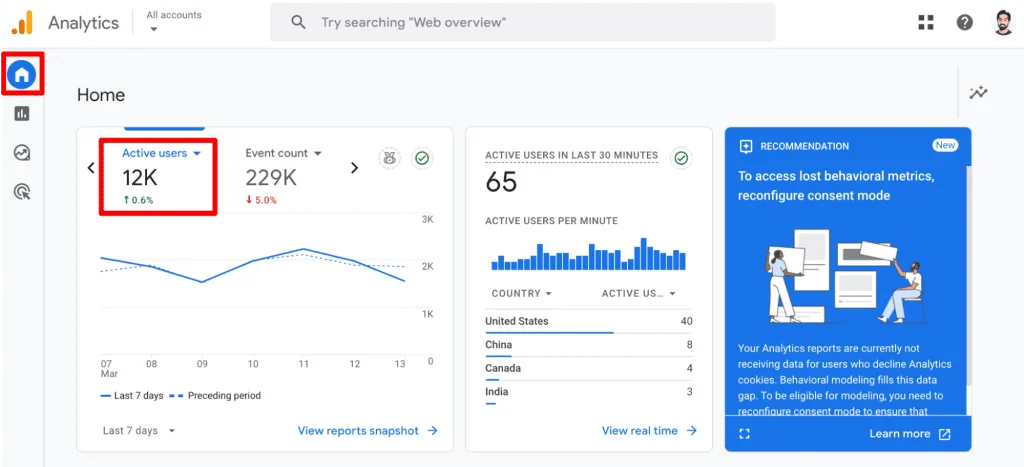
- Home: Displays Active users compared to the previous period.
- Reports snapshot: Features Active and New users, offering quick insights into demographics and acquisition sources.
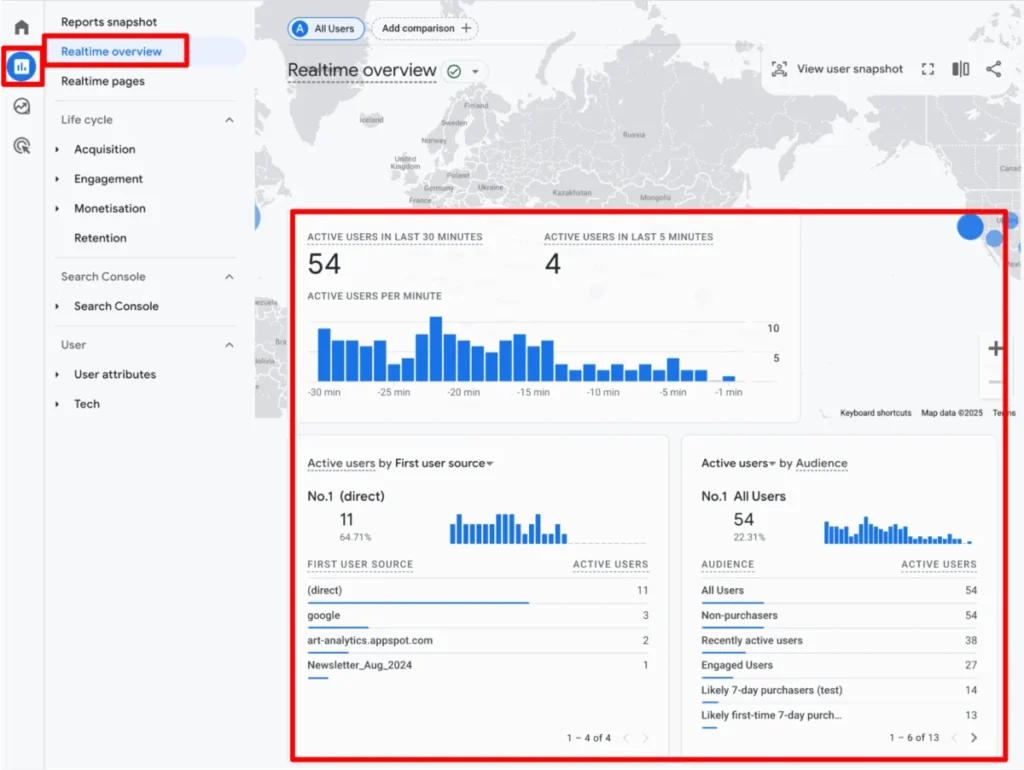
- Realtime overview: Shows Active users in the last 30 minutes.
- Realtime pages: Lists pages where Active users have been in the last 30 minutes.
- Acquisition > Overview cards: Includes Active and New users.
- Acquisition > User acquisition: Details Total, New, and Returning users.
- Acquisition > User acquisition cohorts: Focuses on New users.
- Engagement > Overview cards: Presents Active users.
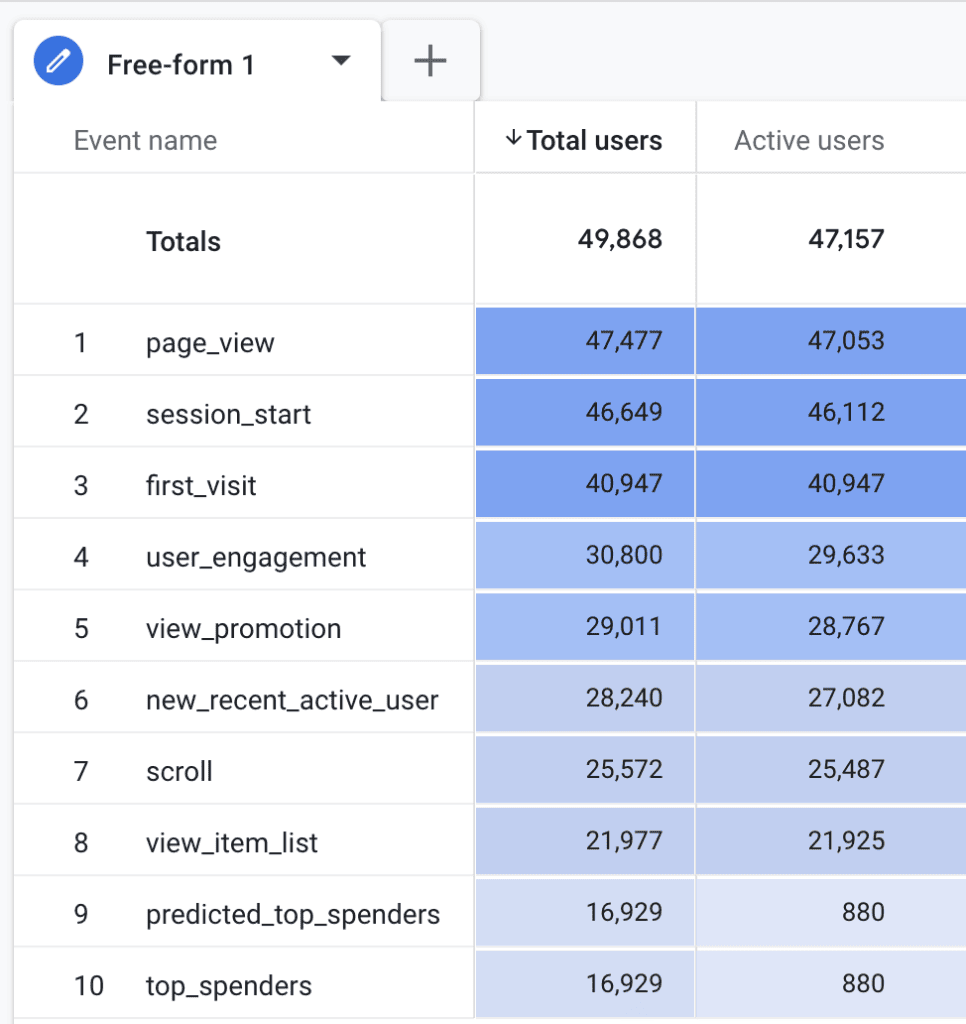
- Engagement > Events: Shows Total users associated with events.
- Engagement > Pages and Screens: Displays Active users on specific content.
- Engagement > Landing pages: Highlights Active and New users.
- Monetization > Overview cards (eCommerce): Includes Active users related to purchase and checkout journeys.
- Monetization > Purchase journey: Displays Active users.
- Monetization > Checkout journey: Displays Active users.
- Retention: Analyzes New and Returning users over time.
- User attributes > Overview cards: Features Active users.
- User attributes > Demographic details: Shows Active and New users based on demographics.
- User attributes > Audiences: Displays New and Total users within defined audiences.
- Tech > Overview cards: Includes Active users by technology.
- Tech > Tech details: Presents Active and New users by specific technologies.
For advanced analysis and customized reporting, the "Explore" section (Explorations) in GA4 allows users to build free-form reports, incorporating any available user metric as needed. Metrics that are incompatible with selected dimensions will be grayed out, guiding the user to valid combinations.
Official Responses: Google’s Stance on User Metrics
Google’s official documentation and product design provide the authoritative definitions and preferred usage of user metrics in GA4. The emphasis on "Active users" in standard reports is a deliberate choice, signaling Google’s prioritization of engaged interactions over mere presence.
As per Google’s guidelines:
- Total users are counted when any event is triggered.
- Active users are counted based on engaged sessions or specific core engagement events.
- The proximity of "Total users" and "Active users" numbers (as observed in data comparisons) is often expected, given the broad definition of engagement.
- Google acknowledges that user counts are approximations, influenced by factors like cookie policies, data sampling, and bot activity. This transparency is crucial for analysts to set realistic expectations for data precision.
- The deprecation of "Unique Visitors" in favor of "Users" (Total/Active) aligns with GA4’s cross-platform, event-driven philosophy, offering a more unified view of the customer journey.
Implications: Best Practices and Limitations for Data-Driven Decisions
Understanding GA4’s user metrics goes beyond mere definitions; it requires an appreciation of best practices for their application and a clear awareness of their inherent limitations to ensure robust data-driven decision-making.
Best Practices for Using User Data:

- Ensure Accurate Tracking Setup: Duplication of tracking tags (e.g., installing GA4 directly and via Google Tag Manager) can lead to inflated event counts and skewed user data. Regularly auditing your GA4 implementation is vital to prevent data inaccuracies. A clean, consistent setup ensures that each user interaction is recorded precisely once.
- Regular Data Monitoring and Anomaly Detection: Consistently reviewing user metrics for unusual spikes or dips can help identify tracking issues, changes in user behavior, or external factors impacting your site. Leveraging GA4’s custom insights and email notifications can automate this process, alerting you to significant shifts promptly.
- Avoid Summing Aggregated User Metrics: User metrics like "Total users" and "Active users" are inherently aggregated. Attempting to sum user counts across different dimensions (e.g., adding users from individual days to get a weekly total) will lead to overcounting. If a user visits on Monday and again on Wednesday within the same week, they are one unique user for the week but two separate counts if you sum daily totals. For accurate unique counts across dimensions, advanced data exports (e.g., to BigQuery using
user_pseudo_id) are often necessary. - Leverage User Segmentation: To extract deeper insights, segment your user data. Analyze how different user groups (e.g., by traffic source, device, geography, or content consumed) behave. This allows for targeted optimization strategies, identifying your most valuable audiences, and understanding their conversion paths.
- Analyze New vs. Returning Users Separately: New and Returning user metrics provide distinct insights into acquisition and retention. Avoid summing them, as a user can be counted as both (e.g., a new user in the first half of a month becomes a returning user in the second half, within the same reporting period). High new user counts with low returning rates signal a need for improved retention strategies (e.g., email marketing, remarketing). Conversely, a strong returning user base indicates loyalty but might highlight weak new user acquisition. Understanding these patterns is crucial for balancing growth and engagement efforts.
Limitations of Unique Users in GA4:
- Cookie-Based Tracking Vulnerabilities: The reliance on first-party cookies for client ID generation makes user tracking susceptible to cookie deletion, browser privacy settings (like Apple’s Intelligent Tracking Prevention, ITP), and ad blockers. These factors can prematurely expire cookies, leading to the same user being counted as "new" multiple times within a reporting period, thus inflating user numbers.
- Data Sampling: For large datasets, GA4 may employ data sampling in standard reports and Explorations to ensure faster processing. While sampling provides a statistically valid estimate, it means the reported user counts are not always absolute figures but projections based on a subset of the data.
- Bot and Spam Traffic: Despite Google’s efforts to filter out bot traffic, some automated scripts and spam may still register as legitimate users, artificially inflating metrics. While GA4 has built-in filters, 100% elimination is challenging.
- Lack of Native Cross-Device Tracking: Without explicit implementation of User-ID, GA4 cannot inherently unify a user’s journey across multiple devices (e.g., phone and laptop). The same individual using different devices will be counted as multiple unique users based on their client IDs.
- User Consent Impacts: The increasing prevalence of cookie consent banners and privacy regulations (GDPR, CCPA) means that if users decline analytics cookies, their activity will not be tracked, leading to an incomplete picture of total site visitors. This gap between actual and tracked users can be significant.
- Data Processing Latency: While GA4 offers real-time reporting, there can be some latency in the processing of comprehensive user data, especially for larger properties, meaning historical reports might not update instantaneously.
Summary and Forward Outlook
The transition to Google Analytics 4 has reshaped the foundational understanding of user engagement on digital platforms. While the explicit "Unique Visitors" metric is absent, GA4’s "Total users" and "Active users" provide a more nuanced, event-driven perspective on audience presence and interaction. We’ve explored how GA4 leverages client IDs and cookies for tracking, the specific criteria for defining "engaged sessions," and the numerous locations within the GA4 interface where these vital metrics can be accessed.
Crucially, this article has highlighted that effective utilization of user data requires adhering to best practices—from ensuring robust tracking setups and regular monitoring to intelligent segmentation and careful interpretation of new versus returning user behavior. Simultaneously, a clear understanding of GA4’s limitations, including cookie vulnerabilities, data sampling, and the absence of native cross-device tracking, is indispensable for drawing accurate and actionable conclusions.
As the digital landscape continues to evolve, marked by increasing privacy concerns and sophisticated user interactions, the ability to interpret user data with precision and context will remain a cornerstone of successful digital strategy. Leveraging GA4 effectively means embracing its unique approach to user measurement, acknowledging its approximations, and continually refining analytical methodologies to gain the clearest possible picture of your audience.
