
Demystifying the Unique Visitor: A Deep Dive into Google Analytics 4 User Metrics
Last Modified on March 26, 2025
In the modern digital landscape, the volume of data available to website owners and marketers is staggering. From total sessions and bounce rates to conversion funnels and churn, the alphabet soup of analytics can feel overwhelming. Among these, one metric stands as the bedrock of web performance: the unique visitor. Yet, in the transition to Google Analytics 4 (GA4), the industry has grappled with a fundamental shift in how we define, track, and interpret "users."
To conduct meaningful analysis, one must move beyond surface-level numbers. This guide explores the complexities of GA4 user metrics, the technical reality of how they are calculated, and the strategic best practices required to turn raw data into actionable business intelligence.

Understanding the Landscape: Total Users vs. Active Users
At its core, a "visitor" is an individual who accesses your website or application via a specific device. A unique visitor is counted once, regardless of how many times they return during a given timeframe. This creates a singular representation of human traffic. However, GA4 does not feature a metric labeled "Unique Visitor" in its standard library. Instead, the platform relies on two primary pillars: Total Users and Active Users.
The Definitions
- Total Users: Google defines this as the total number of unique users who triggered at least one event on your site during a specific date range. Because almost any interaction—even a basic page view—counts as an event, this metric is often the broadest representation of your traffic.
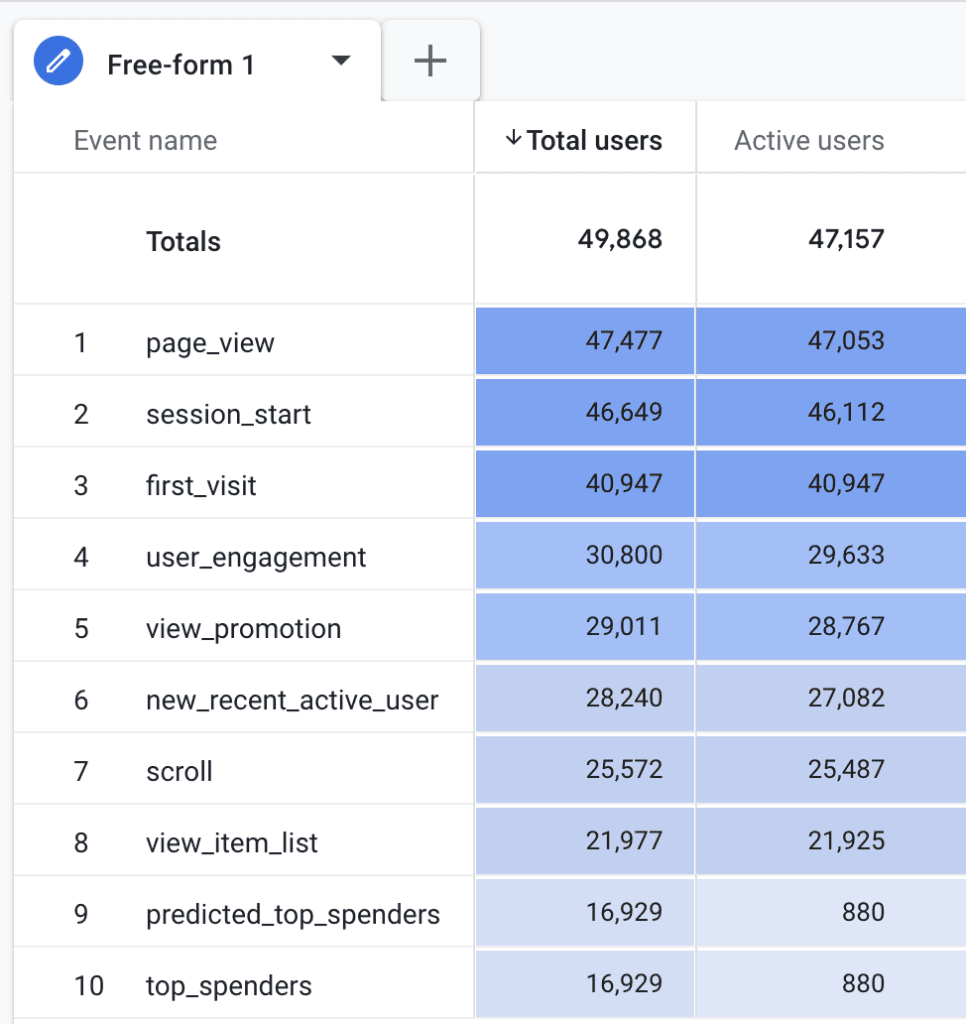
- Active Users: This metric is the "gold standard" for GA4. An active user is defined as someone who has "engaged" with your platform. Engagement is measured if the user has an engaged session or if the platform records a
user_engagementevent, a conversion event, or a first-visit event.
The Nuance of Engagement
The distinction between these two metrics often confuses new users. Why does it matter? Because "Active Users" filters out accidental clicks or bot traffic that doesn’t demonstrate intent. A user_engagement event is triggered when a page remains in focus for at least one second. While official documentation highlights this one-second threshold, real-world testing suggests the event often fires before a page navigation or after 10 seconds of dwell time.
Because most legitimate traffic naturally results in engagement, the numbers for Total Users and Active Users often track closely together. However, they are rarely identical, and understanding the delta between them can help you identify "low-intent" traffic.
Chronology of Tracking: How GA4 Records Identity
Google Analytics 4 employs a technical identifier known as the Client ID (CID) to track uniqueness. When a user first lands on your site, GA4 assigns a unique, randomly generated identifier, which is stored in a first-party cookie named _ga.
The Technical Lifecycle
- Generation: The CID consists of a random number string combined with a UNIX timestamp. It is not a permanent user identifier, but a temporary one tied to the browser and device.
- Expiration: By default, this cookie has a two-year expiration. However, this is subject to the user’s browser settings and local privacy laws.
- Privacy Limitations: In the age of ITP (Intelligent Tracking Prevention), browsers like Safari have drastically reduced the lifespan of these cookies, sometimes to as little as 24 hours.
This creates a significant implication: The same human being using the same browser may be counted as a "new" user multiple times if their cookie is purged. Consequently, GA4 metrics should be viewed as an approximation of human behavior rather than an exact census of unique individuals.
Supporting Data: Where to Find Your Metrics
GA4 provides visibility into user data across its entire reporting suite. Depending on your objective, you can access these metrics in the following areas:
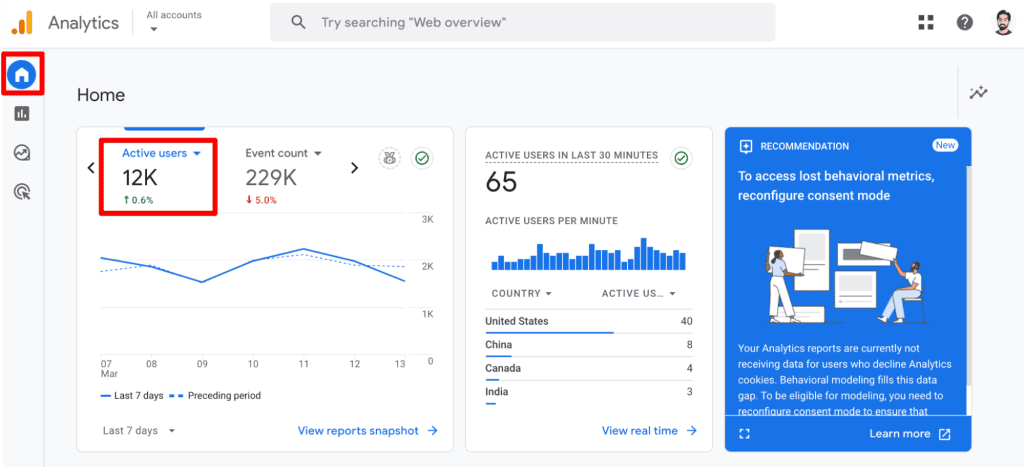
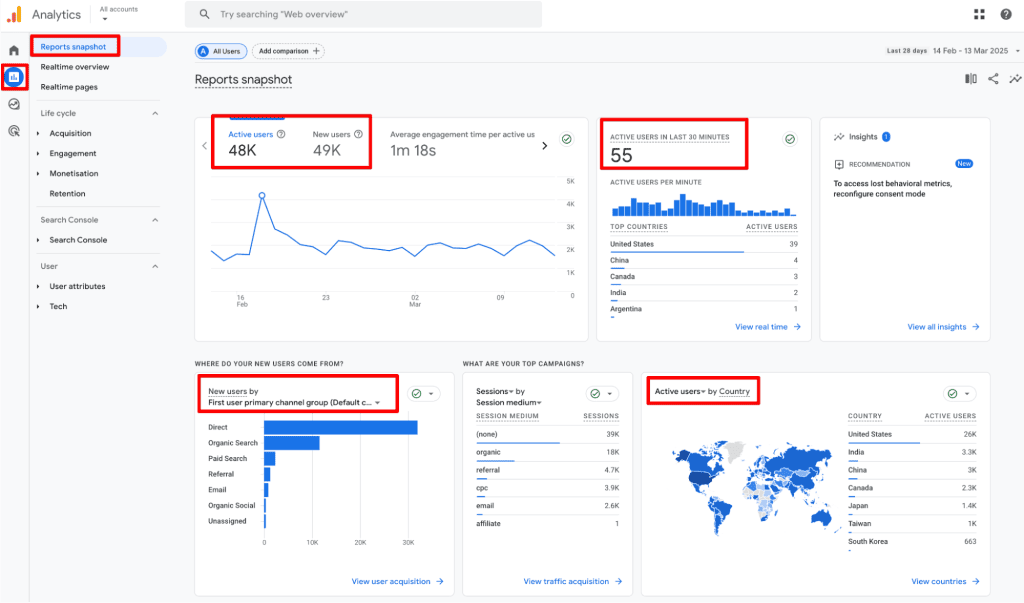
- Executive Overview: The "Home" and "Reports Snapshot" cards offer a quick pulse on Active and New users, ideal for high-level monitoring.
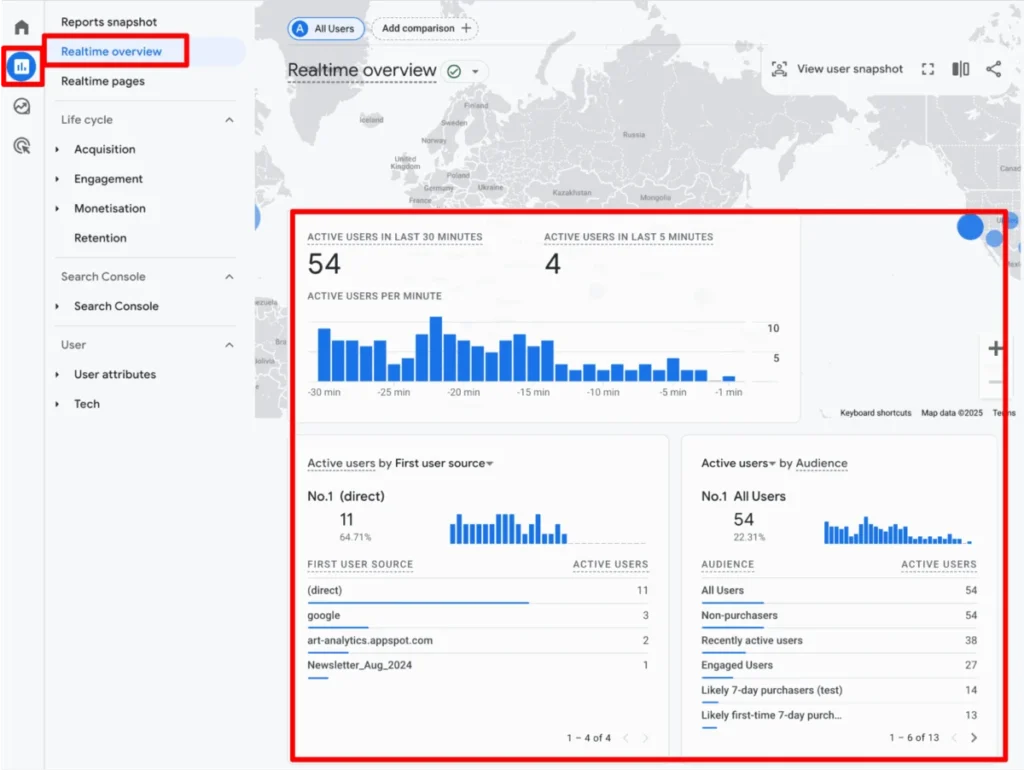
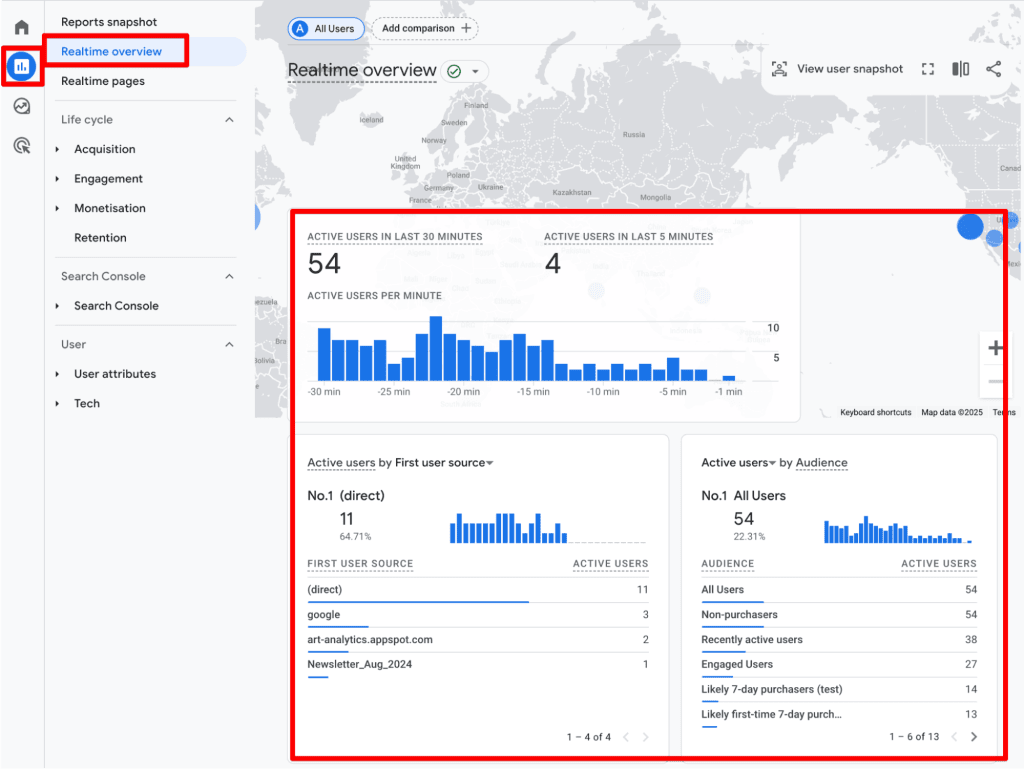
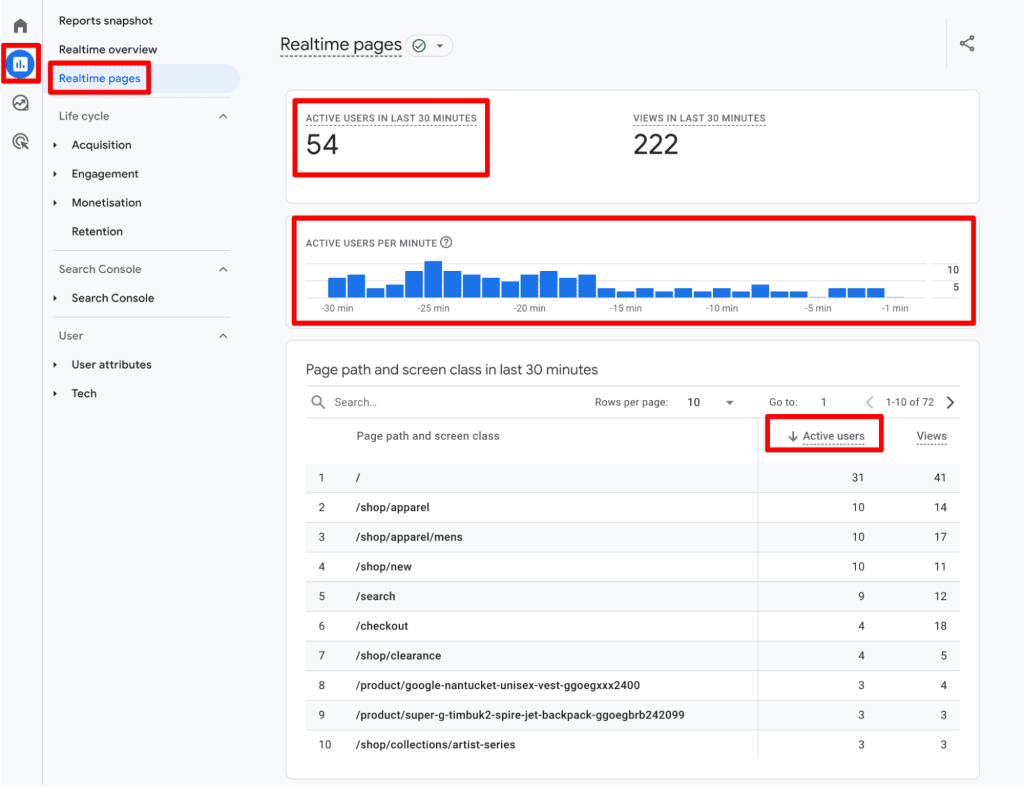
- Real-time Analysis: The "Realtime Overview" and "Realtime Pages" reports provide a 30-minute window into current traffic. This is particularly useful for tracking the impact of live social media campaigns or breaking news.
- Deep-Dive Acquisition: Use the "User Acquisition" report to see the breakdown of New vs. Returning users. This is essential for measuring the efficacy of your top-of-funnel marketing efforts.
- Explorations: For advanced analysts, the "Explore" tab allows for custom reporting where specific user metrics can be blended with custom dimensions to answer complex business questions.
Official Responses and Industry Best Practices
While GA4 is a powerful tool, it is not a "set-it-and-forget-it" system. To maintain data integrity, analysts must follow established best practices.
1. Avoid Data Duplication
If you have implemented GA4 both via a plugin and Google Tag Manager (GTM), you are likely double-counting events. This inflates your user engagement data and obscures the true customer journey. Regularly audit your tag firing rules to ensure accuracy.
2. Leverage Custom Insights
Data anomalies are inevitable. By setting up Custom Insights in GA4, you can trigger email alerts if user counts spike or dip unexpectedly. This proactive approach allows you to address tracking failures before they impact your quarterly reporting.
3. Avoid Summing Across Dimensions
A common mistake is attempting to add up daily unique user counts to arrive at a weekly or monthly total. Because the same user can visit on Monday and Wednesday, summing daily totals will result in double-counting. Always rely on GA4’s aggregated reporting for broader timeframes, or utilize BigQuery for raw data analysis using the user_pseudo_id.
4. Segment for Context
Raw numbers rarely tell the whole story. Use segments to isolate high-value users—such as those who have made a purchase—and compare their behavior to those who have not. This helps in identifying which traffic sources yield the highest return on investment (ROI).
5. New vs. Returning User Strategy
Do not try to force "New + Returning" to equal "Total." These categories are not mutually exclusive within a selected date range. Instead, treat them as indicators of health:
- High New / Low Returning: Indicates strong acquisition but potential issues with customer loyalty or product-market fit.
- High Returning / Low New: Indicates a loyal base, but perhaps a lack of growth in new market segments.
Implications of Limitations
Understanding the limitations of GA4 is not about doubting the data; it is about acknowledging the reality of the web.
- Cookie Deletion: Users clearing their browser cache or using "Incognito" mode will consistently appear as new users, potentially inflating your acquisition numbers.
- Cross-Device Silos: Because GA4 relies on client IDs by default, a user who visits on a desktop, then on a mobile device, will be counted as two unique users. Without implementing a User-ID feature (which requires a login mechanism), cross-device tracking remains an unsolved challenge for most standard GA4 setups.
- Ad Blocker Impact: Increasing privacy awareness means more users are blocking trackers entirely. Your GA4 data represents a "sample" of your actual traffic, not a 100% accurate count.
Conclusion
Google Analytics 4 is a sophisticated engine for understanding user behavior, but it requires a sophisticated operator. By moving past the confusion of terminology and embracing the technical realities of how GA4 tracks visitors, you can move from simple observation to strategic execution.
Whether you are optimizing for engagement, retention, or acquisition, the key lies in consistency. Establish your baseline, monitor your anomalies, and use segments to peel back the layers of your data. As we continue to navigate a privacy-first web, the most successful marketers will be those who use these metrics not as absolute truths, but as essential signposts on the road to better customer experience.
Have you encountered challenges with user counting in GA4? How have you adjusted your tracking strategies? Share your thoughts and experiences in the comments below.
