
Decoding the User: A Comprehensive Guide to Unique Visitors in Google Analytics 4
Last Modified: March 26, 2025
In the modern digital ecosystem, the sheer volume of metrics available to marketers can be overwhelming. From "Total Users" and "Active Users" to "New" and "Returning" visitors, the landscape of web analytics is cluttered with terminology that often overlaps or contradicts itself. As businesses strive to translate raw data into actionable intelligence, the most fundamental question remains: How many people are actually visiting my site?
To conduct a meaningful analysis, one must move beyond surface-level dashboards and understand the mechanics behind the data. This guide provides an exhaustive look at the concept of "Unique Visitors" within Google Analytics 4 (GA4), exploring the technical definitions, the tracking methodologies, and the inherent limitations that every analyst must navigate.

The Core Concept: What is a Unique Visitor in GA4?
At its simplest level, a visitor is an individual who accesses your website or application via a specific device. The term "unique" is applied because these individuals are counted only once, regardless of how many times they return to the site within a specific window.
However, in the era of multi-device usage—where a single person might browse on a smartphone during a commute and complete a purchase on a laptop at home—the definition of "unique" becomes increasingly complex.
It is vital to clarify a common misconception: Google Analytics 4 does not feature a metric specifically labeled "Unique Visitor." Instead, GA4 relies on two primary pillars: Total Users and Active Users.
Total Users vs. Active Users
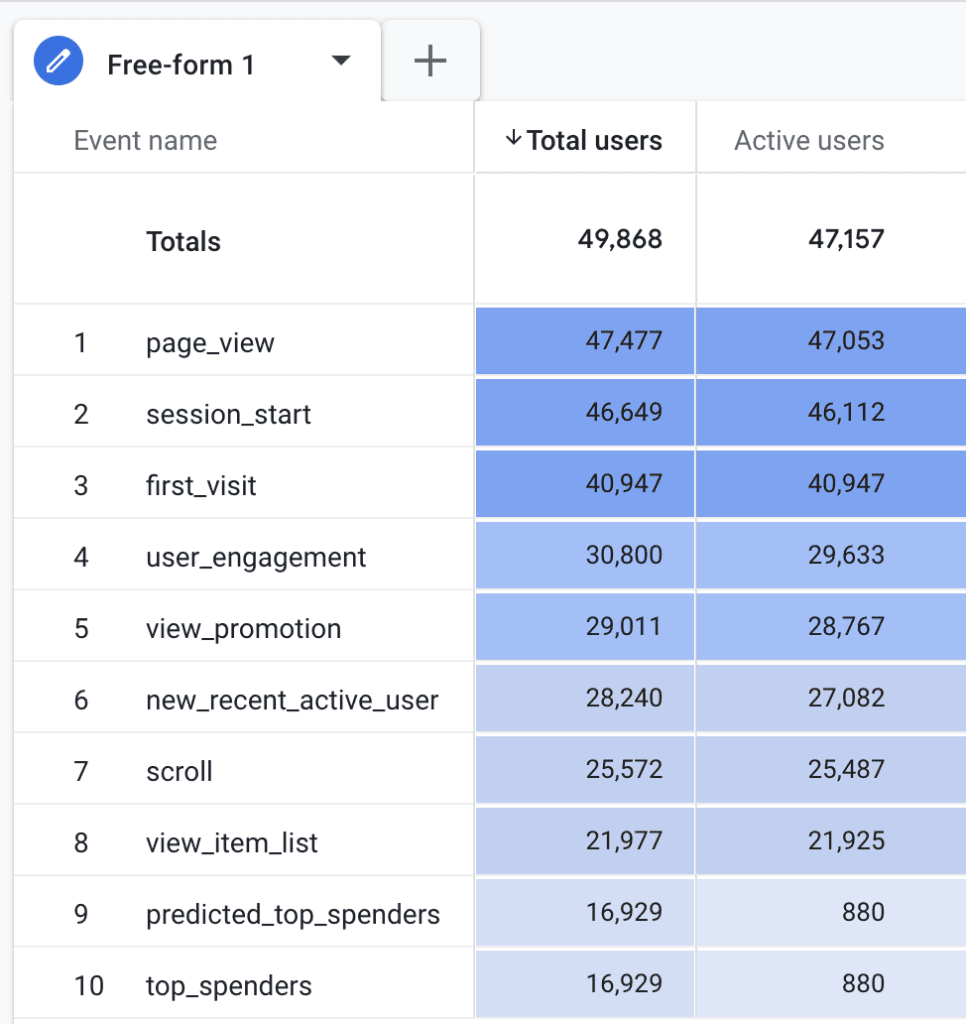
- Total Users: Google defines this as the total number of unique users who trigger any event on your site during a chosen date range. If a user triggers even a single event (like a page view), they are recorded as a unique user.
- Active Users: This is the metric GA4 prioritizes. An "Active User" is defined as a user who has had an "engaged session," or triggered specific events, including the
first_visitevent or theuser_engagementevent.
An engagement event is triggered when a webpage remains in focus—or an app stays in the foreground—for at least one second. While official Google documentation sets this one-second threshold, independent testing suggests the user_engagement event often fires just before a user navigates to a new page or after ten seconds of inactivity on a single page. Because the criteria for "Active" are so broad, the numbers for Total and Active users are often remarkably similar in standard reports.
How GA4 Tracks Identity: The Client ID Mechanism
To maintain the count of unique visitors, Google employs a technical identifier known as the Client ID (CID). This identifier is stored in a first-party browser cookie—specifically, the _ga cookie.
The Anatomy of a Client ID
When a visitor arrives at your site, GA4 assigns a random, unique string (e.g., 1242591205.1741664478) to the browser. The first portion is a randomized number, while the second indicates the creation time of the ID in UNIX format. This ID acts as the "fingerprint" that allows Google to distinguish between a returning user and a first-time visitor.
Limitations of the Client ID
The integrity of this tracking is subject to several external pressures:
- Cookie Expiration: By default, the
_gacookie has a two-year lifespan. However, site owners can configure this within the GA4 interface to align with local privacy regulations (e.g., GDPR or CCPA). - Browser Restrictions: Pro-privacy browsers and iOS settings often restrict cookie storage to as little as 24 hours or seven days. If a cookie is purged, the user will be counted as a "new" visitor upon their next visit, even if they are a loyal, returning customer.
- Cross-Device Blindness: Because the Client ID is tied to a specific browser or device, it cannot track a user who switches from a mobile phone to a desktop computer. To bridge this gap, businesses must implement a "User ID" feature, which requires a logged-in authentication system.
Navigating the Reporting Landscape
GA4 integrates user metrics across its interface. Understanding where these metrics live is essential for accurate reporting.
Key Locations for User Metrics
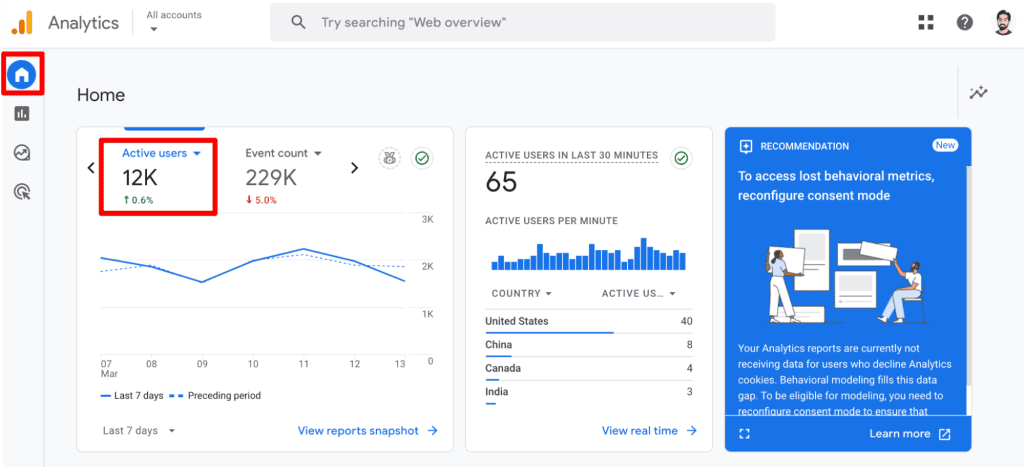
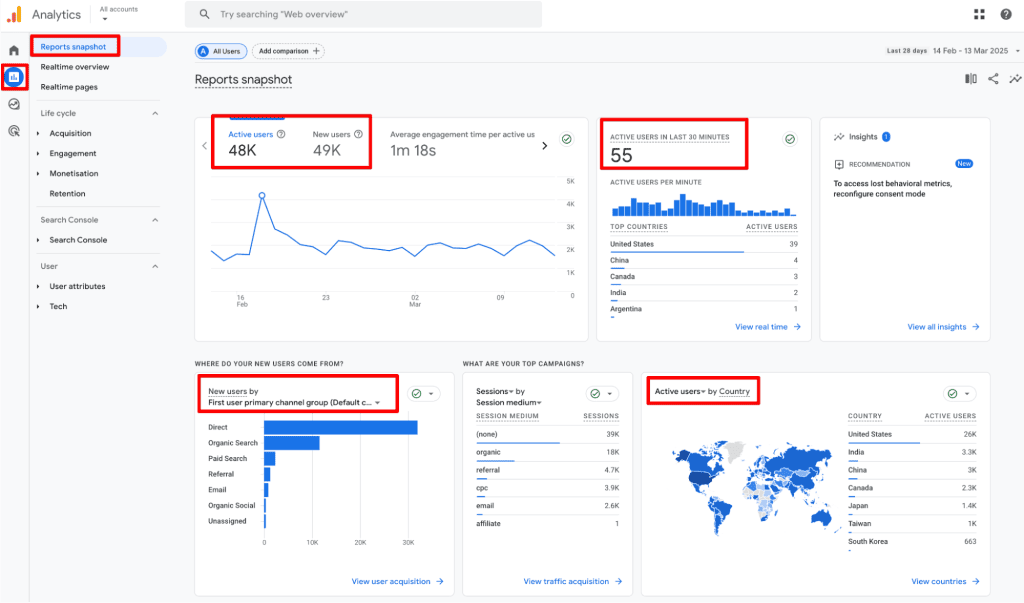
- Reports Snapshot: Provides a high-level view of Active and New users.
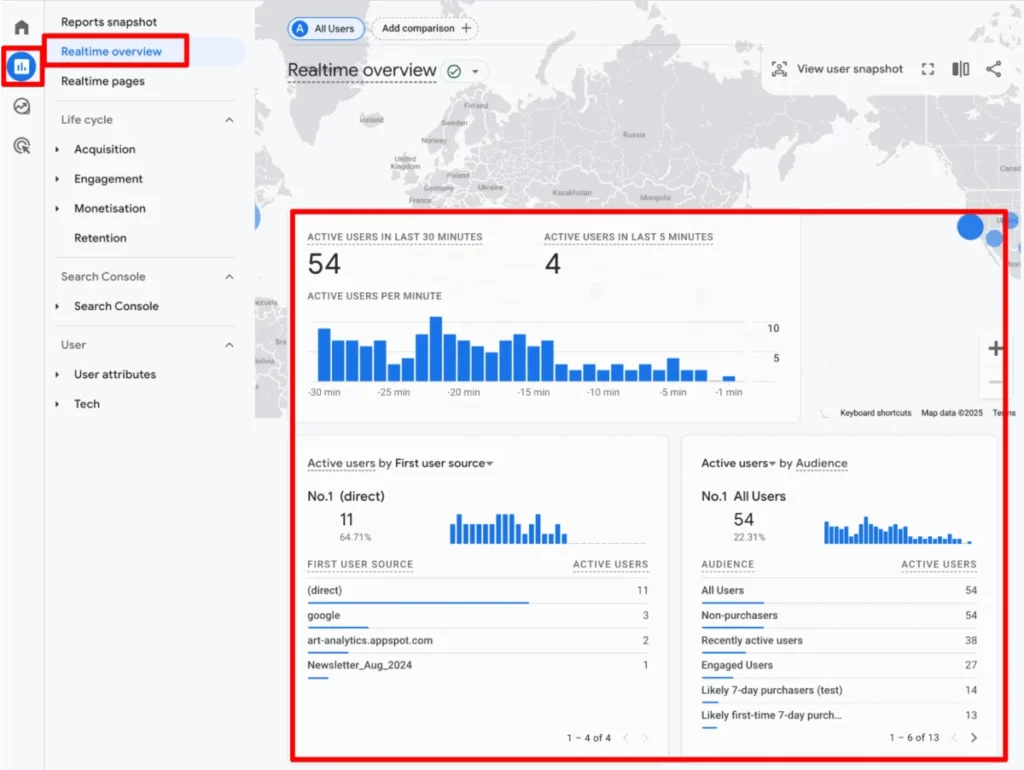
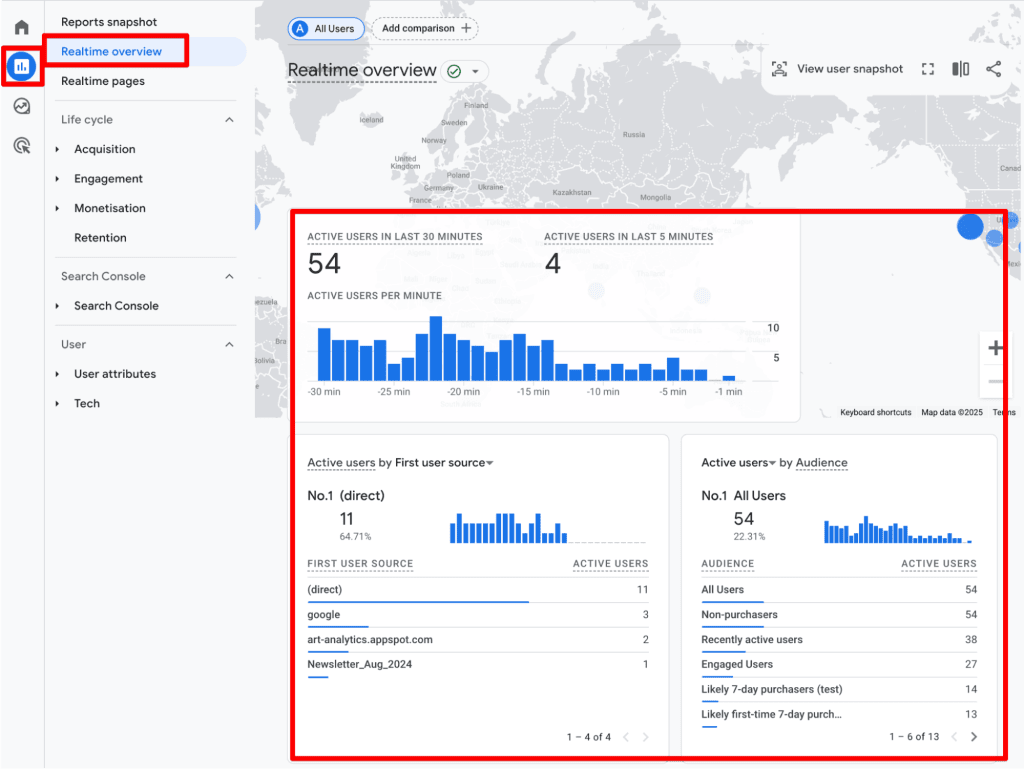
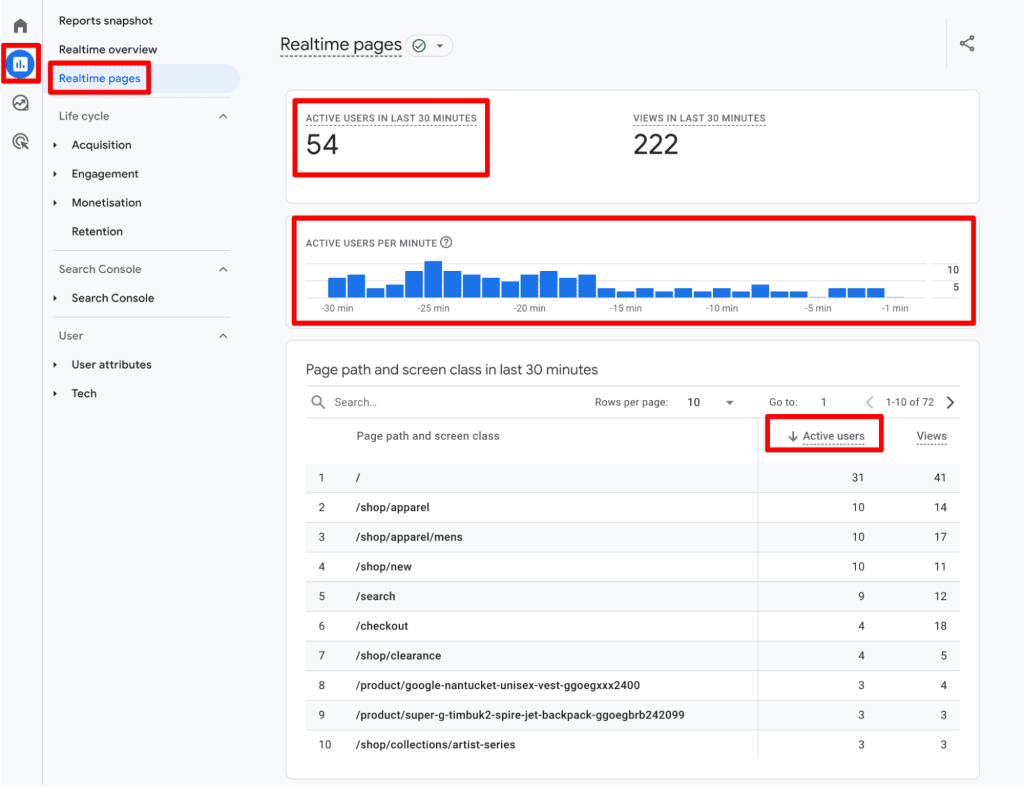
- Realtime Overview: Allows for monitoring of active traffic within the last 30 minutes, providing immediate feedback on marketing campaigns or site stability.
- User Acquisition Reports: This is the primary destination for comparing New vs. Returning users.
- Explorations: For advanced analysts, the "Explore" tab offers the ability to build custom, free-form reports where user metrics can be blended with specific dimensions that are unavailable in standard pre-built reports.
Strategic Implications and Best Practices
Data is only as valuable as the strategy behind it. To move from raw numbers to actionable insights, follow these industry-standard best practices.
1. Avoid Summation Errors
One of the most frequent mistakes in analytics is attempting to manually sum up users across different dimensions. Because a single user may visit the site on multiple days (e.g., Monday and Thursday), they will be counted in each daily bucket. If you sum those buckets, you will inflate your total user count. Always rely on GA4’s aggregate reporting for accurate unique counts.
2. Segment for Context
Raw user counts rarely tell the full story. Segmenting by traffic source, device type, or geographic location is mandatory for understanding user behavior. For instance, comparing the conversion rates of users from "Organic Search" versus "Paid Social" can highlight which acquisition channels are providing the most value.
3. The New vs. Returning Dichotomy
The relationship between new and returning users is a critical barometer for business health.
- High New / Low Returning: Indicates a potential failure in retention strategy. If you are paying for traffic that never comes back, your customer lifetime value (CLV) is likely suffering.
- High Returning / Low New: Suggests strong brand loyalty but a potential plateau in market reach. This is a sign to reinvest in top-of-funnel acquisition strategies.
4. Guarding Against Data Duplication
If GA4 is installed via multiple methods—such as a hard-coded snippet, a plugin, and Google Tag Manager simultaneously—you will likely see duplicated events. This distorts your engagement metrics. Periodically audit your tracking setup to ensure data integrity and prevent "ghost" traffic.
The Reality of Limitations: What You Must Know
It is a mistake to view analytics data as an absolute truth. Every metric in GA4 is an approximation.
- Ad Blockers: Users who utilize aggressive ad blockers or script blockers may not trigger the GA4 tracking code at all, leading to an undercount of your true audience.
- Privacy-First Browsing: As mentioned, the tightening of cookie policies means that your "New User" counts are likely inflated, as repeat visitors are frequently identified as "new" when their cookies expire.
- Data Thresholding: In some reports, if your traffic volume is low, Google will apply thresholding to prevent the identification of individual users, which can lead to missing data rows.
Conclusion
Mastering the "Unique Visitor" in GA4 is less about finding a single, perfect number and more about understanding the behavioral patterns of your audience. By recognizing the limitations of the Client ID, utilizing segments for deeper context, and avoiding the trap of manual summation, you can build a robust foundation for data-driven decision-making.
The transition from Universal Analytics to GA4 was a shift toward an event-based model, and while this has introduced complexity, it has also provided a more granular view of user behavior. Use these tools wisely, keep a close eye on your tracking configurations, and remember: in the world of analytics, context is always more important than the raw total.
How do you leverage user data in your own reporting? What challenges have you encountered with tracking unique visitors? Share your thoughts and experiences in the comments section below.
