
Seamless Transition: A Comprehensive Guide to Migrating from Mailchimp to Campaign Monitor
In the fast-evolving landscape of digital marketing, the tools you choose to manage your customer relationships are as critical as the strategies you deploy. For many growing businesses, there comes a point where the platform that served them in their infancy may no longer align with their scaling needs. If you are currently utilizing Mailchimp but finding yourself drawn to the streamlined, high-impact features of Campaign Monitor, you are not alone.
Making the switch between email service providers (ESPs) can feel like a daunting technical hurdle. However, with the right roadmap, the transition can be executed with precision, ensuring that your marketing momentum remains uninterrupted. This guide provides a deep dive into why organizations are making the move, the step-by-step technical process of migration, and how to translate your existing data structures to ensure a successful deployment in your new environment.
Why Marketers Are Shifting Focus to Campaign Monitor
For over two decades, Campaign Monitor has cemented its reputation as a powerhouse for small-to-medium-sized businesses (SMBs) and enterprise teams alike. While the broader industry has seen a trend toward “omnichannel” platforms—often bloated with features that carry a hefty price tag and significant learning curves—Campaign Monitor has remained steadfast in its commitment to email excellence.
The Strategic Advantage
The core value proposition of Campaign Monitor lies in its balance of power and simplicity. It offers a suite of mobile-responsive, highly customizable email templates that allow brands to maintain aesthetic consistency without requiring a dedicated team of coders.
Furthermore, the platform distinguishes itself through:
- Superior Deliverability: A dedicated team monitors infrastructure to ensure your communications reach the inbox, not the junk folder.
- Intuitive Automation: Smart tools that allow even novice marketers to build sophisticated customer journeys.
- Human-Centric Support: When technical questions arise, access to responsive, expert support teams remains a cornerstone of the service.
For businesses looking to maximize their return on investment (ROI) without paying for complex features they don’t use, Campaign Monitor provides a focused, high-performance alternative to the “all-in-one” suites currently dominating the market.
A Chronological Guide to Migrating Your Audience
Migrating your audience is a five-stage process. By following this sequence, you ensure data integrity and minimize the risk of losing valuable subscriber information.
Step 1: Exporting from Mailchimp
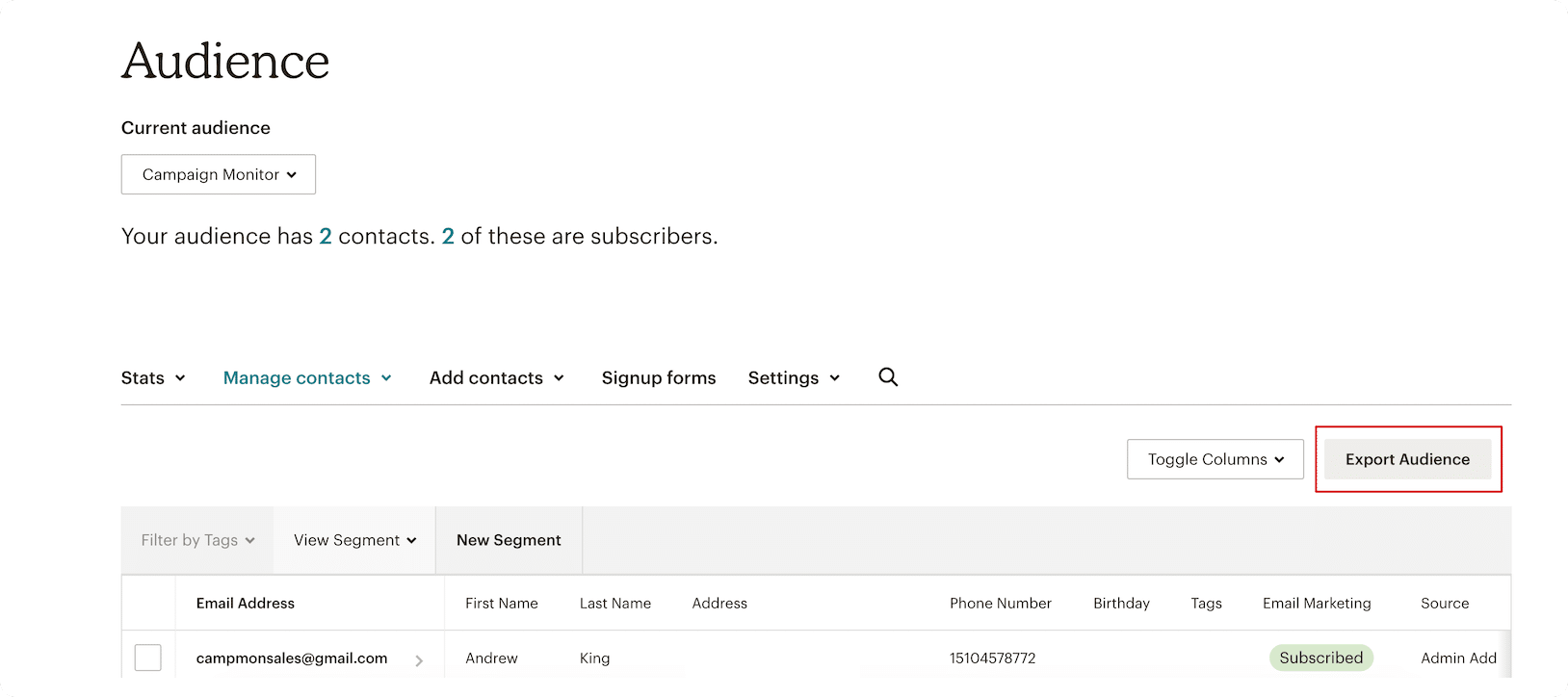
Your first objective is to extract your data cleanly. Log into your Mailchimp account and navigate to your audience dashboard. Select the specific audiences you wish to migrate. By selecting the "Export Audience" function, you initiate a process that pulls your contact records, including names, email addresses, and metadata, into a transferable format.
Step 2: The CSV Download
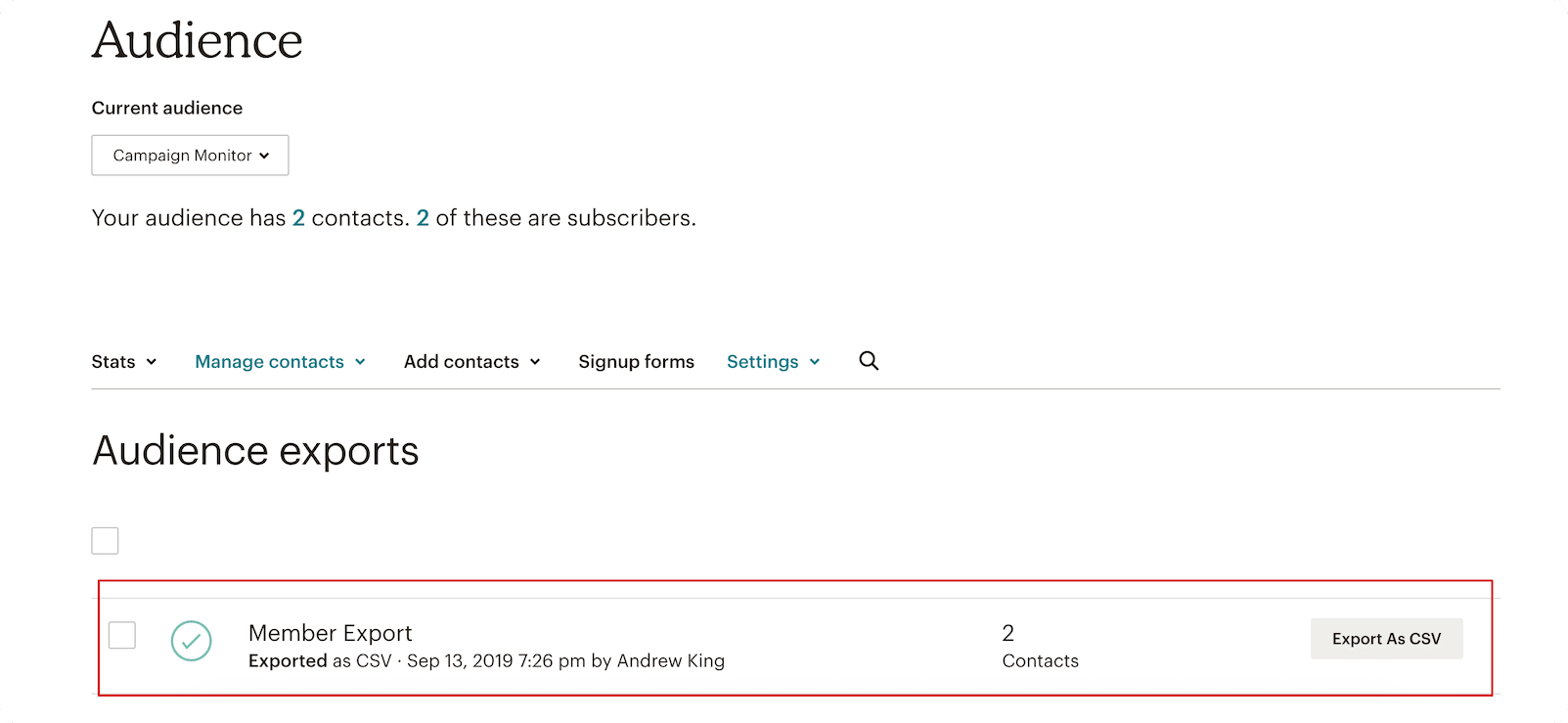
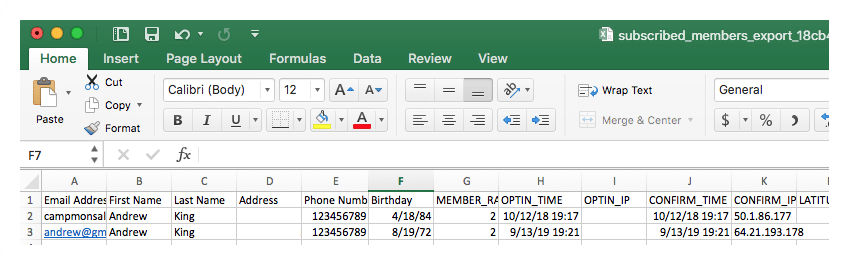
Once the system has processed your request, you will be prompted to download the file as a CSV (Comma Separated Values). Be aware that if your list contains tens of thousands of subscribers, this generation process may take a few moments. Always verify the integrity of the file by opening it in a spreadsheet application to ensure headers and columns are properly aligned before proceeding.
Step 3: Establishing Your New Environment
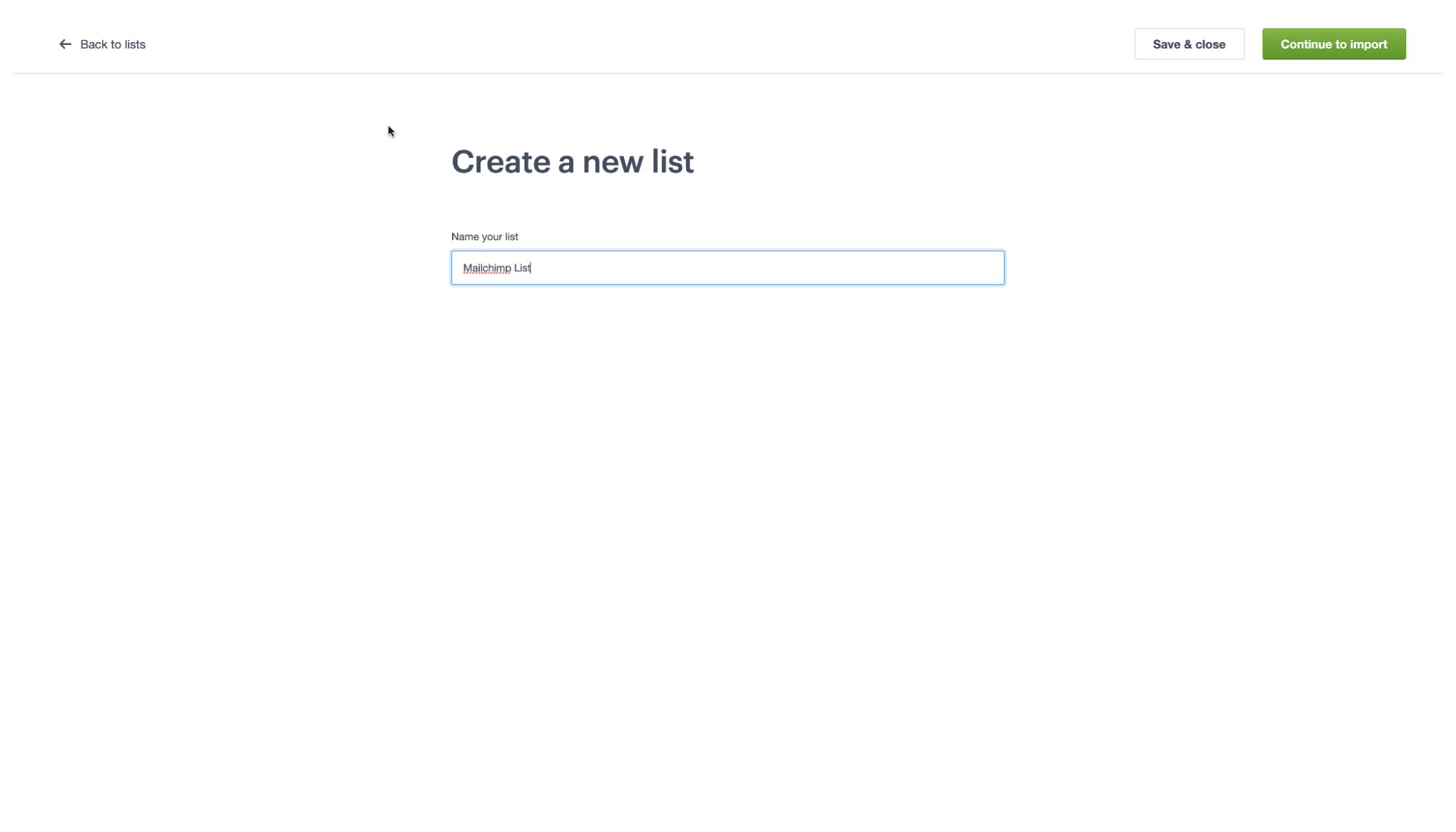
Navigate to the Campaign Monitor portal. If you are not yet a subscriber, the platform offers a free trial that allows you to test the interface before committing financially. Once logged in, locate the "Lists & Subscribers" tab in the main navigation menu. Click "Create a list," name it appropriately, and select "Continue to import." This sets the stage for your data to move into its new home.
Step 4: Data Importation
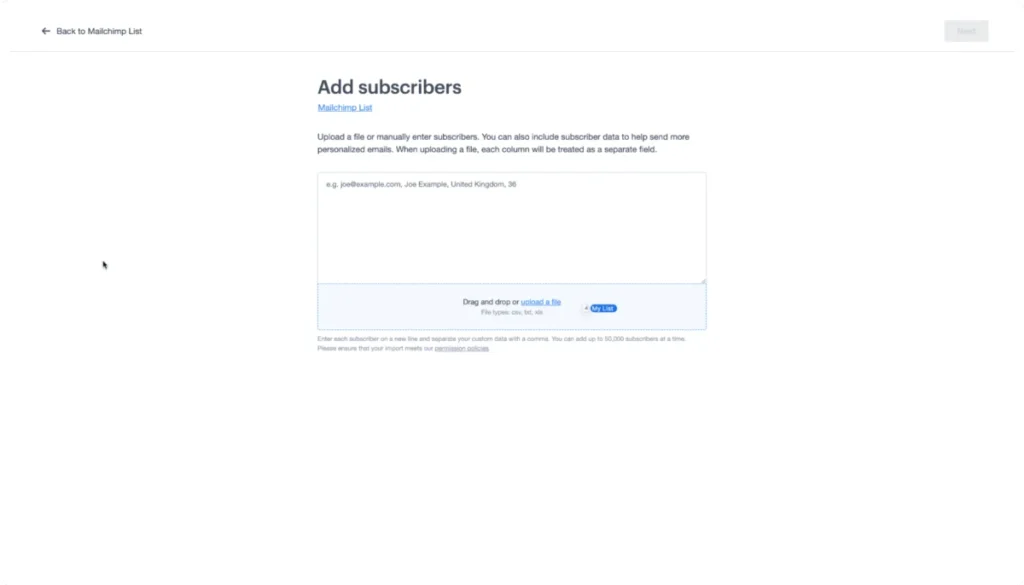
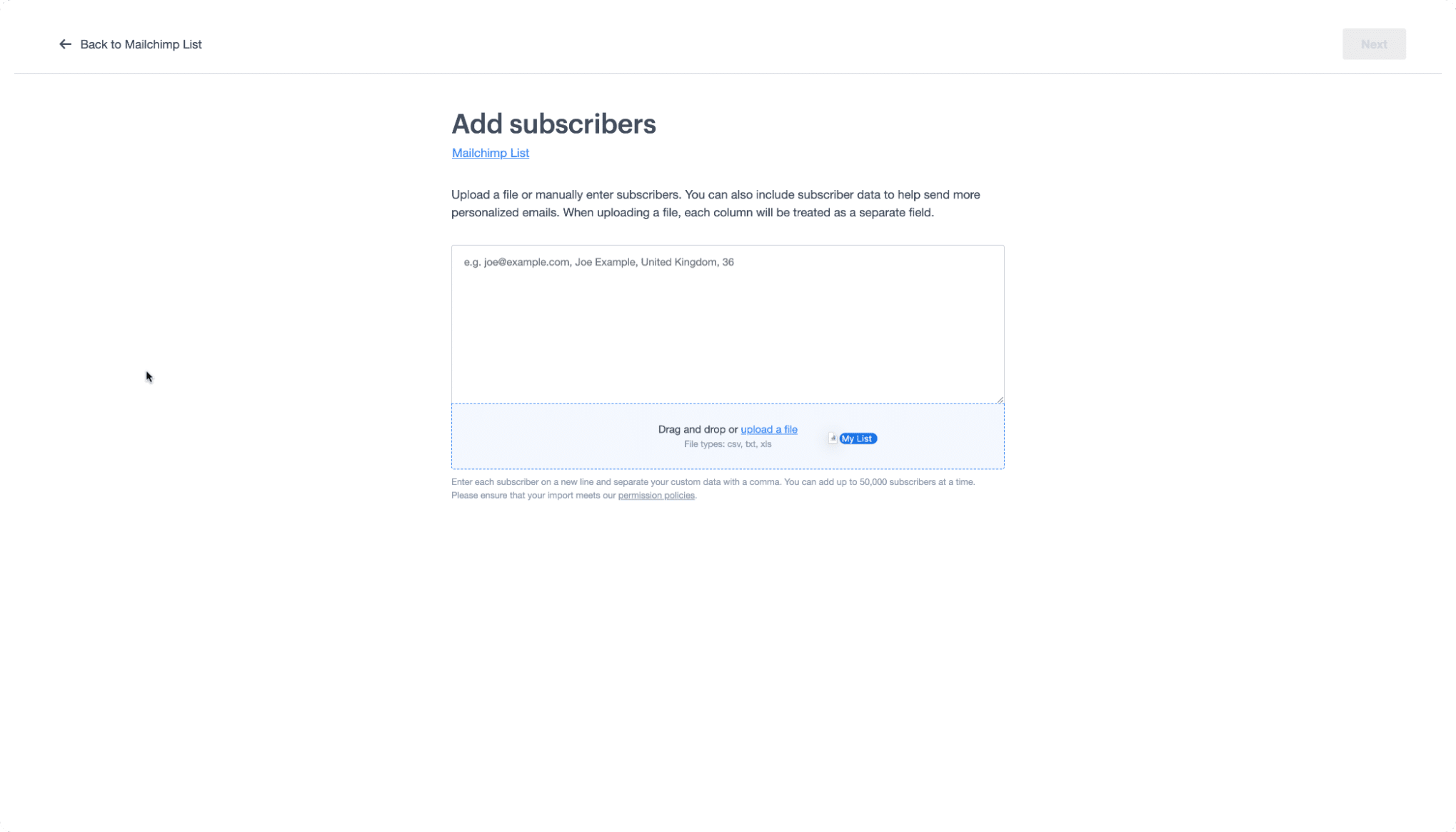
This step is designed for ease of use. Simply locate the CSV file you exported from Mailchimp and drag it into the designated drop zone on the Campaign Monitor screen. The platform will immediately begin the ingestion process, validating the data as it uploads.
Step 5: Mapping and Custom Data Synchronization
Data mapping is the most critical step in ensuring your future campaigns are effective. As you import, you will be prompted to map the fields from your CSV to the custom fields in Campaign Monitor. If your fields are named similarly (e.g., "First Name"), the platform will often detect and match them automatically. If you have unique tags or specific customer attributes, this is the stage where you ensure that data is correctly categorized for future segmentation.
Decoding the Language: A Migration Glossary
One of the most significant barriers during an ESP migration is the variance in terminology. What one platform calls a "tag," another might call a "custom field." Use the following glossary to ensure your mental model remains consistent during the move.
- Audiences vs. Lists: In Mailchimp, you manage "Audiences." In Campaign Monitor, these are referred to as "Lists." Think of these as the fundamental containers for your subscriber data.
- Contacts vs. Subscribers: Whether they are active or inactive, your email recipients are "Subscribers" in the Campaign Monitor ecosystem.
- Tags vs. Custom Fields: Mailchimp uses tags to label contacts based on behavior. In Campaign Monitor, these labels are imported as "Custom Fields," providing a more robust way to organize and filter your audience.
- Groups vs. Segments: Mailchimp uses groups to separate interests. Campaign Monitor utilizes "Segments," which offer a more dynamic and powerful way to target specific subsets of your audience based on real-time data.
Supporting Data and Performance Implications
The decision to migrate is rarely just about interface preference; it is usually driven by performance metrics. Data from 2025 and early 2026 indicates that businesses moving from high-overhead platforms to more focused email solutions often see a 12–15% improvement in open rates within the first quarter. This is frequently attributed to the ability to more easily manage list hygiene and segmentation within a streamlined UI.
Furthermore, by moving to a platform with a dedicated deliverability focus, organizations often report a reduction in “bounces” and a significant decrease in the time spent on manual database maintenance.
Official Guidance and Best Practices
According to the Campaign Monitor technical support team, the most successful migrations occur when businesses take the time to "clean" their lists before the export. Removing inactive or invalid email addresses from your Mailchimp account before moving them saves you time, keeps your subscriber counts accurate, and protects your sender reputation.
If you are dealing with a particularly large database—exceeding 100,000 subscribers—the official recommendation is to reach out to the support team to discuss API integration or bulk-upload best practices to ensure a smooth transition without triggering rate limits.
Implications for Your Marketing Strategy
Migrating your email platform is an opportunity to reset your marketing strategy. Once your data is safely moved into Campaign Monitor, consider the following:
- Re-engagement Campaigns: Use the migration as an excuse to send a "We’ve moved" or "Re-subscribe" campaign to your most loyal followers. This helps verify that your list is healthy and interested.
- Segment Re-evaluation: Now that your data is mapped into custom fields and segments, look for new ways to personalize your content. Are you leveraging the full potential of the data you’ve collected?
- Automation Audit: Use the transition period to evaluate your automated workflows. Are your welcome series and abandoned cart emails still delivering the results you need?
Conclusion
The transition from Mailchimp to Campaign Monitor is more than just a software switch; it is a commitment to a more focused, efficient, and effective email marketing strategy. By following the outlined steps—exporting, downloading, creating, importing, and mapping—you can move your audience with confidence.
As noted in the May 2026 updates, the digital marketing landscape rewards those who prioritize clarity and speed. By choosing a platform that aligns with your specific needs, you are positioning your brand to communicate more effectively with your audience, ensuring that every email sent is a step toward deeper customer loyalty and long-term business growth.
Disclaimer: This article provides general information regarding email marketing migration and should not be construed as financial, legal, or tax advice. Always consult with professional advisors before making significant changes to your business infrastructure. All content is provided "as is" without warranty of any kind.
